
Top 12 Best EDACS Scanner Hacks You Can’t Miss!
The frustration of a scanner that misses channels or drops signals is all too common for those who rely on the best edacs scanner. Many inexpensive models struggle with EDACS systems, resulting in garbled transmissions or lost information at critical times.
A proper EDACS scanner avoids these issues by accurately locking onto frequency groups to ensure clear, reliable decoding without constant manual adjustments.
Key features to look for include frequency coverage that matches the local EDACS trunking range, typically from 851 to 869 MHz for UHF systems. The scanner’s antenna and receiver quality also play a major role, solid-state components that support fast scanning and stable reception matter most. Physical size and interface convenience are relevant as well, since users often need to operate the device in mobile settings or on the go, where durability and ease of programming can save a lot of hassle.
Need a Quick Check?
| Image | Product | Price |
|---|---|---|
Our Top Picks 1  | Uniden SDS200 Scanner | Check Price |
Our Top Picks 2  | Uniden BearTracker BCT15X | Check Price |
Our Top Picks 3 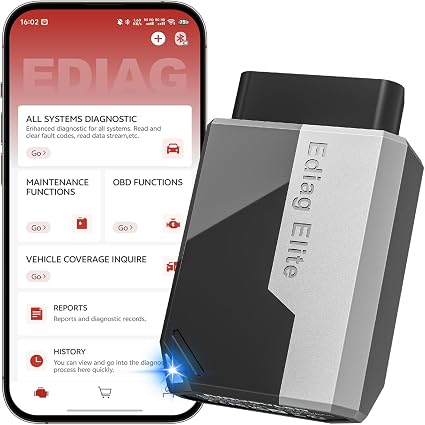 | KINGBOLEN Bluetooth OBD2 | Check Price |
Our Selected Top 12 Edacs Scanner Picks for Every Need
This list features a variety of EDACS scanners designed to meet different user needs and preferences. Each review covers performance details, suitability for particular users, and highlights the strengths and weaknesses to help readers make an informed choice.
1. Uniden SDS200 TrunkTracker X Digital Scanner
Tracking digital radio traffic can be complicated with so many systems out there. Designed for hobbyists and professionals who want detailed digital trunked system monitoring, it shines with its smart combination of easy setup and advanced scanning technology, making it accessible without sacrificing performance.
Setup is straightforward thanks to the HomePatrol Database, which includes all known systems in the US and Canada and updates weekly using Sentinel software. The large 3.5 color screen allows customizing what details you see, making daily scanning more intuitive and visually clear.
USB connection supports easy updates and power management without fiddly cables.
Performance is impressive for even challenging digital simulcast systems, capturing signals with solid clarity thanks to Software Defined Radio and True I/Q technology. Build quality is solid, focusing on compact design and durable materials. Users appreciate how well the database integration works, but some note occasional frustrations with the learning curve of advanced features.
The scanner receives praise for integrating a comprehensive, updateable database that simplifies finding and tracking systems. The most common complaint is the complexity of the advanced settings, which some find difficult to master immediately. Everyday use generally involves frequent updating via USB and customizing the display colors to suit personal preference.
This scanner suits people ready to invest time learning its options for powerful digital scanning and those relying on up-to-date data across wide regions. Those needing something simpler or less technical in setup might look for more basic models serving analog systems or smaller coverage areas.
Pros
- Includes extensive US and Canada radio database
- 3.5″ fully customizable color display
- Weekly software database updates via USB
- Strong digital simulcast reception
Cons
- Learning curve for advanced features
- Limited by standard sheet capacity
| Specification | Details |
|---|---|
| Scanner Type | Radio Scanner |
| Connection Type | USB |
| Light Source Type | LED |
| Standard Sheet Capacity | 10 |
| Media Type | USB |
2. Uniden BearTracker BCT15X TrunkTracker III Scanner
9,000 channels and compatibility with Motorola, EDACS, and LTR systems make the Uniden BearTracker BCT15X ideal for anyone needing a powerful mobile trunking scanner. Its biggest strength lies in the ability to keep up with multiple systems and locations effectively, perfect for those who track communications on the go.
Setting up the scanner involves connecting it in your vehicle with the included power cords and antenna. The location-based scanning feature works smoothly when paired with a GPS receiver, automatically switching to locally programmed channels as you travel. Day-to-day use is straightforward thanks to Alpha Tagging and individual channel volume offsets, which help customize listening experiences without fuss.
Performance is solid with the TrunkTracker III technology, reliably following Motorola, EDACS, and LTR communications. The construction feels durable and ready for mobile use, supported by useful accessories like a mounting bracket and serial programming cable.
Praise often highlights its dynamic memory and close call RF capture, while the main complaint points to the complexity of initial programming for less technical users.
The scanner receives praise for its advanced memory system and ability to capture close call RF signals, making it highly effective in following active channels. Some find the programming setup complicated, particularly without prior experience, which can slow down initial use.
People who need a deeply customizable scanner for mobile use with support for multiple trunking systems will like this model. Those seeking a simpler or more plug-and-play solution might want to consider other options.
Pros
- Supports 9,000 channels for extensive coverage
- TrunkTracker III technology for multiple system types
- Location-based scanning with GPS compatibility
- Includes comprehensive mounting and programming accessories
Cons
- Programming can be complicated for beginners
- Requires compatible GPS receiver for location-based features
| Specification | Details |
|---|---|
| Channels | 9,000 |
| TrunkTracker Technology | III |
| Included Accessories | AC Adapter, Vehicle Accessory Power Cord, Antenna, Serial Programming Cable |
| Alpha Tagging | Yes |
| Location-Based Scanning | With compatible GPS receiver |
| Warranty | 1 year manufacturer |
3. Ediag Elite KINGBOLEN Bluetooth OBD2 Scanner
Drivers wanting an affordable yet capable OBD2 scanner that connects easily to their phone will appreciate this device. Its major strength lies in offering full system diagnostics and over 15 reset services without any subscription or update fees.
Compact and lightweight, it suits anyone needing quick and detailed vehicle status checks on the go.
Daily use involves simply plugging the scanner into the car’s OBD2 port and pairing it with your phone via Bluetooth. The app interface responds quickly, showing real-time data and offering active tests to diagnose issues faster.
Its pocket-friendly size means it’s always ready for road trips or regular maintenance without bulk or cumbersome setup.
Performance-wise, the scanner performs full system diagnostics reliably and includes advanced features like CANFD & FCA AutoAuth. Build quality is light but sturdy enough for regular handling.
Most praise centers on the absence of subscription fees making it highly cost-effective. The common complaint involves occasional Bluetooth connectivity hiccups that may disrupt the smoothest user experience.
The scanner stands out by providing full vehicle diagnostics and multiple reset functions with no extra fees. It works well for detailed checks, though Bluetooth connection problems can interrupt diagnosis occasionally. Users value the comprehensive features offered at this price point.
Those seeking a cost-friendly tool with extensive diagnostics will find it suitable. People needing consistently flawless Bluetooth performance or rugged hardware might explore other options better tailored to those needs.
Pros
- Lifetime updates without any fees
- Compact and easy to carry in a pocket
- Supports in-depth full system diagnostics
- Bluetooth connection for smart device pairing
Cons
- Occasional Bluetooth connectivity issues
- Lightweight build might feel less durable
| Specification | Details |
|---|---|
| Brand Name | KINGBOLEN |
| Item Weight | 5.92 ounces |
| Model Number | KBLJ05 |
| Included Components | KINGBOLEN Ediag Elite Bluetooth obd2 scanner |
| Manufacturer Warranty Description | 1 year |
4. LAUNCH X431 PRO3S+ Heavy Duty Truck Scanner

Designed for both passenger and heavy-duty commercial vehicles, the LAUNCH X431 PRO3S+ Heavy Duty Truck Scanner stands out by supporting 12V and 24V systems all in one device. Its biggest strength is the compatibility with a wide range of vehicle types, making it a practical choice for mechanics tackling cars, trucks, buses, and even excavators.
Getting started is straightforward with the included components for many brands like BENZ, NISSAN, BMW, and more. Day-to-day use involves accessing over 60 service reset functions, such as SAS, TPMS, and DPF, plus ECU coding and bi-directional controls that allow a thorough diagnosis. The online data access through J2534 protocols helps keep the software updated easily without needing extra tools.
Performance-wise, the scanner delivers precise ECU fault codes and supports advanced service resets which cover most maintenance tasks. It feels solid and well-constructed, suitable for the rough environments of heavy-duty work. Most users appreciate the extensive brand coverage, though some point out the learning curve when dealing with its wide feature set.
The scanner receives high marks for its broad vehicle compatibility and extensive reset functions, making it especially useful in professional automotive settings. Most users find the range of features impressive but note that the interface and capabilities may take some getting used to for efficient use.
Strong candidates for this tool include technicians working on a variety of heavy-duty and passenger vehicles, especially those dealing with commercial fleets. Those focusing solely on light passenger cars might find simpler scanners more convenient.
Pros
- Supports both 12V and 24V heavy-duty vehicles
- Over 60 service reset functions available
- Compatible with many vehicle brands and types
- Includes J2534 protocol for ECU coding and updates
Cons
- Complex features require time to learn
- Mostly focused on commercial and heavy vehicles
| Specification | Details |
|---|---|
| Brand Name | LAUNCH |
| Model Number | LAUNCH PRO3S+SMARTLINK HD |
| Included Components | BENZ-38, NISSAN-14+16, BMW-20, HYUNDAI-16, IVECO-38, others |
| Supported Vehicles | Passenger & Commercial (12V & 24V) |
| Service Functions | Over 60 reset functions including SAS, EPB, TPMS |
| Warranty | 5-year warranty |
5. Uniden HomePatrol-2 TrunkTracker V Digital Scanner

Uniden HomePatrol-2 TrunkTracker V is a digital scanner designed to keep you connected with public safety communications around you. Great for anyone interested in police, fire, ambulance, or weather channels, it stands out with its intuitive digital color touchscreen that simplifies choosing channels to listen to.
Setting it up is straightforward thanks to the USB connection and the included Sentinel software that automatically keeps the scanner up to date. The touchscreen shows a clear list of radio services, making daily navigation easy without scrolling through complicated menus.
It’s a practical tool for quickly accessing the channels that matter to you in your community.
The scanner performs well at picking up non-encrypted communication signals across multiple services. The build feels solid and reliable, typical of Uniden products. Reviews praise the touchscreen interface for making scanning simpler than ever, while some mention the touchscreen can be a bit sensitive at times, requiring careful taps for accurate control.
The touchscreen interface receives strong praise for making channel selection simple and user-friendly. Common complaints focus on its sensitivity, which might require gentle taps to avoid accidental inputs. The automatic updates keep the scanner current without user intervention.
Anyone who wants a straightforward way to monitor local public safety channels will appreciate this scanner. Those needing to access encrypted channels or prefer a physical button interface may want to look at other options.
Pros
- Easy-to-use digital color touchscreen
- Automatically updated through Sentinel software
- Access to multiple public safety channels
Cons
- Touchscreen can be overly sensitive
- Only receives non-encrypted signals
| Specification | Details |
|---|---|
| Scanner Type | Radio Frequency scanner |
| Connection Type | USB |
| Media Type | USB |
6. Uniden BCD536HP HomePatrol Series Digital Scanner

Handling communications across various radio systems feels straightforward and flexible with this scanner, especially if you track multiple types like EDACS, APCO-25, or analog channels. It suits anyone needing a scanner that adapts to location changes and covers a wide range of frequencies, with its biggest strength being the smart location-based scanning that picks channels on the go.
Setting it up involves connecting to a compatible GPS receiver, which then automatically adjusts to different scan systems depending on where you are. Everyday use benefits from the Close Call RF Capture, which quietly listens for nearby transmissions without interrupting the current channel, thanks to the Do-Not-Disturb helper.
Managing the 25,000 dynamic channels for scanning and searching is simple, and the Wi-Fi connectivity means it integrates well with desktop, laptop, or smartphone devices for greater control.
Performance is solid with clear reception of both analog and digital formats, including P25 Phase I and Phase II and Motorola systems. The build holds up well for desktop or mobile use but is not water resistant and requires external power through 12 volts and two AA batteries.
Its standout feature is the massive scanning capacity paired with responsive location-based switching. Common complaints focus on the lack of water resistance and limited battery autonomy due to the need for AA batteries.
Many users appreciate how well the scanner switches channels based on GPS location and captures various radio formats with clarity. The most frequent drawback mentioned is the lack of water resistance, which requires caution in damp or outdoor environments. Battery reliance on AA cells means occasional replacements can interrupt usage.
Hunters of wide radio variety and those working across multiple locations will find this highly useful. People needing rugged outdoor durability or extended unplugged use might want to explore other options with water resistance and longer battery capability.
Pros
- Automatic location-based channel selection
- Supports multiple digital and analog systems
- Close Call RF Capture detects nearby transmissions
- Access to 25,000 dynamic channels
Cons
- Not water resistant
- Limited battery life with AA batteries
| Specification | Details |
|---|---|
| Number of Channels | 5 |
| Frequency Range | 25.0000 to 49.9900 MHz |
| Voltage | 12 volts |
| Number of Batteries | 2 AA batteries required |
| Connectivity Protocol | Wi-Fi |
7. Epson Workforce ES-50 Portable Document Scanner

Perfect for anyone needing a compact scanner on the go, this portable device shines with ultra-fast scanning speeds. It suits those who prioritize light weight and quick handling of single documents, making it handy for work or travel.
Setting up involves plugging it into your USB port, with compatibility for both Windows and Mac easing integration. The scanner handles a single sheet at a time and fits easily into a bag thanks to its slim build. Epson ScanSmart software lets you quickly scan, review, and save files, simplifying daily document management without bulky hardware.
Scanning a page takes about 5.5 seconds, keeping pace with busy days. The build is lightweight and compact but designed for straightforward, everyday use. Most users find the speed impressive, while a common drawback is the one-sheet capacity, which may slow down when multiple pages need scanning.
The scanner’s standout feature is the quick scan time paired with its portability, making it easy to throw into a bag and use anywhere. Most users praise its speed and lightweight design, though the inability to feed multiple pages quickly is often noted as a limitation.
Ideal for professionals needing to digitize individual documents, receipts, or IDs while traveling or working remotely. Those requiring bulk or high-volume scanning should consider alternative models that handle multiple sheets simultaneously.
Pros
- Fast single-page scan in 5.5 seconds
- Lightweight and ideal for travel
- Compatible with Windows and Mac
- Includes user-friendly scanning software
Cons
- Only handles one sheet at a time
- Limited for bulk scanning tasks
| Specification | Details |
|---|---|
| Scanner Type | Document |
| Connection Type | USB |
| Resolution | 1200 |
| Standard Sheet Capacity | 1 |
| Light Source Type | LED |
8. BLCKTEC 460T OBD2 Diagnostic Scanner

Durable plastic casing with a compact design suits both home mechanics and professionals looking for a comprehensive OBD2 scanner. Its biggest strength lies in delivering all-system diagnostics, covering engine, transmission, ABS, and SRS codes with professional-grade detail.
Getting started involves connecting the included OBD2 cable to your vehicle, then powering on the tool, which is straightforward thanks to the quick start guide. Day-to-day use centers on reading and clearing trouble codes, performing system resets, and checking live data, all essential for assessing your car’s condition or prepping for SMOG checks.
Compatibility matters, so checking your vehicle’s support is a necessary first step.
It performs detailed diagnostics across all 10 OBD2 modes, providing real-time data that helps pinpoint issues accurately. The build feels solid and well-protected inside its storage case, making it easy to carry around. Most reviews highlight how thorough the diagnostic features are, while a common complaint concerns some functions being unavailable depending on the vehicle model.
Diagnostics cover every system expected from a professional-level scanner, offering thorough vehicle insights. The main drawback is that some features won’t work with all vehicles, which can limit usefulness depending on the car’s make and model.
Home mechanics and professionals with compatible vehicles will appreciate the depth of data and variety of functions here. Those with less common or unsupported vehicles might want to look for a scanner with broader compatibility or more tailored features.
Pros
- Supports all 10 OBD2 diagnostic modes
- Reads and clears Engine/Transmission/ABS/SRS codes
- Includes workshop reset tools
- Comes with a storage case and quick start guide
Cons
- Function availability depends on your vehicle
- Some advanced features require vehicle compatibility check
| Specification | Details |
|---|---|
| Brand Name | BLCKTEC |
| Model Number | 460T |
| Included Components | Tool, OBD2 Cable, Storage Case, Quick Start Guide |
| Manufacturer Warranty Description | 2 year limited manufacturer warranty |
9. ANCEL AD310 Universal OBD II Scanner

Known for its sturdy design and trusted functionality, the ANCEL AD310 Universal OBD II Scanner suits anyone looking to diagnose check engine lights quickly. Its standout feature is the ability to read and clear fault codes effectively, making it perfect for people looking for straightforward, reliable diagnostic tools.
Setup involves plugging the scanner into the vehicle’s OBD II port, which is simple thanks to its 2.5-foot cable with thick, flexible insulation that holds up well during use. Reading live data and viewing freeze frame data are straightforward, allowing users to monitor vehicle health regularly without fuss.
No charger or adapter is needed, making day-to-day use simple and convenient.
In terms of performance, the scanner reliably identifies engine issues and clears codes quickly, helping to diagnose emission systems and check readiness monitors. The build is solid and compact, reducing worries about drops or rough handling. Common praise highlights its durable cable, while the most frequent complaint mentions occasional limitations on advanced diagnostics for newer vehicle models.
The durable, thick cable is praised for withstanding drops and rough handling during repairs. Users frequently note the simplicity and fast code clearing as strong points. On the downside, some vehicles, especially newer models, might not get fully supported advanced diagnostics, limiting its use for certain users.
Those needing a basic, reliable code reader will find it very useful for understanding check engine lights and emission readiness. However, anyone looking for wireless features or extensive diagnostics should look at other options that offer broader compatibility and connectivity.
Pros
- Reads and clears diagnostic trouble codes
- Sturdy cable with thick, flexible insulation
- No charger or adapter required
- Compact and easy to handle
Cons
- Limited advanced diagnostics for some vehicles
- Lacks wireless connectivity
| Specification | Details |
|---|---|
| Brand Name | ANCEL |
| Included Components | 1* AD310 OBD2 Scanner, 1* User’s Manual |
| Cable Length | 2.5 feet |
| Model Number | AD310 |
| Manufacturer Warranty | For AD310 OBD2 scanner |
10. Epson WorkForce ES-400 II Duplex Document Scanner

Designed for heavy office use, the Epson WorkForce ES-400 II Duplex Document Scanner handles large stacks with a 50-sheet feeder that keeps your workflow moving. Its biggest strength lies in speeding up document scanning with a practical auto document feeder that makes batch scanning simple and efficient.
Setup is straightforward through USB connection and the included Epson ScanSmart Software makes daily scanning intuitive. Previewing, emailing, and uploading files to the cloud happens without hassle. Automatic file naming proves handy for organizing scanned documents, and integration with existing business software is smooth thanks to the TWAIN driver.
It handles its scanning tasks reliably with a resolution of 300 dpi and color depth of 8 bpp, delivering clear scans that meet office standards. The CCD optical sensor and LED light source provide consistent document capture. Reviews often praise the speed and efficiency but users sometimes mention the 50-sheet capacity can fill up quickly during very large jobs.
The most common praise highlights the fast scanning ability and easy software use that keeps document workflows moving quickly. The chief complaint points to the 50-sheet feeder limit, which can slow down very large projects needing multiple reloads.
Ideal for offices with moderate to heavy daily scanning volumes who want fast, manageable batches with automatic file handling. Those needing higher resolution scans or continuous very large batch scanning should consider other models with larger feed capacities or enhanced detail capability.
Pros
- 50-sheet Auto Document Feeder speeds batch scans
- Easy file preview and cloud uploading via ScanSmart
- Automatic file naming saves time organizing
- TWAIN driver for smooth document management integration
Cons
- 50-sheet capacity may be limiting for very large stacks
- Resolution capped at 300 dpi for detailed archiving
| Specification | Details |
|---|---|
| Scanner Type | Document |
| Connection Type | USB |
| Resolution | 300 dpi |
| Color Depth | 8 bpp |
| Standard Sheet Capacity | 50 |
| Optical Sensor Technology | CCD |
11. ScanSnap iX1300 Wireless Color Document Scanner

Sorting through piles of papers and cards can take up more desk space than you have, especially in a small office or home workspace. Designed to fit into tight spots without getting in the way, this wireless color document scanner suits anyone needing quick, high-quality scans without a huge footprint.
Its best feature is how compact it stays while handling a wide variety of documents.
Setting it up involves a simple USB or Wi-Fi connection that gets it running without fuss. Everyday use is straightforward thanks to the Quick Menu, which lets you scan directly to your preferred apps with a single drag and drop. Scanning thick documents, cards, or photos doesn’t require special adjustments, and the 20-sheet capacity means fewer interruptions when processing multiple pages.
Scanning delivers clear images every time thanks to automatic features like de-skew and color optimization that work quietly behind the scenes. Its build feels solid and reliable, perfect for daily office tasks. Most users appreciate the uncomplicated one-touch start and great image quality, though some find the 20-sheet capacity a bit limited when handling large batches.
Automatic de-skew, color correction, and blank page removal ensure consistently sharp, vibrant scans with very little manual adjustment. The most common drawback is the 20-sheet input, which makes longer scanning sessions less convenient.
People who scan a variety of document types regularly will find the flexibility and ease of use appealing. Those needing to scan large volumes at once might want to look for a scanner with a higher sheet capacity instead.
Pros
- Compact design saves desk space
- Easy one-touch operation
- Supports thick items and plastic cards
- Wireless or USB connection options
Cons
- Limited 20-sheet capacity for large jobs
- Some setup needed for Quick Menu customization
| Specification | Details |
|---|---|
| Connection Type | USB, Wi-Fi |
| Resolution | 600 dpi |
| Standard Sheet Capacity | 20 |
| Wattage | 17 watts |
| Scan Speed | Up to 30ppm duplex |
| Color Depth | 48 bits |
12. Autel MaxiPRO MP900-BT Diagnostic Scanner

Covering more vehicles than its predecessors, the Autel MaxiPRO MP900-BT is designed for anyone needing advanced and wide-ranging diagnostic capabilities. Its standout feature is matching the functions of the MS906 PRO while supporting more models, making it a solid choice for professional mechanics and serious car enthusiasts alike.
Setup involves simple registration and connecting the scanner to the vehicle’s OBD2 port. The display and interface are straightforward enough to handle day-to-day diagnostics without confusion.
The included MaxiVideo MV108 further helps with inspections, turning the scanner into a more versatile tool beyond just reading fault codes. Help is just an email away for technical questions or confirming vehicle compatibility.
Performance shines through broad vehicle coverage and accurate diagnostics. The build quality feels solid and durable, especially given its pro-grade features inherited from earlier models in the Autel lineup. Reliable operation gets high marks, while some users mention occasional delays in startup or needing assistance with subscription renewals as a downside.
Autel’s MaxiPRO MP900-BT is praised for its comprehensive vehicle compatibility and professional-grade diagnostic capabilities. The main complaint centers on occasional startup delays and the complexity surrounding subscription and renewal processes, which can be frustrating without support.
Matters most for professionals who run diagnostics on a wide variety of vehicles frequently. Those needing a simple, quick-scan tool for basic use might prefer a more streamlined or entry-level option instead.
Pros
- Wider vehicle coverage than previous models
- Same features as MS906 PRO at lower price
- Includes MaxiVideo MV108 for visual inspections
- Helpful and accessible technical support
Cons
- Some people have noticed occasional startup delays.
- Subscription renewals can be confusing
| Specification | Details |
|---|---|
| Brand Name | Autel |
| Included Components | Autel Maxisys MS906BT, MaxiVideo MV108 |
| Item Type Name | Automotive OBD2 Scanner Diagnostic Tool |
| Model Number | Maxisys MS906BT |
| Manufacturer Warranty Description | 1-Year Warranty |
Best EDACS Scanners Comparison Table
| Product | Type | Connection | Included Components | Battery |
|---|---|---|---|---|
| Uniden SDS200 Scanner | Radio Scanner | USB | – | – |
| Uniden BearTracker BCT15X | Radio Scanner | – | Full accessory kit | – |
| KINGBOLEN Bluetooth OBD2 | OBD2 Scanner | Bluetooth | 1 item | – |
| LAUNCH X431 PRO3S+ Truck | OBD2 Scanner | – | Multi-brand adapters | – |
| Uniden HomePatrol-2 Scanner | Radio Frequency Scanner | USB | – | – |
| Uniden BCD536HP Scanner | Radio Scanner | – | – | 2 AA batteries |
| Epson ES-50 Scanner | Document Scanner | USB | – | – |
| BLCKTEC 460T OBD2 | OBD2 Scanner | – | Tool and case | 2 year warranty |
| ANCEL AD310 Scanner | OBD2 Scanner | – | Scanner and manual | No charger needed |
| Epson ES-400 II Scanner | Document Scanner | USB | – | – |
| ScanSnap iX1300 Scanner | Document Scanner | USB, Wi-Fi | – | – |
| Autel MaxiPRO MP900-BT | OBD2 Scanner | – | Diagnostic and video | – |
- TypeRadio Scanner
- ConnectionUSB
- Included Components–
- Battery–
- TypeRadio Scanner
- Connection–
- Included ComponentsFull accessory kit
- Battery–
- TypeOBD2 Scanner
- ConnectionBluetooth
- Included Components1 item
- Battery–
- TypeOBD2 Scanner
- Connection–
- Included ComponentsMulti-brand adapters
- Battery–
- TypeRadio Frequency Scanner
- ConnectionUSB
- Included Components–
- Battery–
- TypeRadio Scanner
- Connection–
- Included Components–
- Battery2 AA batteries
- TypeDocument Scanner
- ConnectionUSB
- Included Components–
- Battery–
- TypeOBD2 Scanner
- Connection–
- Included ComponentsTool and case
- Battery2 year warranty
- TypeOBD2 Scanner
- Connection–
- Included ComponentsScanner and manual
- BatteryNo charger needed
- TypeDocument Scanner
- ConnectionUSB
- Included Components–
- Battery–
- TypeDocument Scanner
- ConnectionUSB, Wi-Fi
- Included Components–
- Battery–
- TypeOBD2 Scanner
- Connection–
- Included ComponentsDiagnostic and video
- Battery–
How to Choose the Right EDACS Scanner
Look for a scanner with clear audio, reliable frequency coverage, and easy programming to ensure it captures all needed channels without hassle. Choosing the right features helps avoid compatibility issues and saves time and money on returns or upgrades.
Frequency Range and Compatibility
Many scanners fail to cover the full range of frequencies used by local police, fire, and public utility agencies, which leads to missing critical transmissions. Support for both conventional and trunked communication systems is essential because agencies often use a mix of both. A receiver covering all relevant bands in the UHF and VHF spectrum lets users stay updated on the latest channels without swapping devices.
Updates or the ability to add new frequencies as agencies shift networks prevent a device from becoming obsolete. Scanners that allow manual programming or software updates handle these changes better. Look for models that include frequencies from approximately 25MHz to 1.3GHz to cover common public safety and service bands.
User Interface and Display
Some screens become unreadable outside or under bright indoor lighting, making it hard to see what’s happening. Devices with backlit displays and adjustable contrast permit easy monitoring regardless of lighting.
The interface should let users add or remove channels from scanning lists without digging through complex menus.
An intuitive menu system speeds up programming and avoids frustration. Models offering customizable alerts for specific channels or signal types keep users aware without constant screen checks. A simple color or icon code for activity helps scan through busy systems efficiently.
Signal Reception and Audio Quality
Scanners with poor sensitivity struggle to pick up weak or distant signals, resulting in frequent dropouts. High-quality reception means hearing transmissions clearly even on fringe signals. Also, rich, distortion-free audio matters since many units have small speakers and limited volume ranges.
Noise reduction filters help minimize static or interference, making communications intelligible. Headphone jacks provide an option for private listening or clearer sound in noisy environments. Look for devices rated with strong signal-to-noise ratios and decent speaker output.
Portability and Power Options
Larger or heavier scanners become tiresome to carry during extended use, especially outdoors or in vehicles. Models designed to feel balanced in hand and weigh under 2 pounds work well for handheld use.
Battery life frequently determines if a scanner will last through a shift or day of scanning.
Devices featuring rechargeable batteries provide convenience, but having the option to run off mains power or replaceable batteries adds flexibility. Typical battery life around 8-12 hours suits most daily users, with faster charging options being a bonus for those on the move.
Programming and Software Support
Manually programming channels can become tedious and error-prone, making software compatibility crucial. Tools that connect via USB to a computer and support bulk loading of frequencies save time. Regular software updates keep the device compatible with network changes and new features.
The process to download and transfer data should be straightforward, with clear instructions and reliable connectivity. Support for common programming formats and easy backup options also protect user configurations from loss.
Tips for Optimizing Your EDACS Scanner Reception
Positioning your scanner is key to getting better reception. Place it near a window or at a higher location in the room to avoid obstructions like walls or furniture. Avoid metal surfaces that can interfere with signal strength.
External antennas can improve range substantially; consider one designed for EDACS frequencies if your scanner supports it.
Check the scanner settings carefully. Programming the correct frequency banks and priority channels helps you focus on important transmissions without scanning through all channels.
Regularly update your scanner’s frequency list based on local changes to ensure you don’t miss relevant traffic.
- Use a clear line of sight for best results.
- Keep your scanner firmware updated for optimal performance.
- Experiment with antenna placement to find the strongest signal.
Common Mistakes to Avoid When Using an EDACS Scanner
One common mistake is not customizing the scanner’s programming for local EDACS frequencies. Generic settings often include unnecessary channels, which can slow down the scanning process and reduce responsiveness during important activity. Also, scanning too many channels at once can cause the scanner to miss transmissions if the system handles multiple talkgroups simultaneously.
Another frequent error is neglecting the antenna setup. Using the built-in antenna indoors might work for some, but it often limits range. Skipping the use of external antennas designed for trunked systems reduces reception quality.
Failing to update scanner firmware and software can cause compatibility issues and limit access to newer features, reducing overall effectiveness.
Comparing EDACS Scanners with Other Trunked Radio Systems
EDACS scanners are designed specifically for the EDACS trunked radio system, which impacts their performance compared to generic trunked radio scanners. EDACS uses a particular control channel management method that requires the scanner to decode its data stream accurately, enabling access to multiple talkgroups efficiently.
Compared to other trunked systems like Motorola’s or APCO P25, EDACS scanners often have a more focused frequency range and programming requirements. This focus can make them simpler to program but more limited to EDACS networks. Other scanners might cover a broader range of systems but may require frequent updates or manual input to handle system changes.
Scanners tailored for EDACS tend to pick up system activity without delay, but they might lack flexibility if your monitoring interest spans multiple trunked systems or newer digital formats.
People Also Asked
How Do I Properly Use an Edacs Scanner for Optimal Results?
Start by programming the scanner with the correct frequency lists for your area. Keeping the software updated and regularly checking the channel lockout settings helps maintain clear reception without unwanted transmissions.
What Safety Precautions Should I Take When Using an Edacs Scanner?
Avoid using the scanner near high-voltage areas or where interference could cause malfunction. Using it outdoors in wet conditions without protection might damage the device, so keep it dry and handle it gently.
How Can I Check If an Edacs Scanner Is Compatible with My System?
Check your scanner’s manual or product details to see supported bands and system types. Comparing these with your local radio system specs ensures compatibility before purchasing or programming the scanner.
What Common Problems Do Users Experience with Edacs Scanners?
Common problems with EDACS scanners include difficulty programming them and limited online support for troubleshooting. Some models have complex menu systems that require patience to learn. Users often find that setting up the right frequencies takes time and trial. Keeping a printed manual handy helps because quick access to instructions is crucial during programming.
How Long Does an Edacs Scanner Typically Last with Regular Use?
Typically, these scanners last several years with daily use if handled properly. Regular maintenance like dust removal and safe storage can extend the operational life.
Conclusion
Choosing a good EDACS scanner means focusing on two or three key factors. The scanner should cover frequencies used in your area to ensure strong signal reception.
It needs a clear, easy-to-read display and straightforward controls to make scanning convenient. Battery life also matters if you plan on using it away from power sources for extended periods.
Think about where and how often you’ll use the scanner before making a choice. A compact model works well in tight spaces, while a sturdier one is better for regular use. Make sure the price lines up with your budget, too.
Check the comparison table and earlier sections to weigh these points against the options listed.