Top 10 Best Stop Scanner That Will Blow Your Mind Today
Using a poorly made best stop scanner often results in slow reads, frequent errors, or even device malfunctions during critical moments. A scanner that struggles to capture barcodes accurately can delay processes and cause unnecessary frustration, especially in busy retail or warehouse settings. Those who’ve dealt with cheap scanners know how often they drop connection or fail to work with a wide range of codes.
Reliable best stop scanners tend to have a durable build, often with shock-resistant materials that withstand daily wear and occasional drops. Scan accuracy depends heavily on the sensor quality and the ability to handle different barcode types, including damaged or poorly printed ones. Battery life is another key factor, with solid options lasting over 8 hours of continuous use before needing a recharge.
Compact design helps too, allowing the scanner to fit comfortably in hand during long shifts without causing fatigue.
Need a Quick Check?
| Image | Product | Price |
|---|---|---|
Our Top Picks 1  | ANCEL AD310 Scanner | Check Price |
Our Top Picks 2  | TOPDON AD800BT Scanner | Check Price |
Our Top Picks 3  | MUCAR 632 Elite Scanner | Check Price |
Our Selected Top 10 Stop Scanner Worth Considering
This list features a range of stop scanners designed for different needs and budgets. Each review covers how well the device performs, its ideal users, and the key advantages and disadvantages to help you make an informed decision.
1. ANCEL AD310 OBD2 Scanner
Reading and clearing check engine light codes quickly is the standout feature of the ANCEL AD310 OBD2 Scanner, making it ideal for anyone who wants a straightforward tool to understand vehicle trouble codes. It suits drivers who want to diagnose engine problems without extra fuss, especially those who prefer a classic, no-frills scanner.
Using it involves simply plugging the compact scanner into the car’s OBD2 port with its thick, 2.5-foot cable. The cable’s durability is noticeable when working under the dashboard where the scanner can easily fall. It doesn’t need a charger or batteries, which means you just connect and start.
Reading live data, freeze frame, and emission codes is clear and happens fast, making regular checks easy and practical.
Performance is reliable for a basic diagnostic tool. It quickly spots check engine light triggers and clears codes after repairs.
The plastic casing feels solid and the cable’s thickness adds extra protection during hands-on use. The most common praise centers on its straightforward effectiveness. On the downside, the screen and interface feel very basic compared to newer models.
The strongest praise appreciates how quickly the scanner identifies engine issues and clears codes without any setup hassle. The most common complaint points to the simple screen and user interface, which feels outdated for some modern drivers.
Anyone needing a simple, reliable code reader will find it meets everyday diagnostic needs well. Those wanting more detailed live data analysis or a more modern user interface might want to consider other options.
Pros
- Quickly detects and clears engine codes
- No external power needed
- Durable cable withstands drops
- Compact and easy to carry
Cons
- Basic screen with limited graphics
- Not suitable for advanced diagnostics
| Specification | Details |
|---|---|
| Brand Name | ANCEL |
| Model Number | AD310 |
| Included Components | 1* AD310 OBD2 Scanner, 1* User’s Manual |
| Cable Length | 2.5 foot, thick and flexible insulation |
| Item Type Name | Classic Enhanced Universal OBD II Scanner |
2. TOPDON AD800BT OBD2 Scanner
Anyone working on cars at home or in a small repair shop will appreciate how reliable and updated this scanner stays. It suits people who want deep diagnostics without extra ongoing costs. Its biggest strength is the free lifetime updates, which keep the tool current with minimal effort or expense.
Setting it up is straightforward, you just connect the VCI Bluetooth adapter to your car and pair it with the scanner. The included Type-C cable helps keep it charged, and the carry case makes storage easy. Regular use involves quick vehicle scans and accessing detailed reports without fuss, thanks to the clear interface and included user manual.
The tool does a solid job identifying trouble codes and supports many vehicles. It has a sturdy feel but weighs 660 grams, which might be a bit heavy compared to lighter models.
The one-year warranty offers a safety net, though some users point out the device could be smaller. Most like the lifetime free updates as a big win, saving money over time.
Free lifetime updates stand out as a major advantage, letting the tool stay current without additional costs. The main complaint is its weight at 660 grams, making it less portable than lighter options. The build quality feels reliable but leans toward the bulkier side.
People who want an up-to-date scanner without paying recurring fees will find this a smart choice. It fits DIYers and small shop technicians well. Those needing a lighter or more compact device might want to look elsewhere.
Pros
- Free lifetime software updates
- Includes Bluetooth VCI connector
- Comes with a protective carry case
- Detailed user manual included
Cons
- Heavier than some competing models
- One-year warranty period only
| Specification | Details |
|---|---|
| Item Weight | 660 g |
| Included Components | ArtiDiag800 BT + VCI blue-tooth connector, Carry Case, Password envelope, Type-C cable, User Manual |
| Manufacturer Warranty Description | 1 Year Warranty |
| Manufacturer Part Number | AD800 BT |
| Unit Count | 1 Count |
3. MUCAR 632 Elite OBD2 Scanner
MUCAR 632 Elite OBD2 Scanner stands out by offering lifetime free software updates with no subscription fees. Ideal for people with cars looking for reliable diagnostics without ongoing costs, it stays updated with new vehicles and diagnostic features over time.
Its single biggest strength is avoiding expensive renewal fees while maintaining current vehicle coverage.
Setting up the scanner is straightforward, including a diagnostic cable and a Type-C cable for charging or connection. The quick start guide helps get it running fast. Daily use involves plugging it into the OBD2 port and accessing vehicle diagnostics without worrying about update costs.
Lifetime updates keep the tool relevant, avoiding obsolescence as newer car models hit the market.
It performs well in reading and clearing diagnostic trouble codes, giving clear vehicle health feedback. The build feels solid enough for regular garage or roadside use. Reviews praise the lifetime free updates, which save money long term.
The most common complaint is that some vehicle-specific third-party services aren’t covered under the free updates, limiting access for certain models.
Regular updates without extra fees receive strong praise, ensuring continued vehicle compatibility. A common downside is the lack of coverage for some manufacturer-specific third-party services, which limits full diagnostic access on certain cars.
Those looking for a cost-effective, no-hassle OBD2 scanner with broad vehicle coverage will appreciate this model. Users needing advanced manufacturer-specific features or third-party services might want to consider options that include those capabilities.
Pros
- Lifetime free software updates included
- No subscription fees or renewal costs
- Comes with all necessary cables
- 12 months warranty included
Cons
- Does not include some third-party manufacturer services
- Only software updates covered, not vehicle-specific access
| Specification | Details |
|---|---|
| Brand Name | mucar |
| Included Components | 1* Quick Start Guide, 1*Diagnostic Cable, 1*MUCAR 632 OBD2 Scanner, 1*Type-C Cable |
| Model Number | mucar 632 obd2 scanner |
| Manufacturer Warranty Description | 12 Months |
| Manufacturer | mucar |
4. TOPDON AD500 OBD2 Scanner

TOPDON ArtiDiag500 is a solid OBD2 scanner aimed at DIYers needing more than basic code reading. It stands out with its ability to diagnose four major systems, engine, transmission, ABS, and SRS, making it ideal for thorough vehicle checks and simple maintenance tasks without spending extra on separate tools.
Setup involves plugging into your car’s OBD2 port, which takes just seconds. Day-to-day use is straightforward through a clear interface, letting you access full OBD2 functions and six maintenance services with ease. It supports monitoring live data streams and clearing fault codes, so routine diagnostics and minor repairs become approachable even for non-professionals.
The scanner performs reliable diagnostics on multiple systems beyond just engine codes. It feels sturdy and weighs around 1.2 pounds, giving it a portable yet substantial feel in hand.
Most praise focuses on its comprehensive functions and affordable price. Common complaints mention the interface could be more intuitive, especially for beginners unfamiliar with troubleshooting steps.
Top features include detailed engine and transmission diagnostics plus ABS and SRS system checks. Users often highlight the accessible maintenance services. On the downside, some users find the interface confusing, which might be tough for first-timers without mechanical experience.
Those who want a more advanced scanner than basic OBD2 readers and appreciate DIY car care will be satisfied. Drivers needing professional-grade or specialist diagnostics might look for a higher-end tool instead. This fits best for routine vehicle health checks and simple troubleshooting at home.
Pros
- Full OBD2 and 4-system diagnostics
- Includes 6 maintenance service functions
- Clear reading of fault codes and data streams
- Compact, portable design
Cons
- Interface may not be intuitive to all users
- Limited to basic and mid-level diagnostics
| Specification | Details |
|---|---|
| Brand Name | TOPDON |
| Model Number | ArtiDiag500 |
| Item Weight | 1.2 pounds |
| Included Components | TOPDON ArtiDiag500, User Manual |
| Manufacturer Warranty | 1 Year Warranty |
5. TOPDON X800BT OBD2 Scanner

Running diagnostics feels straightforward with the TOPDON X800BT OBD2 Scanner, especially for anyone wanting detailed insights into various car systems. Its biggest strength lies in offering full system diagnostics across multiple vehicle functions, bringing professional-level checks right into your garage or driveway.
Setup involves powering the unit via its included nonstandard battery, then connecting it to your vehicle’s OBD2 port. Using the scanner’s broad functionalities, you can read and clear DTCs, monitor live data, and reset several warning lights. The interface supports all 10 OBD2 modes, making everyday troubleshooting and monitoring of engine, transmission, ABS, and other systems pretty user-friendly.
Performance delivers deep and reliable system diagnostics on par with OE-level scans, covering engine, transmission, ABS, TPMS, and more. The build feels solid, weighing close to 3 pounds with a package size that’s easy to handle but not overly compact.
Strong praise often focuses on the range of diagnostic functions, though some users mention the weight and size as a minor inconvenience when handling it for long periods.
The scanner stands out for providing extensive, OE-level diagnostic coverage across many vehicle systems, ensuring detailed fault detection and reset capabilities. Handling it can feel somewhat cumbersome due to its weight and size, but this is a trade-off for its comprehensive functionality.
Drivers who want professional-grade scans without going to a shop will appreciate its in-depth diagnostics. Those needing a lighter, more portable scanner might want to consider alternatives better suited for quick checks or frequent mobility.
Pros
- Supports full system diagnostics including ABS, TPMS, EPB
- Reads and clears DTCs with all 10 OBD2 modes
- Included battery ensures ready use out of the box
- Captures live and freeze frame data for performance monitoring
Cons
- Relatively heavy at nearly 3 pounds
- Package size larger than some compact scanners
| Specification | Details |
|---|---|
| Brand | TOPDON |
| Model | VeriDiag X800 BT |
| Item Weight | 2.95 pounds |
| Batteries | 1 Nonstandard Battery (included) |
| Manufacturer Part Number | VeriDiag X800 BT |
| Package Dimensions | 10.83 x 7.52 x 4.25 inches |
6. BLCKTEC 460T OBD2 Scanner

Great for home mechanics and pros alike, the BLCKTEC 460T OBD2 Scanner covers all bases in vehicle diagnostics. Its biggest strength lies in supporting every OBD2 mode and performing comprehensive system scans, making it a reliable choice for anyone serious about pinpointing car issues and prepping for inspections.
Setup involves connecting the OBD2 cable to your car’s port and powering up the tool. The included quick start guide helps you get through initial steps without fuss. Day-to-day use relies on accessing multiple diagnostic codes and live data, which feels straightforward because it supports all systems from engine to ABS, so you get detailed info about your vehicle’s condition.
The scanner delivers thorough diagnostics and handles complex tasks like workshop resets and live data streaming with decent speed. Build quality feels solid, with a durable casing and a handy storage case to keep everything neat. The most notable praise revolves around its all-system diagnostic capabilities, while the occasional limitation depends on vehicle compatibility, which users should double-check before buying.
The device excels at providing extensive diagnostics across all car systems, with users appreciating its professional-level features. A common caveat is that certain functions depend on your vehicle’s make, model, and year, which can limit what you can do without confirming compatibility first.
Anyone who needs detailed diagnostics and system resets will find this tool useful. Those with uncommon vehicles or who prefer plug-and-play convenience without checking compatibility might want to consider alternatives first.
Pros
- Supports all 10 OBD2 modes
- Reads and clears multiple system codes
- Includes workshop reset tools
- Compact storage case included
Cons
- Function availability varies by vehicle
- Requires compatibility check before purchase
| Specification | Details |
|---|---|
| Brand Name | BLCKTEC |
| Model Number | 460T |
| Included Components | Tool, OBD2 Cable, Storage Case, Quick Start Guide |
| Manufacturer Warranty Description | 2 year limited manufacturer warranty |
| Manufacturer | McGaaw, LLC |
7. MUCAR 892BT PRO OBD2 Scanner

Solidly built and designed for dependable diagnostics, the MUCAR 892BT PRO OBD2 Scanner is perfect for drivers and mechanics who want a detailed, hands-on tool. Its biggest strength lies in its thorough vehicle compatibility and included accessories that cater to diverse charging needs and easy storage.
Setup is straightforward with the included user manual guiding you through connecting via TYPE-C cable or using the provided 3-in-1 charger, which fits US, UK, and EU plugs. Daily use benefits from clear display data and quick vehicle communication, making it easy to identify issues without extra devices. The carrying box adds convenience when taking it along to any vehicle.
Performing diagnostic scans is reliable, providing in-depth information on engine trouble codes and system status. The sturdy construction feels durable and well-made, though some mention the occasional difficulty with connection on certain vehicles.
A common praise is its responsive technical support and clear instructions, ensuring users troubleshoot problems confidently.
The strongest praise highlights fast and helpful customer support that assists with any functional uncertainties. The most frequent complaint involves sporadic difficulties connecting to some vehicle types, which might slow down diagnostics at times.
Those who need a detailed and well-supported scanner with broad charging options will appreciate this device. People driving less common vehicles or seeking a scanner guaranteed to connect instantly every time might want to consider other models.
Pros
- Includes versatile 3-in-1 charger for global plugs
- Clear instructions aid setup and usage
- Compact carrying box protects device on the go
- Responsive customer support via email
Cons
- Some vehicles have connection issues occasionally
- Occasional confusion over function support for certain car models
| Specification | Details |
|---|---|
| Brand Name | mucar |
| Number of Items | 1 |
| Included Components | TYPE-C Cable, 3-in-1 Charger, Carrying Box, User Manual, J2534 VCI |
| Model Number | 892BT PRO |
| Manufacturer Warranty | 1 Year Warranty |
8. FOXWELL NT301 OBD2 Scanner

Easy-to-read trouble codes stand out as the first thing about the FOXWELL NT301 OBD2 Scanner. Ideal for people wanting to understand engine issues without expert help, it focuses on providing clear diagnostic information so you can decide on repairs wisely before visiting a shop.
Setup is straightforward, just plug it into your vehicle’s OBDII port and power it up. The scanner offers an intuitive interface with live data monitoring and trouble code definitions, making everyday use stress-free. It comes with a quick reference guide and USB cable, which can be convenient for updates or data transfer.
The scanner reliably reads and clears engine trouble codes, allowing you to verify repairs without guesswork. Users praise its clear display and easy navigation, but some mention limited support for advanced diagnostics. The build is compact and lightweight at 0.16 kg, solid enough for regular use.
The scanner clearly shows trouble codes and confirms repairs by allowing you to clear codes and recheck the engine status. Many users appreciate how simple it is to use but note it lacks more advanced diagnostic functions.
Good fit for those wanting basic engine diagnostics and code clearing without complexity. Those needing deeper vehicle insights or a modern interface might prefer an alternative with more features.
Pros
- Clear trouble code definitions
- Lightweight and compact design
- Easy to read and clear codes
- Includes USB cable and guide
Cons
- Limited advanced diagnostic features
- Basic interface may feel outdated
| Specification | Details |
|---|---|
| Brand Name | FOXWELL |
| Model Number | NT301 |
| Item Weight | 0.16 kg |
| Included Components | NT301 OBD2 scanner, USB cable, quick reference guide |
| Manufacturer Warranty Description | 12 Months |
9. TOPDON ONE Bidirectional Scanner

Tech enthusiasts and professional mechanics will appreciate this scanner for its combination of speed and interface quality. What stands out most is the dual WiFi connection, enabling scanning that’s three times faster than Bluetooth, making diagnostic work noticeably quicker and less frustrating.
Getting started involves connecting the ONE VCI to your vehicle, then pairing it wirelessly with the 10.1 touchscreen tablet. The interface responds well, with no lag during scans.
Included cables like USB-C and OBDII extension aid easy setup and charging. Software updates, available for at least a year, and possibly two if you buy within the promotion period, keep the tool current.
Scanning feels thorough and fast, matching expectations for professional use. The build is solid, with the tablet and VCI designed to work well together.
Praise centers on its reliable wireless link and intuitive touchscreen. The common complaint relates to the unit’s weight, which may feel a bit heavy during longer sessions at 3.5 pounds.
Many highlight the stable and significantly faster WiFi connection as a major advantage, making diagnostics smooth and efficient. Some find the 3.5-pound weight tiring when used for extended periods, which can affect handling comfort.
Mechanics and tech-savvy users needing quick, professional scans will appreciate this tool’s speed and interface. Casual or occasional users might prefer a lighter, simpler scanner without as many advanced features or weight considerations.
Pros
- Fast dual WiFi connection speeds up scanning
- Large, responsive 10.1″ touchscreen interface
- Includes multiple cables for easy setup
- Software updates extend tool life and functionality
Cons
- Unit weighs 3.5 pounds, a bit heavy for handheld use
- Bonus software update period limited by purchase date
| Specification | Details |
|---|---|
| Screen Size | 10.1″ |
| Wireless Connection | Dual WiFi (3x faster than Bluetooth) |
| Included Items | OBDII Extension Cable, USB-C and USB-A to USB-C Cables, ONE Tablet, ONE VCI, Power Adapter |
| Weight | 3.5 pounds |
| Manufacturer Warranty | 1 Year |
| Bonus Software Updates | Extra 1 year if purchased before Dec 20, 2026 |
10. Innova 5610 OBD2 Scanner
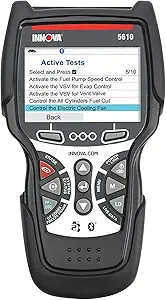
Car troubles are frustrating, especially when you want quick answers without visiting a mechanic. The Innova 5610 OBD2 Scanner is the kind of tool that suits people who want to diagnose vehicle issues confidently at home. Its strongest point is the ability to access live data for various advanced systems, making troubleshooting more precise than basic code readers.
Setting up involves connecting the scanner to your vehicle’s OBD2 port and powering it on. The included OBD2 cable and protective boot make handling simple and safe.
Daily use highlights the Enhanced Data Stream, which lets you watch engine, ABS, SRS, and transmission data in real time, helping to pinpoint issues. Reset functions mimic dealership-level procedures, adding value for regular maintenance.
The scanner performs well at reading and clearing codes across multiple vehicle systems, showing detailed live data you can rely on. Built solidly, it’s not heavy at 1.3 pounds and comes with useful accessories like a USB cable and soft pouch. Most users appreciate its professional functionalities, but some find it less user-friendly without prior diagnostic knowledge.
The strongest praise for this scanner lies in its detailed live data and reset functions, which allow for complex diagnostics beyond simple code reading. Common complaints focus on its learning curve, as the tool is not aimed at users unfamiliar with vehicle systems.
Those comfortable with car diagnostics or looking for dealership-level capabilities will be satisfied. People wanting a simple plug-and-play device may prefer a more basic code reader with fewer advanced features.
Pros
- Accesses live data for engine, ABS, SRS, and transmission
- Includes special reset functions for re-learn procedures
- Supplied with protective boot and storage pouch
- Lightweight at just 1.3 pounds
Cons
- Not very intuitive for beginners
- Some features require technical understanding
| Specification | Details |
|---|---|
| Brand Name | Innova |
| Model Number | 5610 |
| Item Weight | 1.3 pounds |
| Included Components | Code Reader with Protective Boot, Manual, OBD2 Cable, Soft Pouch, USB Cable |
| Manufacturer | Innova Electronics Corporation |
Best Stop Scanners Comparison Table
| Product | Weight | Warranty | Included Components | Power |
|---|---|---|---|---|
| ANCEL AD310 Scanner | – | – | Scanner, Manual | No charger needed |
| TOPDON AD800BT Scanner | 660 g | – | Scanner, Case, Cable | – |
| MUCAR 632 Elite Scanner | – | 12 Months | Scanner, Cable, Guide | – |
| TOPDON AD500 Scanner | 1.2 pounds | 1 Year | Scanner, Manual | – |
| TOPDON X800BT Scanner | 2.95 pounds | – | Scanner, Battery | Nonstandard battery included |
| BLCKTEC 460T Scanner | – | 2 year limited | Tool, Cable, Case | – |
| MUCAR 892BT PRO Scanner | – | – | Cable, Charger, Box | – |
| FOXWELL NT301 Scanner | 0.16 kg | – | Scanner, Cable, Guide | – |
| TOPDON ONE Scanner | 3.5 pounds | – | Tablet, Cables, Adapter | – |
| Innova 5610 Scanner | 1.3 pounds | – | Reader, Cables, Pouch | – |
- Weight–
- Warranty–
- Included ComponentsScanner, Manual
- PowerNo charger needed
- Weight660 g
- Warranty–
- Included ComponentsScanner, Case, Cable
- Power–
- Weight–
- Warranty12 Months
- Included ComponentsScanner, Cable, Guide
- Power–
- Weight1.2 pounds
- Warranty1 Year
- Included ComponentsScanner, Manual
- Power–
- Weight2.95 pounds
- Warranty–
- Included ComponentsScanner, Battery
- PowerNonstandard battery included
- Weight–
- Warranty2 year limited
- Included ComponentsTool, Cable, Case
- Power–
- Weight–
- Warranty–
- Included ComponentsCable, Charger, Box
- Power–
- Weight0.16 kg
- Warranty–
- Included ComponentsScanner, Cable, Guide
- Power–
- Weight3.5 pounds
- Warranty–
- Included ComponentsTablet, Cables, Adapter
- Power–
- Weight1.3 pounds
- Warranty–
- Included ComponentsReader, Cables, Pouch
- Power–
How to Choose the Right Stop Scanner
Choosing a reliable stop scanner depends on accuracy, durability, and ease of use, ensuring consistent and precise readings. Prioritizing these features helps avoid costly errors and frequent replacements, saving both time and money in the long run.
Scanning Speed and Accuracy
Scanning delays slow down workflows and frustrate users. A device that captures barcodes or QR codes instantly reduces wait times during checkout or stock taking.
Some models struggle with certain barcode types or damaged codes, causing multiple scan attempts and slowing everything down. Good scanners consistently read different barcode formats, even if codes are scratched or poorly printed.
Performance varies noticeably in different lighting or when scanning at awkward angles. Strong reading accuracy holds up across these conditions, helping maintain efficiency.
Look for scanners with omnidirectional scanning and laser or imaging engines rated for at least 1,000 scans per second. Those are the features that usually deliver reliable, quick, and precise reads in day-to-day use.
Connectivity Options
A scanner that can’t connect stymies your work, so compatibility counts. Devices offering multiple connection options like Bluetooth, USB, or WiFi provide flexibility.
This makes it easier to pair with cash registers, tablets, or PCs across various operating systems. Sticking with just one connection type might work initially but limits usage scenarios.
Stable pairing and fast data transfer matter because losing connection mid-scan wastes time. Dual-mode scanners that support both wired and wireless connections add value by letting you switch between reliable wired use and convenient untethered scanning.
Reliable drivers and connection stability reduce interruptions noticeably.
Ergonomics and Design
Long scanning sessions wear down the hand if the device is bulky or heavy. Lightweight construction paired with an ergonomic grip reduces fatigue and lets you work longer comfortably.
Compressing the scanner into a small, manageable size also helps with portability and one-handed handling.
Durability is important because retail stores and industrial settings are rough on equipment. Look for devices with reinforced plastic or rubberized shells that withstand drops and impacts.
Solid build quality ensures the scanner keeps performing without frequent repairs or replacements.
Battery Life and Power Management
Battery lifespan affects how often you need to pause work for a recharge or battery swap. Devices with longer operation times between charges improve productivity by reducing downtime.
Typical scan tools can last anywhere from 8 to 16 hours on a single charge depending on battery size and power management.
Fast recharge times are important where shift changes are quick, or charging opportunities are limited. Some models recharge fully within a couple of hours.
Powersaving settings like automatic sleep during inactivity prolong battery life, meaning less frequent charging and longer daily use.
Software Compatibility and Features
Software compatibility influences how smoothly the scanner integrates with inventory or point-of-sale systems. Support for common scanning software guarantees straightforward setup and data integration. Customizable features such as adjustable beep volume and scan modes let users tailor the device to their environment.
Being able to update firmware ensures you can fix bugs or add improvements without replacing hardware. User-friendly interfaces for configuration simplify managing settings and reduce the learning curve.
These practical features make the scanner fit better into daily workflows.
Tips for Optimal Usage of Stop Scanners in Various Environments
Stop scanners perform best when placed where they can clearly detect vehicle movement without obstruction. Positioning these scanners near stop signs or intersections that experience frequent traffic helps capture accurate stop and go events. Avoid placing the scanner in direct sunlight during peak hours, as glare can interfere with sensor accuracy.
Many units have adjustable sensitivity settings, allowing customization based on traffic density and environmental conditions. Regularly check that the scanner’s field of view is free from dirt, leaves, or snow to maintain detection reliability.
Practical Tips for Different Environments:
- Urban areas: Mount the scanner higher to avoid interference from parked vehicles.
- Rural roads: Position away from tall grass or foliage that may block sensors.
- High-traffic intersections: Use models with faster processing rates to handle volume.
These steps ensure consistent performance and reduce false readings in real-world situations.
Maintenance and Care Practices to Prolong the Life of Your Stop Scanner
Routine cleaning extends the functionality of stop scanners by preventing sensor blockages. Use a soft, damp cloth to wipe lenses or detection surfaces, avoiding harsh chemicals that might damage protective coatings.
Check wiring connections frequently to spot any signs of wear or corrosion, particularly in outdoor installations exposed to weather changes. Updating firmware whenever available can fix bugs and improve scanner response times.
Maintenance checklist:
- Weekly wipe down of the scanner lens.
- Monthly inspection of mounting hardware to ensure stability.
- Quarterly review of software updates or calibration needs.
Consistent upkeep reduces downtime and keeps readings reliable over time.
Comparing Stop Scanners with Other Traffic Monitoring Technologies
Stop scanners focus on detecting when vehicles come to a halt, making them specialized tools for traffic compliance monitoring. In contrast, radar or LIDAR systems measure speed without necessarily identifying stop events, providing broader traffic flow data but less detail on stops specifically.
Video-based systems capture visual evidence but require more bandwidth and processing power for analysis.
Comparative points:
- Stop scanners provide targeted data on stopping behavior without complex analysis.
- Radar offers precise speed measurement but lacks stop event detection.
- Camera systems can confirm driver actions visually but depend on good lighting and storage.
Choosing the right technology depends on whether the priority is tracking stops, speeding, or overall traffic patterns.
People Also Asked
How Do I Properly Care for My Stop Scanner Device?
Clean the scanner lens regularly with a soft, dry cloth to keep it clear and functional. Avoid using harsh chemicals on the device, as they can damage the plastic and internal components. Store it in a protective case when not in use to prevent scratches and dust buildup.
What Size Stop Scanner Do I Need for My Vehicle?
Choose a size that fits comfortably in your hand and easily scans any barcodes you encounter in your vehicle’s environment. Bulkier models might be harder to carry around, while smaller devices may not read codes from a distance effectively. Measure the space where you plan to keep it, such as a glove compartment.
Are Stop Scanners Safe to Use Around Electronics?
Yes, most stop scanners use low-energy wireless signals or infrared, which do not interfere with other electronic devices. Keep the scanner a few inches away from sensitive electronics when not in use as a general precaution. Avoid placing it directly on top of electronics for extended periods.
How Long Does a Typical Stop Scanner Last Before Replacement?
A stop scanner typically lasts several years with regular use, but battery life is the limiting factor in many models. Rechargeable batteries can be replaced, extending the device’s usable life. Keeping the scanner clean and protected from drops helps avoid early failure.
What Are Common Problems Users Face with Stop Scanners?
Common problems include difficulty reading damaged or dirty barcodes and occasional connectivity issues with smartphones or computers. Battery degradation is often reported in wireless models, leading to shorter usage times. Calibration may be needed over time for accurate scanning results.
Conclusion
Choosing the best stop scanner comes down to scan quality, speed, and ease of use. Good image clarity allows for better data capture, while faster scanning can save time on larger projects.
A straightforward interface reduces the learning curve, letting you get started without fuss.
Consider how often you’ll use the scanner and the size of your workspace before making a purchase. This helps avoid overpaying or ending up with a device too bulky for your needs.
Revisit the comparison table and earlier reviews to see which models fit your specific requirements best.