Top 10 Best TDMA Scanner That Will Blow Your Mind
Many people who rely on a TDMA scanner know the frustration of missing critical transmissions or struggling with unclear audio. A poorly chosen scanner can suffer from weak reception and slow response times, making it hard to follow fast-moving communications.
The best TDMA scanner cuts through these issues by maintaining clear, reliable signal capture and quick channel switching, essential for tracking conversations without delay or static.
What separates a good TDMA scanner from a poor one comes down to a few key factors. Sensitivity to signals is crucial, with effective models handling weaker signals around -120 dBm comfortably. Scan speed matters too; the best devices switch channels in less than 20 milliseconds to keep up with rapid updates.
Ease of programming and firmware updates can impact how quickly you can adapt the scanner to different networks, while a durable build and battery life of several hours add to usability in the field.
Need a Quick Check?
| Image | Product | Price |
|---|---|---|
Our Top Picks 1  | Uniden BCD436HP Scanner | Check Price |
Our Top Picks 2  | Uniden HomePatrol-2 Scanner | Check Price |
Our Top Picks 3  | Uniden SDS150 SDR Scanner | Check Price |
Our Selected Top 10 Tdma Scanner Worth Your Money
This list features reliable TDMA scanners designed for effective communication monitoring. Each review explains how the scanner performs, identifies the type of user it best suits, and highlights its main advantages and disadvantages to help you make an informed choice.
1. Uniden BCD436HP HomePatrol Digital Handheld Scanner
Scanning at 85 channels per second makes this ideal for anyone who wants to catch a wide variety of signals quickly. It fits users looking for a straightforward experience, especially with its simple setup that requires no programming.
The ability to pick up public safety, police, weather, and military channels right out of the box stands as its biggest strength.
Getting started involves just turning the device on and entering your zip code, allowing TrunkTracker V to handle channel selection automatically. The large screen is easy to read during use, and Close Call RF Capture works well to detect nearby transmissions fast.
The GPS connectivity adds helpful location-based functions for scanning specific areas without fuss, and the battery life supports about 8 hours of continuous use.
Performance-wise, it picks up a wide frequency range from 25 MHz all the way to 1300 MHz, making it versatile for various signal types. The scanner’s build is typical handheld size and it runs on 3 AAA batteries, which makes it portable but not water-resistant. Most praise highlights how easy it is to use right away; complaints usually mention the lack of water resistance limiting outdoor use in bad weather.
Many appreciate how straightforward it is to operate without programming, getting straight to scanning public safety and other important frequencies. The main drawback often pointed out is its lack of water resistance, which makes it less practical for use in rain or damp outdoor environments.
People who want a scanner that just works with minimal setup and good channel coverage will find it fitting. Those needing a rugged, weatherproof device or longer battery life might want to explore other options better suited for outdoor or intensive use.
Pros
- Easy setup with zip code entry only
- Fast scanning at 85 channels per second
- Large, easy-to-read display
- Included Weather Alert feature
Cons
- Not water resistant, vulnerable in wet conditions
- Requires AAA batteries, no rechargeable option
| Specification | Details |
|---|---|
| Scan Speed | 85 channels per second |
| Frequency Range | 25-512 MHz, 758-824 MHz, 849-869 MHz, 894-960 MHz, 1240-1300 MHz |
| Number of Channels | 85 |
| Battery | 3 AAA batteries required, 8 hours average life |
| Connectivity | GPS |
| Extra Feature | Weather Alert |
2. Uniden HomePatrol-2 Digital Touchscreen Scanner
People interested in keeping track of local public safety channels and weather information will find this scanner suits their needs well. Its biggest strength lies in the intuitive digital color touchscreen, which makes selecting and managing channels straightforward even for beginners.
Setting up involves connecting it via USB and using the Sentinel software to ensure your scanner is always up to date with the latest channels and frequencies. Daily use becomes simple as you can easily browse radio services on the touchscreen and pick the ones you want to listen to. The ability to hear various communication channels like police, fire, ambulance, aircraft, and military helps you stay well informed about community events.
The scanner receives clear transmissions from non-encrypted channels it supports and performs its job dependably. Build quality feels solid and durable, designed to last through regular handling.
Users appreciate how the touchscreen interface makes scanning accessible, but some find that the USB connection limits mobility since it requires a power source or computer link. The scanner handles a wide range of signals effectively, though it doesn’t decode encrypted communications.
The scanner’s touchscreen and software update system receive consistent praise for making channel selection simple and keeping frequencies current. A common drawback comes from its reliance on USB, which means it isn’t very portable and needs to stay connected to a power source or computer during use.
Anyone wanting to monitor local emergency services and weather with minimal setup will be satisfied by this device. Those needing a hand-held, fully portable scanner or the ability to listen to encrypted channels might want to look elsewhere.
Pros
- Easy-to-use color touchscreen interface
- Supports numerous public safety radio channels
- Keeps itself updated via Sentinel software
- Clear audio on non-encrypted signals
Cons
- USB connection limits portability
- Cannot receive encrypted communications
| Specification | Details |
|---|---|
| Scanner Type | Radio Frequency scanner |
| Connection Type | USB |
| Media Type | USB |
3. Uniden SDS150 Software Defined Radio Scanner
Setting itself apart with built-in GPS and Bluetooth, the Uniden SDS150 is crafted for serious radio enthusiasts who need clear digital reception and long battery life. It suits those looking for a portable scanner with advanced trunk tracking and app connectivity, all packed into a lightweight, water-resistant package.
Setup involves syncing the scanner with your smartphone via Bluetooth and using the U/AWARE app, which simplifies programming and monitoring frequencies. The charge cradle keeps it powered without fuss, and the enhanced sensitivity reduces background noise during long daily scans.
Its digital display and clean control layout make it straightforward to adjust channels or access weather alerts on the go.
Performance leans heavily on the TrunkTracker X tuner and support for multiple digital formats like APCO P25 and DMR Tier III, providing reliable signal reception across a wide 1300 MHz frequency range. The rugged design feels sturdy for field use, yet remains lightweight. Most praise points to the improved signal filtering, with some users noting occasional interface quirks.
Scanning clarity is usually excellent thanks to advanced signal filtering, helping hear details often lost on other scanners. The main hang-up lies in occasional difficulty navigating the interface, which can slow down operation when on the move.
People who need reliable, portable tracking across many digital formats will appreciate it. Those prioritizing simple, plug-and-play ease or preferring standard batteries might look elsewhere.
Pros
- Enhanced signal reception with interference filtering
- Built-in GPS receiver for location-based features
- Long battery life optimized for field use
- Lightweight yet durable and water resistant
Cons
- Sometimes tricky interface navigation during scanning
- Uses nonstandard battery included in package
| Specification | Details |
|---|---|
| Connectivity Technology | Bluetooth |
| Tuner Type | TrunkTracker X, APCO P25 Phase I & II, DMR Tier III* |
| Power Source | Battery Powered |
| Radio Bands Supported | AM, NFM, FM, WFM, or FMB |
| Frequency | 1300 MHz |
| Additional Features | Weather Alert, Built-in GPS Receiver |
4. Uniden Bearcat BC125AT Analog Handheld Scanner

Uniden Bearcat BC125AT Analog Handheld Scanner is ideal for anyone looking to monitor analog radio frequencies with ease. Its biggest strength lies in handling up to 500 channels, offering detailed alpha tagging to keep organized and informed on the go.
Setting up the scanner is straightforward, with 2 AA batteries powering it for around 10 hours of use. The digital display simplifies navigation through the various channels, and Close Call RF capture technology helps quickly lock onto nearby signals.
A Do Not Disturb mode avoids interruptions during transmissions, making it useful when you don’t want constant notifications.
Performance-wise, the scanner covers a wide frequency range from 25 to 512 MHz, including UHF, ideal for monitoring many analog channels. It performs well picking up local and distant broadcasts within a 50-kilometer range.
The compact build is handy but not water-resistant, so it needs to be kept dry. The main praise highlights its quick tuning, while a common complaint is it only supports analog signals, missing out on digital scanning features.
The scanner consistently receives praise for its quick tuning and easy access to a broad channel range. A frequent drawback is its limitation to analog signals, which excludes monitoring newer digital radio systems found in many urban emergency services.
This handheld scanner suits users focused on analog monitoring, such as hobbyists or rural listeners with analog broadcasts. Those needing to track digital trunking systems or newer digital communications should consider more advanced models supporting those formats.
Pros
- Supports 500 alpha-tagged channels
- Close Call RF capture technology
- Compact and lightweight design
- Includes 10-hour battery life
Cons
- Only analog scanning, no digital signals
- Not water resistant, sensitive to moisture
| Specification | Details |
|---|---|
| Number of Channels | 500 |
| Frequency Range | 25-54 MHz, 108-174 MHz, 225-380 MHz, 400-512 MHz (UHF) |
| Battery Type | 2 AA batteries required (included) |
| Battery Life | 10 hours |
| Talking Range Maximum | 50 kilometer |
| Water Resistance | Not Water Resistant |
5. Uniden SDS100 True I/Q Digital Handheld Scanner

Picking up transmissions feels straightforward and reliable with a scanner designed for serious communication enthusiasts. It suits hobbyists who appreciate a device built to handle digital and trunked signals in tricky reception areas without fuss. The biggest strength is its True I/Q receiver, which really shines in tough RF conditions.
Setup involves plugging in via USB and entering your zip code to access the HomePatrol database of US and Canadian radio systems. Day-to-day use benefits from the customizable color display, letting you focus on the channels and details you care about. MicroSD card support means storing and managing data is easy, making scanning more organized and convenient.
Performance is solid, especially when picking up weak or simulcast digital signals that often confuse other scanners. It feels sturdy enough for frequent handheld use without being bulky.
Praise often highlights the weekly database updates keeping channels fresh, while the main gripe centers on some users finding the programming interface less intuitive than expected.
The strongest praise highlights the scanner’s excellent digital performance in both simulcast and weak-signal environments, supported by regular updates to the HomePatrol database. The most common complaint involves the learning curve associated with programming, which might feel complicated for first-time users without experience.
Anyone needing reliable reception and easy database updates will appreciate this unit. Those who prefer simple, standalone programming or minimal computer setup might look for something with a more straightforward interface.
Pros
- True I/Q receiver excels in weak signal areas
- Updatable weekly HomePatrol database keeps info current
- Customizable color display shows preferred information
- Compact and durable for handheld use
Cons
- Programming interface can be confusing
- Dependent on computer connection for updates
| Specification | Details |
|---|---|
| Scanner Type | Digital Handheld Scanner |
| Connection Type | USB |
| Resolution | 24 Bits |
| Color Depth | 24 |
| Media Type | MicroSD Card |
6. Uniden SDS200 TrunkTracker X Base/Mobile Scanner

Uniden SDS200 TrunkTracker X suits anyone wanting a highly advanced, easy-to-use TDMA scanner. Its standout feature is the large, customizable 3.5 color display, which makes keeping track of multiple radio systems simple and clear without overwhelming you with information.
Setup is straightforward thanks to the HomePatrol database that already includes all known radio systems in the US and Canada. Updating the software and database is done through USB with the Sentinel software, keeping everything current. The display color customization lets you arrange what information you see and how it looks, which is helpful during long scanning sessions.
Performance is solid, excelling even with tough digital simulcast systems thanks to Software Defined Radio and True I/Q technology. The build feels sturdy with a bright LED light source guiding the display. The main praise focuses on how well it handles complex signals, though some users find the resolution on the screen could be better for the price.
This scanner performs very well even in demanding digital and simulcast environments, making signal tracking reliable. Most praise highlights the ease of use coupled with powerful technology, while the most frequent complaint concerns the screen resolution, which some find less sharp than expected.
People who want an up-to-date, user-friendly scanner for North American systems will find it a good fit. Those who prioritize a higher-resolution screen or simpler update methods might want to consider other options.
Pros
- Large, fully customizable 3.5″ color display
- Includes US and Canada radio systems database
- Weekly database updates via USB
- Strong performance with digital simulcast systems
Cons
- Screen resolution could be improved
- Database updates require software use
| Specification | Details |
|---|---|
| Scanner Type | Radio Scanner |
| Connection Type | USB |
| Light Source Type | LED |
| Media Type | USB |
7. Uniden BCD996P2 Digital Mobile TrunkTracker Scanner

Solidly built with a clear LCD display, this scanner suits anyone needing detailed, real-time radio monitoring on the go. Its strongest feature is the TrunkTracker V technology, allowing you to keep up with trunked radio systems without missing a beat in communication.
Setup involves connecting to a 12-volt DC power source, which fits well in most vehicles. Daily use benefits from Close Call RF Capture that picks up nearby transmissions, while the Do-Not-Disturb feature keeps the audio from interrupting active channels. Access to NOAA weather alerts through S.A.M.E. technology ensures you stay informed about severe weather events around you.
Performance shines through with reliable reception across 25,000 channels, giving wide coverage without lag. The radio frequency tuner works consistently for smooth scanning. Build quality feels durable but it lacks water resistance, so indoor or vehicle use fits best.
Reviews praise its scanning accuracy but note most users find the interface somewhat complex at first.
Scanning accuracy and extensive channel coverage receive high praise, making it dependable for serious monitoring. Some find the controls and setup process challenging until they familiarize themselves, which might delay use at first.
People who need mobile, detailed radio system scanning with weather alerts will appreciate this device. Those looking for a simple, water-resistant option might want to explore other scanners better suited for rough outdoor conditions or easier operation.
Pros
- Accurate TrunkTracker V technology for trunked radio systems
- S.A.M.E. weather alerts keep you updated on severe weather
- Close Call RF Capture finds nearby transmissions quickly
- Includes lithium ion battery for portable use
Cons
- No water resistance limits outdoor use
- The user interface can be confusing at first.
| Specification | Details |
|---|---|
| Power Source | 12 volts Direct Current (DC) |
| Radio Bands Supported | 1-Band |
| Frequency | 25 MHz |
| Channels | 25,000 |
| Additional Features | Close Call RF Capture, TrunkTracker V, S.A.M.E. weather alert |
| Audio Output Mode | Stereo |
8. Uniden Bearcat BCD160DN Handheld Digital Scanner
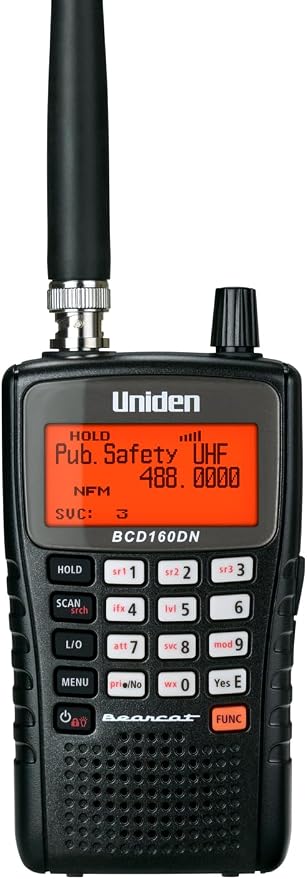
Anyone looking for a versatile handheld digital scanner will notice how fast it detects and tags signals right away. It suits hobbyists who want detailed decoding for common radio systems without the fuss of trunking or encryption support. Its ability to quickly decode DCS/CTCSS tones is its standout feature.
Setup is straightforward with USB connectivity for programming and updates. Day-to-day use highlights features like the Band Scope Rapid System/Channel Number Tagging that helps zero in on signals quickly.
The scanner’s support for DMR and NXDN out of the box, with free firmware updates for APCO P25 decoding, keeps it relevant without extra purchases. Narrow-band reception helps catch faint transmissions effectively.
Performance matches expectations for digital scanners, handling common conventional systems reliably. The build feels solid for handheld use, while the display of decoded tones is consistently accurate and fast. Strongest praise centers on its quick tone decoding and useful tagging features.
Most noted complaint is the lack of trunking support and inability to decode encrypted signals.
The rapid decode feature for CTCSS and DCS tones gets constant positive remarks, making it easier to lock onto exact frequencies. On the downside, many users consider the absence of trunking a significant limitation, especially for those wanting to scan complex systems.
People interested in plain digital scanning for common voice modes and easy setup will find it meets their needs well. Those requiring trunking or encrypted signal decoding should look for more specialized devices since this one focuses on conventional digital systems only.
Pros
- Rapid DCS/CTCSS tone detection
- Free firmware updates for new protocols
- USB connection for easy programming
- Narrow-band reception included
Cons
- Trunking systems not supported
- Cannot decode encrypted signals
| Specification | Details |
|---|---|
| Scanner Type | Radio Scanner |
| Connection Type | USB |
| DCS/CTCSS Decoding | Rapid Decode |
| Supported Decoding | DMR, NXDN, APCO P25 (via firmware update) |
| Trunking Support | None |
9. Uniden Bearcat SR30C Analog Handheld Scanner

Ideal for those wanting a straightforward, affordable handheld scanner, the Uniden Bearcat SR30C covers over 32,000 frequencies across popular bands. Its biggest strength lies in its convenience, offering preset banks that help you jump right into listening without fuss.
Setup involves just popping in AA batteries or plugging it in via USB for power. Navigating preset channels like police, weather, or marine is simple, and the scanner allows PC programming if you want more control over frequencies.
The Close Call RF Capture and Turbo Search speed up finding active signals, making daily listening quick and convenient.
Performance matches the basic scanning needs well, picking up analog transmissions clearly across its wide frequency range. Built compact with a durable feel, the scanner fits comfortably in hand for portable use. Strongest praise mentions its excellent frequency coverage and ease of use, while some say the mono speaker audio could be better.
Users appreciate the wide range of preset frequencies and ease of accessing various services quickly. The scanner’s mono audio output is the most common drawback, sometimes making sound clarity less satisfying for some listeners.
Anyone looking for a budget-friendly, simple analog scanner with expansive channel presets will find this a solid option. Those needing digital scanning or richer audio quality might want to consider other models with more advanced features.
Pros
- Pre-loaded with 10 service banks for quick start
- Compact, portable design
- Supports PC programming via USB
- Wide frequency coverage up to 32,000 MHz
Cons
- Audio output is mono only
- Limited to one radio band
| Specification | Details |
|---|---|
| Radio Bands Supported | 1-Band |
| Frequency | 32000 MHz |
| Power Source | USB, Battery-Powered |
| Additional Features | Close Call RF Capture, Turbo Search, PC Programming, Wide Frequency Support |
| Connectivity Technology | USB |
| Audio Output Mode | Mono |
10. Whistler TRX-2 Digital Police Scanner

Trying to keep up with police, fire, and emergency channels can be a challenge without a reliable scanner. The Whistler TRX-2 Digital Police Scanner fits well for anyone wanting detailed and accurate access to Motorola, EDACS, LTR, and P25 trunked radio systems. Its main strength lies in quickly finding and locking onto transmissions nearby, making monitoring easy.
Setup involves loading the included 2GB SD card for recording conversations that you can replay or save to your PC. Programming custom alerts with different sounds and light patterns lets you know right away when important transmissions happen.
The tri-color LED alerts are handy for a quick glance, while the scanner’s USB connection helps with data transfer and charging.
Listening to multiple systems at once, it picks up calls clearly and holds onto signals effectively. It feels solid without being too bulky, and the screen resolution gives good readability. Praise often focuses on its detailed capabilities in trunked radio scanning.
The most noted downside is that some find the LED brightness a bit strong for nighttime use.
Detailed scanning capabilities and well-designed alert options stand out as the product’s best features. Most users appreciate how easily they can monitor specific calls and record them. The strongest complaint centers on the brightness of the LED indicators, which some feel can be distracting in low light conditions.
People looking to monitor multiple trunked systems will find this scanner very useful. Those who need quieter, less intrusive indicator lights might want to consider alternatives. The ability to record and review long audio sessions makes it a good choice for serious scanning enthusiasts.
Pros
- Supports multiple trunked radio systems
- Customizable alerts with sound and LED patterns
- Records up to 50 hours of audio
- Easy USB connection for data transfer
Cons
- LED alerts may be too bright at night
- Limited to 2GB SD card included
| Specification | Details |
|---|---|
| Scanner Type | digital voice audio |
| Connection Type | USB |
| Resolution | 600 |
| Light Source Type | LED |
| Media Type | SD Card |
Best TDMA Scanners Compared Side by Side
| Product | Number of Channels | Frequency Range | Connectivity | Power Source |
|---|---|---|---|---|
| Uniden BCD436HP Scanner | 85 | 25-512, 758-960 MHz, 1240-1300 MHz | – | 3 AAA batteries |
| Uniden HomePatrol-2 Scanner | – | – | USB | – |
| Uniden SDS150 SDR Scanner | – | – | Bluetooth | Battery Powered |
| Uniden Bearcat BC125AT Scanner | 500 | 25-54, 108-174, 225-512 MHz | – | 2 AA batteries |
| Uniden SDS100 Digital Scanner | – | – | USB | – |
| Uniden SDS200 Base Scanner | – | – | USB | – |
| Uniden BCD996P2 Mobile Scanner | – | 25 MHz | IR | 12 volts DC |
| Uniden Bearcat BCD160DN Scanner | – | – | USB | – |
| Uniden Bearcat SR30C Scanner | – | 32000 MHz | USB | USB, Battery-Powered |
| Whistler TRX-2 Scanner | – | – | USB | – |
- Number of Channels85
- Frequency Range25-512, 758-960 MHz, 1240-1300 MHz
- Connectivity–
- Power Source3 AAA batteries
- Number of Channels–
- Frequency Range–
- ConnectivityUSB
- Power Source–
- Number of Channels–
- Frequency Range–
- ConnectivityBluetooth
- Power SourceBattery Powered
- Number of Channels500
- Frequency Range25-54, 108-174, 225-512 MHz
- Connectivity–
- Power Source2 AA batteries
- Number of Channels–
- Frequency Range–
- ConnectivityUSB
- Power Source–
- Number of Channels–
- Frequency Range–
- ConnectivityUSB
- Power Source–
- Number of Channels–
- Frequency Range25 MHz
- ConnectivityIR
- Power Source12 volts DC
- Number of Channels–
- Frequency Range–
- ConnectivityUSB
- Power Source–
- Number of Channels–
- Frequency Range32000 MHz
- ConnectivityUSB
- Power SourceUSB, Battery-Powered
- Number of Channels–
- Frequency Range–
- ConnectivityUSB
- Power Source–
How to Choose the Best TDMA Scanner
Key factors to consider include scanning range, frequency compatibility, and ease of use, as these directly impact performance and reliability. Choosing the right features ensures efficient monitoring and helps avoid costly mistakes or the need for frequent replacements, ultimately saving time and money.
Frequency Compatibility
Many scanners fall short because they do not cover all the frequencies needed for a specific area. Missing out on certain bands means you could lose important signals, especially public safety or trunked radio systems that switch between VHF and UHF ranges. It’s common to find cheaper models that only cover one range, which limits usability.
The solution comes down to confirming support for the exact TDMA frequency bands in your region.
For practical daily use, a scanner that covers at least 25 to 512 MHz usually handles both VHF and UHF traffic. This provides flexibility to monitor local police, fire, EMS, and business communications without frequently switching devices.
Make sure it explicitly states compatibility with trunked systems used by local authorities; otherwise, many transmissions might be missed.
Scanning Speed and Performance
Switching speed between channels directly impacts your ability to catch short but important transmissions. Slow scanners can miss the start of conversations, making the information incomplete or useless. Sensitivity also matters, a unit that picks up weak signals clearly reduces frustration from static or dropped audio.
Selectivity minimizes interference from adjacent frequencies, which is critical in urban or crowded radio environments.
Devices with higher scanning rates, often above 300 channels per second, hold an advantage. Quality models handle multiple talkgroups simultaneously without noticeable delay, so you stay informed on all active channels without interruption.
Paying attention to these specs reduces the risk of missing critical updates or background chatter.
User Interface and Display
Ascanner with a clunky menu or complicated programming system quickly becomes a hassle. Models boasting simple, logical interfaces save time and reduce the learning curve, letting you focus on listening rather than fiddling.
Display readability is more than just screen size; glare and viewing angle can impact use outdoors or in bright environments.
Look for a display with good contrast and backlighting to maintain visibility at night or in low-light situations. Physical buttons dedicated to common functions often work better than touchscreens in rough or quick-access scenarios. A clear layout and straightforward options improve daily convenience significantly.
Portability and Power Options
Handheld scanners that feel bulky or heavy quickly become inconvenient during long listening sessions or patrols. A compact model around 6 to 8 inches and weighing under a pound offers a good balance of usability and portability. Power options must match your lifestyle; access to rechargeable batteries or multiple adapters can prevent downtime.
Battery life varies, but a practical device should last a full day of moderate use on a single charge. Battery-saving modes that dim the display or reduce power consumption extend usage without constant recharging. These features are essential if you rely on the scanner outside or in mobile scenarios.
Connectivity and Expandability
Connecting your scanner to other devices opens up more control and easier updates. Many modern models offer PC or smartphone compatibility for programming, which saves tedious manual entry.
The option to attach external antennas improves reception quality, especially indoors or in fringe areas.
Audio output ports allow connection to headphones or speakers, preferable in noisy environments. Bluetooth support for wireless accessories adds convenience for users on the move. These connectivity features boost flexibility and make sure your setup can grow with your needs.
Effective Usage Tips for Maximizing Your TDMA Scanner’s Performance
Keep your TDMA scanner’s firmware up to date. Manufacturers often release updates that fix bugs and improve signal decoding. Use the official software provided to check for updates regularly. Positioning the antenna correctly influences the reception quality.
Placing it near a window and away from large metal objects helps reduce interference. Avoid locations with strong electromagnetic noise such as near microwaves or routers.
Utilize scanning presets for efficiency. Most TDMA scanners allow saving frequency banks or channels, so you don’t waste time hunting manually. Use memory features to organize channels by location or type of communication.
Customize alert tones to distinguish important transmissions without constant monitoring.
Adjusting the squelch setting is crucial. Setting it too low causes background static while too high may block weaker signals. Experiment to find the balance that suits your environment.
Also, ensure you understand your scanner’s channel step size, which affects how it locks onto TDMA transmissions.
Common Maintenance Practices to Extend the Lifespan of Your TDMA Scanner
Clean the antenna connector regularly. Dust and debris can cause poor connections and signal loss. A gentle brush or electronics cleaning wipe works well for this task.
Inspect the antenna cable for signs of wear or fraying; damaged cables should be replaced promptly to maintain signal integrity.
Keep the scanner in a dry and cool environment to avoid heat damage and moisture buildup. Excessive heat can shorten internal component life.
Avoid leaving the scanner in direct sunlight or enclosed spaces without ventilation.
- Power down the device properly before disconnecting the antenna or accessories to prevent electrical shocks.
- Store the scanner in a padded case or cover when not in use to protect it from physical damage.
- Periodically check and tighten screws or connectors that may loosen over time.
Replacing batteries before they fully drain helps prevent leakage and maintains consistent power supply. Rechargeable battery packs can reduce long-term costs.
Comparing TDMA Scanners with Other Digital Scanning Technologies
TDMA scanners focus on tracking time division multiple access broadcasts, which split each frequency into time slots. This contrasts with traditional analog scanners that capture continuous transmissions but cannot distinguish such time-based signals effectively.
Compared to trunking scanners, TDMA models often excel at decoding specific digital conversations found in newer radio networks. Trunking scanners scan among many frequencies but may not handle TDMA signals properly without digital decoding support.
- Pure digital scanners cover a wider range of protocols like P25 and DMR but sometimes lack the specialized timing features of dedicated TDMA units.
- Multi-mode scanners combine analog, digital, and TDMA reception, though this flexibility sometimes comes at the cost of more complex setup processes.
The choice depends on the network type you monitor. TDMA scanners work best in areas where time-slot based digital transmissions dominate.
Analog or trunking scanners apply to other environments, but may struggle to capture all data on TDMA systems reliably.
People Also Asked
How Do I Properly Use a TDMA Scanner for Beginners?
Begin by reading the user manual carefully to understand your scanner’s controls and features. Start scanning known frequencies to get familiar with its operation before exploring other channels. Keep the antenna steady and in a clear area to improve signal reception during use.
Is a TDMA Scanner Compatible with All Radio Frequencies?
TDMA scanners are designed to work with TDMA digital signals but may not support all types of radio frequencies, especially analog or other digital standards like FDMA. Check the scanner’s specifications to ensure compatibility with the frequencies you want to monitor.
What Safety Precautions Should I Take When Using a TDMA Scanner?
Use the scanner in safe environments away from hazardous electrical sources or moving vehicles. Avoid directing the antenna near sensitive electronic equipment to prevent interference. Take breaks if listening for long periods to avoid hearing fatigue or ear discomfort.
How Long Does a Typical TDMA Scanner Last with Regular Use?
A typical TDMA scanner can last several years with normal daily use if properly maintained. Regularly clean the scanner and keep its software updated to avoid glitches. Make sure to store it in a dry place when not in use to protect the internal components.
What Are Common Problems Faced While Operating a TDMA Scanner?
Common issues include difficulty picking up weak signals, delays in switching channels, and occasional software glitches. Ensuring the antenna is properly connected and updating the firmware can solve many problems. Also, avoid using the scanner near devices that cause radio interference.
Conclusion
Choosing a TDMA scanner comes down to a few key points: how clearly it picks up signals, ease of programming and use, and the range of frequencies it covers. Battery life is important too if you plan to use it away from power sources.
These factors will affect how reliable and convenient the scanner is during daily use.
Consider the area where you’ll be scanning, your budget, and how often you’ll use the device before making a decision. This will help narrow down the options. Revisit the comparison table and product details above to match features with your needs, ensuring you get a scanner that fits your specific situation.