Top 10 Best Prepper Scanner You Can’t Live Without!
Many preppers know the frustration of relying on a cheap or unsuitable scanner that fails at critical moments. A poor device may miss important emergency broadcasts or use too much power, which can be a serious drawback in survival situations.
Choosing the best prepper scanner means having a dependable, efficient way to monitor local and national signals without wasting resources or risking missed alerts.
The main factors that set a good prepper scanner apart are reception range, battery life, and durability. A solid scanner covers a wide range of frequencies, from VHF to UHF, often between 25 MHz and 1300 MHz, to pick up various emergency channels.
Battery life should extend well beyond 8 hours on a single charge or set of batteries. The unit also needs to be compact enough to carry readily while built to handle rough conditions, often with water-resistant or rugged housing to prevent damage during outdoor use.
Need a Quick Check?
| Image | Product | Price |
|---|---|---|
Our Top Picks 1  | Epson ES-50 Mobile Scanner | Check Price |
Our Top Picks 2 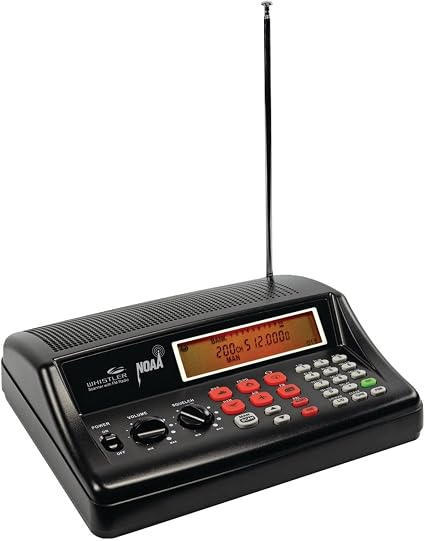 | Whistler WS1025 Desktop Scanner | Check Price |
Our Top Picks 3  | Uniden BC125AT Handheld Scanner | Check Price |
Our Selected Top 10 Prepper Scanner You Can Trust
This list features reliable prepper scanners designed for emergency communication and information gathering. Each review covers how well the scanner performs, the types of users it best suits, and highlights its main advantages and disadvantages to help you make an informed choice.
1. Epson WorkForce ES-50 Mobile Document Scanner
Built for people on the move, the Epson WorkForce ES-50 Mobile Document Scanner stands out thanks to its portability and speed. It’s best suited for those who need a quick and lightweight scanner for single sheets, receipts, or ID cards without dealing with bulky setups. Portability is its biggest advantage.
Setup is straightforward with a USB connection, compatible with both Windows and Mac. Scanning a document is fast, with a single page processed in just over five seconds. The device handles documents up to 8.5 x 72 inches, so it’s convenient for long pages or receipts too.
The bundled Epson ScanSmart Software helps you easily review, organize, and save your scans, making everyday use smooth and effective.
Scanning quality hits up to 1200 dpi resolution, which should satisfy most standard document needs. The scanner is lightweight and compact, ideal for carrying in a bag or briefcase.
Customers appreciate its quick scanning speed but note the single sheet feeder can slow down tasks involving multiple pages. Build quality feels solid enough for frequent travel, but handling multiple scans in a row requires some patience.
The quickest scanning speed and portability receive the most praise for on-the-go use, while the single-sheet feed is frequently mentioned as a limitation when scanning many pages. It performs reliably but requires handing pages one by one.
Those who need a light, fast scanner for occasional document or receipt scanning will find it suited to their needs. Users requiring heavy-duty multi-page scanning routines should consider alternatives with higher sheet capacities.
Pros
- Extremely portable and lightweight design
- Fast single-page scanning in 5.5 seconds
- Compatible with Windows and Mac systems
- Scans long documents and receipts easily
Cons
- Only holds one sheet at a time
- Not ideal for multi-page batch scanning
| Specification | Details |
|---|---|
| Scanner Type | Document |
| Connection Type | USB |
| Resolution | 1200 |
| Standard Sheet Capacity | 1 |
| Wattage | 2.1 watts |
| Color Depth | 16 bpp |
2. Whistler WS1025 Analog Desktop Scanner
Trying to keep track of multiple communications channels is easier with a dedicated analog desktop scanner. Ideal for experienced users, it focuses on quickly finding and listening to important frequencies.
The priority channel feature stands out, letting you follow a key frequency closely without missing responses.
Setting it up involves choosing channels and enabling the priority channel option, so the scanner checks your chosen frequency every two seconds while scanning others. The scan delay helps catch replies by pausing two seconds before switching channels. You can also tune around a specific frequency to find new signals, helping you discover unlisted options.
Bluetooth connection adds convenience, though the overall setup suits those familiar with desktop radios.
Performance is steady with reliable scanning and priority monitoring working as intended. Build quality is solid for a desktop unit, designed for paper media with a good sheet capacity. Reviews praise its priority channel but note that experienced users find its interface demanding.
Some mention the physical build felt a bit bulky for tight setups, but functionality keeps it effective.
Reliable priority channel scanning is the most praised feature, keeping listeners on important communications without missing responses. The most frequent complaint concerns the complexity of its interface, making it less approachable for beginners despite its strong functionality.
Those comfortable with desktop scanners and looking for precision priority monitoring will appreciate this unit. People new to scanning or needing a compact, simple device might want to explore other options aimed at ease of use and smaller size.
Pros
- Priority channel checks one channel every two seconds
- Scan delay allows a pause to catch replies
- Tune feature finds unlisted frequencies
- Bluetooth connection for easier setup
Cons
- Interface better suited to experienced users
- Bigger footprint than some desktop models
| Specification | Details |
|---|---|
| Scanner Type | Radio |
| Connection Type | Bluetooth |
| Resolution | 200 dpi |
| Standard Sheet Capacity | 300 |
| Optical Sensor Technology | CCD, CMOS |
3. Uniden Bearcat BC125AT Handheld Scanner
500 alpha-tagged channels make this handheld scanner ideal for anyone wanting to monitor a wide range of analog signals. Its compact design fits comfortably in your hand, and Close Call RF capture quickly locks onto nearby transmissions without delays.
A solid choice for those focused on analog radios in their daily prepper setup.
Setting it up is straightforward, with clear digital display feedback. It runs on just two AA batteries, lasting around 10 hours, so you won’t have to constantly swap power sources during the day.
Do Not Disturb Mode ensures it won’t interrupt ongoing transmissions when scanning nearby frequencies. The scanner covers a wide frequency range from 25 to 512 MHz, letting you pick up local emergency and weather channels easily.
The main job of picking up signals works well through UHF and VHF bands, with Close Call allowing a fast scan without manual tuning. Build quality is decent but it lacks water resistance, so it’s best kept dry.
Reviews highlight its simple usability and reliability for analog reception but mention it cannot catch any digital radio systems, limiting usefulness in areas with newer tech.
This scanner is praised for its reliable analog scanning and easy operation, especially the quick tune-in feature for nearby transmitters. The biggest limitation is its inability to monitor newer digital systems, which some users find restrictive in urban areas shifting to digital trunking radios.
Those who mainly need analog monitoring in rural or less digitalized environments will find this scanner very useful. Anyone requiring digital system coverage should look for models that explicitly support digital trunking protocols for wider compatibility and future-proof use.
Pros
- Handles 500 channels with alpha tagging
- Close Call RF capture tunes to nearby signals
- Do Not Disturb mode blocks checks during transmission
- Runs on commonly available AA batteries
Cons
- Not capable of digital radio system monitoring
- Not water resistant; avoid exposure to moisture
| Specification | Details |
|---|---|
| Number of Channels | 500 |
| Frequency Range | 25-54 MHz, 108-174 MHz, 225-380 MHz, 400-512 MHz (UHF) |
| Battery Average Life | 10 hours |
| Voltage | 3 volts |
| Number of Batteries | 2 AA batteries required |
4. Uniden SDS150 Digital Radio Scanner

People who need a reliable scanner for field use will appreciate this model, especially those interested in detailed digital radio monitoring. Its strongest feature is the enhanced sensitivity that picks up signals clearly, even in challenging environments.
Getting started is straightforward, thanks to the simplified interface and digital display. The built-in GPS helps track location, and Bluetooth connectivity pairs it easily with a smartphone for app support. Daily use benefits from a lightweight design and extended battery life, making it easy to carry and use over long periods without frequent recharging.
Signal reception is solid, with wide band support and multiple trunking systems handled, including APCO P25 and Motorola. The build holds up well outdoors due to water resistance and durable materials.
Praise often highlights the scanner’s excellent sensitivity, while common critiques mention the nonstandard battery can be harder to replace.
The scanner performs very well with excellent signal sensitivity, even in areas with interference. The most frequent downside is the battery type, which does not conform to typical standards and might require special ordering or spare preparation. The user-friendly interface and Bluetooth integration make setup and daily use easier.
Those needing reliable, detailed digital scanning in different modes will appreciate this unit’s capabilities and rugged design. People who want a more standard battery setup or prefer a simpler display might want to look at other options. It suits anyone using a smartphone companion app to extend scanning features on the go.
Pros
- Enhanced signal sensitivity captures weak transmissions
- Simplified control layout for easier operation
- Long battery life suitable for extended fieldwork
- Lightweight and rugged enough for daily use
Cons
- Uses nonstandard battery, less convenience for replacements
- Some users find the digital display takes time to read
| Specification | Details |
|---|---|
| Connectivity Technology | Bluetooth |
| Tuner Type | TrunkTracker X, APCO P25 Phase I & II, Motorola, EDACS, LTR DMR Tier III*, Hytera XPT*, Single-Channel DMR* NXDN 4800/9600*, EDACS ProVoice* |
| Power Source | Battery Powered |
| Radio Bands Supported | AM, NFM, FM, WFM, or FMB |
| Water Resistance Level | Water Resistant |
| Additional Features | Weather Alert, Built-in GPS receiver, Charge cradle |
5. Epson WorkForce ES-400 II Desktop Document Scanner

Designed to handle high-volume scanning jobs, the Epson WorkForce ES-400 II stands out with its 50-sheet Auto Document Feeder. Ideal for preppers who need to digitize large piles of important documents quickly, it offers a fast and efficient way to keep files organized and accessible.
Setup is straightforward with a USB connection, and daily scanning feels smooth thanks to the Epson ScanSmart Software. It allows quick previews, easy emailing, and direct uploads to the cloud, making document management more manageable.
Automatic file naming saves time, so fewer manual steps are needed after scanning.
The scanner scans at 300 dpi using CCD optical sensor technology, delivering clear, readable digital copies. Its build is practical and office-friendly, with a solid feeder capable of holding 50 sheets.
Reviews often highlight how fast it works through stacks of paper, while some users mention occasional software quirks that slow down workflow.
Scans quickly through stacks with mostly smooth software performance, though occasional glitches affect speed. The 50-sheet feeder and clear 300 dpi output make it a reliable daily tool.
Anyone needing to digitize many documents fast will appreciate it. Those wanting wireless convenience or fewer software issues might want to explore other models.
Pros
- 50-sheet Auto Document Feeder speeds up scanning
- Epson ScanSmart Software offers easy cloud uploads
- Automatic file naming reduces post-scan effort
- Solid build suitable for office workflows
Cons
- Software sometimes causes delays during scanning
- Limited to USB connection, no wireless option
| Specification | Details |
|---|---|
| Scanner Type | Document |
| Connection Type | USB |
| Resolution | 300 dpi |
| Standard Sheet Capacity | 50 |
| Optical Sensor Technology | CCD |
| Color Depth | 8 bpp |
6. Canon CanoScan Lide 300 Scanner

Canon CanoScan Lide 300 is a compact document scanner designed for prepping needs, standing out with its Auto Scan Mode that detects what you’re scanning automatically. It suits anyone needing to digitize documents, photos, receipts, or business cards with high optical resolution and simple USB connectivity.
Setup is straightforward with a single USB connection that powers the scanner and transfers data. Day-to-day use benefits from the Auto Scan Mode, which saves time by recognizing the type of media inserted and adjusting settings accordingly. Handling different paper sizes is easy, though the scanner only holds one sheet at a time, making it good for occasional or careful scanning rather than bulk jobs.
The optical resolution of 2400 x 2400 dpi produces sharp images and clear text, making it great for preserving important prepper documents or photos. The build is lightweight but solid, with quiet operation powered by an LED light source.
Most praise points to its automatic detection feature, while a common drawback is the limited sheet capacity, requiring patience for scanning multiple pages.
Auto Scan Mode is praised for detecting different document types automatically, making everyday use straightforward. The major complaint is the inability to scan multiple pages at once, so each page requires manual effort.
This scanner works well for people who scan a few documents or photos occasionally and want high-quality scans without fuss. Those needing faster, multi-page scanning or wireless connection should consider other models.
Pros
- Auto Scan Mode simplifies digitizing
- High optical resolution for detailed scans
- Compact and lightweight design
- USB connection is plug-and-play
Cons
- Only one sheet capacity limits batch scanning
- No wireless connectivity option
| Specification | Details |
|---|---|
| Resolution (Optical) | 2400 x 2400 dpi |
| Connection Type | USB |
| Scanner Type | Document, Photo |
| Color Depth | 48 bits |
| Standard Sheet Capacity | 1 |
| Wattage | 4.5 watts |
7. ScanSnap iX1300 Color Document Scanner

Scanning documents feels straightforward and quick, making it a solid choice for folks needing a compact scanner that doesn’t crowd the desk. It suits anyone who wants to scan everything from photos to plastic cards with minimal fuss.
Its biggest strength lies in fitting neatly into small spaces while offering reliable, fast scanning.
Getting it set up is painless, whether through USB or Wi-Fi, which is great for connecting to a laptop, desktop, or mobile device. The Quick Menu lets you jump right into scanning without digging through menus, just one touch and it starts.
Handling up to 20 sheets at once keeps daily tasks flowing smoothly, and it easily deals with thick documents or cards.
Image quality comes through clearly with 600 dpi resolution and color optimization, perfect for documents or photos. The scanner’s build is compact but sturdy, fitting in tight spots without feeling flimsy.
Reviews mention it delivers consistently strong scans, though some find the sheet capacity a bit limited for larger jobs.
The scanner consistently produces clear, high-quality images with good color detail and reliable automatic adjustments. The most common issue noted is that the 20-sheet input limit means frequent reloads during bigger scanning tasks, which can interrupt workflow.
Its small footprint and ease of use will please anyone with limited workspace or simple scanning needs. Larger volume scanners might suit those expecting to scan many documents at once without interruptions.
Pros
- Compact design that saves desk space
- Quick Menu allows fast access to apps
- Supports thick items and plastic cards
- Wireless and USB connection options
Cons
- Limited to 20 sheet capacity per load
- May require frequent feeding for large jobs
| Specification | Details |
|---|---|
| Connection Type | USB, Wi-Fi |
| Resolution | 600 dpi |
| Standard Sheet Capacity | 20 |
| Color Depth | 48 bits |
| Wattage | 17 watts |
8. ScanSnap iX2500 Wireless Document Scanner

Perfect for anyone needing quick, reliable document scanning, this wireless scanner stands out with its 45ppm speed and large touchscreen. It suits small offices or home environments where fast, double-sided scanning and easy sharing are priorities.
Setup involves connecting via Wi-Fi 6 or USB, which is straightforward and stable. Daily use benefits from the 100-sheet feeder, meaning less frequent reloading.
Customizable profiles on the touchscreen allow you to send scans directly to computers, mobile devices, or cloud services, simplifying organization and sharing. Automatic optimizations improve scan quality without extra effort.
The scanner performs consistently with sharp 600 dpi resolution thanks to its CIS optical sensor technology. Build quality supports frequent use and includes a 4-year protection plan for added confidence.
The most praised feature is its fast, double-sided scanning speed. Some users find the touchscreen interface takes a little getting used to before mastering quick menu navigation.
Fast scanning and wireless reliability are standout features, making day-to-day use efficient and smooth. The touchscreen interface needs some familiarization but offers good customization once learned.
Ideal for users who scan a high volume of documents regularly and need quick outputs. Those looking for a lower power device or extremely simple controls might want to explore other scanners.
Pros
- Fast 45ppm double-sided scanning speed
- Large, responsive touchscreen for easy control
- Supports Wi-Fi 6 for stable wireless connections
- 100-sheet feeder reduces paper reloading
Cons
- Touchscreen menu can be tricky at first
- Uses 17 watts, higher than some competitors
| Specification | Details |
|---|---|
| Scanner Type | Document, Business Card, Photo, Receipt, ID Card, Insurance Card |
| Connection Type | USB, Wi-Fi |
| Resolution | 600 dpi |
| Standard Sheet Capacity | 100 |
| Optical Sensor Technology | CIS |
| Wattage | 17 watts |
9. TM-10B Bluetooth 1D & 2D Barcode Scanner

Plastic and compact design make this scanner a practical fit for those needing a versatile barcode reader. Best for users who handle both 1D and 2D codes regularly, it supports a broad range of barcode types beyond the standard 1D. Its standout feature is the ability to decode a wide variety of 1D and 2D codes including QR and DataMatrix.
Getting it set up is straightforward with options for Bluetooth, USB cable, or 2.4GHz wireless connection. It connects easily to laptops, desktops, tablets, smartphones, and POS systems.
Operating on a single lithium-ion battery, charging and cordless use add to convenience during busy scanning tasks. Works well in varied environments thanks to multi-device compatibility.
The scanner performs well in reading multiple barcode types quickly and accurately, living up to its promise of strong decoding ability. Its build feels sturdy enough for frequent handling, though it isn’t the most lightweight device available. Common praise highlights reliability across code types, while users note occasional incompatibility with Square payments as a drawback.
The scanner’s strongest point is its capacity to decode a wide range of barcode types reliably, appreciated by people handling diverse items. The main complaint from reviews is its incompatibility with Square, which limits use for some small business transaction setups. Everyday scanning across codes remains its core strength.
Those who regularly scan many barcode formats across different devices will find it suits their needs well. People needing compatibility with Square or preferring the lightest, most compact scanner should consider alternative options better aligned with those requirements.
Pros
- Supports both 1D and 2D barcode types
- Connects via Bluetooth, wireless, or USB
- Works with multiple device types
- Battery included for immediate use
Cons
- Not compatible with Square payment system
- Bulkier than some other handheld scanners
| Specification | Details |
|---|---|
| Connectivity Technology | 2.4Ghz Wireless, Bluetooth, USB Cable |
| Power Source | Battery Powered |
| Number of Batteries | 1 Lithium Ion battery (included) |
| Compatible Devices | Laptop, Desktop, Tablet, Smartphone, POS |
10. Canon imageFORMULA R40II Office Document Scanner

Scanning documents quickly is the first thing you notice with the imageFORMULA R40II. It’s well suited for anyone needing a reliable office scanner that handles multiple document types without slowing down.
Its fastest feature is the ability to scan both sides of a page simultaneously at a notable speed.
Setting up the scanner takes just plugging in the supplied USB-C cable and installing Canon’s CaptureOnTouch software. Daily use is straightforward thanks to one-touch operation and a 60-sheet automatic feeder.
The monochrome LCD display helps you manage tasks without fumbling through menus, making it easy to scan receipts, contracts, and long reports alike.
Scanning speeds reach up to 45 pages per minute, handling document thickness variations well with the innovative feeding system. The build feels sturdy for office use, although some reviews mention the lack of TWAIN and ISIS driver support as a downside. The monochrome 1-bit color depth keeps file sizes manageable but limits color detail.
Most praise comes from the fast double-sided scanning and the ability to feed many sheets automatically, making quick work of large jobs. Common complaints focus on driver limitations, especially lacking TWAIN and ISIS support, which some find reduces compatibility with certain software.
Those needing a dependable, fast office scanner for a variety of documents will appreciate this model. Users requiring broad software compatibility or higher color depth might want to look for other options tailored to those requirements.
Pros
- Scans both sides at up to 45 pages per minute
- 60-sheet automatic feeder reduces manual input
- Simple one-touch operation with LCD display
- Supports a variety of document types and sizes
Cons
- No TWAIN or ISIS driver support
- Color depth limited to 1 bit per pixel
| Specification | Details |
|---|---|
| Scanner Type | Document |
| Connection Type | USB |
| Resolution | 600 dpi |
| Wattage | 15.6 watts |
| Standard Sheet Capacity | 60 |
Best Prepper Scanners Comparison Table
| Product | Scanner Type | Connection | Power Source | Standard Sheet Capacity |
|---|---|---|---|---|
| Epson ES-50 Mobile Scanner | Document | USB | 2.1 watts | 1 |
| Whistler WS1025 Desktop Scanner | Radio | Bluetooth | – | 300 |
| Uniden BC125AT Handheld Scanner | Handheld Scanner | – | 2 AA batteries | – |
| Uniden SDS150 Digital Scanner | Digital Scanner | Bluetooth | Battery Powered | – |
| Epson ES-400 II Desktop Scanner | Document | USB | – | 50 |
| Canon Lide 300 Scanner | Document, Photo | USB | 4.5 watts | 1 |
| ScanSnap iX1300 Color Scanner | Document, Receipt | USB, Wi-Fi | 17 watts | 20 |
| ScanSnap iX2500 Wireless Scanner | Document, Multi | USB, Wi-Fi | 17 watts | 100 |
| TM-10B Bluetooth Barcode Scanner | Barcode Scanner | Bluetooth, USB | 1 Lithium Ion battery | – |
| Canon R40II Office Scanner | Document | USB | 15.6 watts | 60 |
- Scanner TypeDocument
- ConnectionUSB
- Power Source2.1 watts
- Standard Sheet Capacity1
- Scanner TypeRadio
- ConnectionBluetooth
- Power Source–
- Standard Sheet Capacity300
- Scanner TypeHandheld Scanner
- Connection–
- Power Source2 AA batteries
- Standard Sheet Capacity–
- Scanner TypeDigital Scanner
- ConnectionBluetooth
- Power SourceBattery Powered
- Standard Sheet Capacity–
- Scanner TypeDocument
- ConnectionUSB
- Power Source–
- Standard Sheet Capacity50
- Scanner TypeDocument, Photo
- ConnectionUSB
- Power Source4.5 watts
- Standard Sheet Capacity1
- Scanner TypeDocument, Receipt
- ConnectionUSB, Wi-Fi
- Power Source17 watts
- Standard Sheet Capacity20
- Scanner TypeDocument, Multi
- ConnectionUSB, Wi-Fi
- Power Source17 watts
- Standard Sheet Capacity100
- Scanner TypeBarcode Scanner
- ConnectionBluetooth, USB
- Power Source1 Lithium Ion battery
- Standard Sheet Capacity–
- Scanner TypeDocument
- ConnectionUSB
- Power Source15.6 watts
- Standard Sheet Capacity60
How to Choose the Right Prepper Scanner
Choosing the right prepper scanner depends on factors like frequency range, scanning speed, and durability to ensure reliable communication during emergencies. Prioritizing these features helps avoid compatibility issues and costly replacements, making preparedness more efficient and trouble-free.
Frequency Coverage
It’s common to miss critical alerts because a scanner can’t pick up every frequency emergency services use. Many radios only catch standard analog channels, which limits access to modern digital police and fire communications.
A scanner that covers both analog and digital bands opens up local, regional, and even some international frequencies, crucial for staying informed across various situations.
Having a device that scans 25 MHz to 1300 MHz ensures broad coverage of public safety, aviation, maritime, and ham bands. Without this range, important updates might be lost. Including support for P25 Phase 1 and 2 digital formats can be essential since many agencies use these now.
The right coverage means fewer blind spots and more reliable monitoring day-to-day.
Portability and Durability
Carrying a bulky scanner in the field quickly becomes a burden, especially during long prep sessions or emergency moves. Lightweight scanners weighing under 1.5 pounds and compact enough to fit in a jacket pocket make it easier to keep them on hand. But such portability only matters if the device lasts through rough handling.
Devices with shock-resistant housings made from durable plastics or rubberized coatings avoid damage from drops or bumps. Water resistance to at least IPX4 level keeps the scanner functional during unexpected rain or spills.
Without these features, the scanner might fail at critical moments, which nobody wants when relying on emergency signals.
Power Options and Battery Life
Running out of power during a long watch is a common frustration with scanners, especially in areas without ready electricity. Units that allow multiple power sources offer flexibility, such as using rechargeable lithium-ion batteries, standard AA or AAA cells, and external power adapters.
Battery life around 8 to 12 hours supports a full day of intermittent listening. Models with hot-swappable batteries simplify extended use because you can replace batteries quickly without turning off the scanner.
Low power consumption modes help stretch out runtime, making the device more dependable for extended preparedness.
User Interface and Ease of Use
Emergency situations rarely allow time to fiddle with complicated controls or menus. Scanners featuring straightforward buttons and a clear, backlit LCD screen speed up frequency changes. Rotary knobs combined with simple menu navigation prevent fumbling and wasted seconds when scanning important channels.
Having preset memory slots for local police, fire, weather, and emergency services saves programming time. The speaker output should be loud and clear enough to hear over outdoor noise, with an adjustable volume control that responds well.
Poor interface design causes missed calls and frustration when quick action is needed most.
Signal Reception and Sensitivity
Reception drops drastically when signals come from distant or obstructed locations, making antenna quality a critical factor. Scanners equipped with telescoping or external antenna options improve signal pickup, which matters in both urban and remote settings.
High receiver sensitivity allows detection of weak transmissions that others might miss. Devices with effective interference filtering reduce static and cross talk, leading to clearer, understandable audio.
Without this, important messages can be lost in noise or weak signals, undermining preparedness efforts.
Maximizing Signal Reception in Remote Areas
Reception quality is critical for any scanner, especially in remote locations where signals are weak. Antenna choice and placement play a huge role in maximizing signal strength. Using a longer external antenna or a directional one can significantly improve reception distances compared to the standard whip antennas that come with most scanners.
Positioning the antenna as high as possible and away from obstructions, such as buildings or dense trees, helps reduce interference and signal loss.
Battery life and power sources affect signal consistency too. Scanners with rechargeable batteries or options for external power sources ensure you don’t lose signal when your internal battery runs low.
Weatherproof models also maintain better performance outdoors. Signal frequency range should be considered, as scanners covering a broad spectrum of frequencies pick up more emergency and communication channels relevant to your area.
- Use a high-gain or directional antenna
- Place antenna high and away from obstructions
- Opt for scanners with external power options
- Choose models covering a wide frequency range
Essential Maintenance Tips for Long-Term Scanner Performance
Routine maintenance extends the lifespan of scanners significantly. Simple practices like keeping the scanner clean and dry prevent corrosion and dust buildup that can block antenna connections or internal circuitry. When not in use, storing the scanner in a protective case reduces damage from drops or moisture exposure.
It’s important to check and tighten external antenna mounts and connectors regularly to avoid loose contacts that degrade reception. For models using rechargeable batteries, following charging guidelines avoids battery memory issues and loss of capacity over time.
Updating the scanner’s firmware when manufacturers release improvements or bug fixes ensures ongoing compatibility and feature function. Avoid exposing the scanner to extreme temperatures as this can negatively impact electronic components.
- Clean and dry the scanner after outdoor use
- Store in a padded, moisture-proof case
- Check antenna mounts and connectors for tightness
- Follow proper charging procedures for batteries
- Update firmware regularly
- Protect from temperature extremes
Comparing Prepper Scanners to Typical Communication Devices
Prepper scanners have a specific focus compared to typical communication devices like walkie-talkies or consumer radios. Their frequency coverage tends to be broader, often including public safety channels, aviation, amateur radio bands, and NOAA weather alerts. This wide selection is designed to gather diverse types of signals that can be critical in emergency situations.
Most general communication devices are intended for two-way communication within limited ranges rather than passive monitoring. Prepper scanners allow listening without transmitting, which can be vital when discretion is needed or transmission privileges are restricted.
Battery life and portability are also factors that differentiate these devices. Many prepper scanners emphasize longer battery performance or flexible power options to support extended use without access to mains electricity.
- Broader frequency range for emergency and public channels
- Receive-only functionality to monitor multiple sources
- Long battery life and varied power options
- Designed for signal monitoring rather than communication
People Also Asked
How Do I Properly Care for My Prepper Scanner?
Keep your scanner clean and dry, and store it in a cool, dust-free place when not in use. Regularly check the antenna and connectors to make sure they are tight and free from corrosion for optimal performance.
What Size Prepper Scanner Is Ideal for Emergency Use?
A compact, handheld scanner is best for emergency kits due to its portability. It fits easily in a bag and you can carry it around without hassle during evacuations or power outages.
Are Prepper Scanners Safe to Use Around Children?
Scanners are generally safe for children but should be used under adult supervision. Their small parts and cords could pose a risk, so keeping the device out of reach when not in use is important.
Will This Scanner Work with My Existing Communication Devices?
Most prepper scanners work with various communication devices like ham radios and emergency channels if they cover the same frequency ranges. Confirm compatibility by checking the scanner’s frequency list against your other gear.
How Long Does a Typical Prepper Scanner Battery Last?
Battery life varies but expect roughly 8 to 12 hours with standard AA batteries under typical use. Carrying spare batteries or a rechargeable option ensures continuous operation during prolonged outages or emergencies.
Conclusion
Choosing a prepper scanner comes down to ease of use, reliable reception, and the ability to tune into the frequencies you actually need. Portability matters if you plan to carry it around or use it outdoors. Battery life should also be considered for longer use without frequent recharging.
Think about where you’ll keep your scanner and how often you expect to use it. A bulky or complex device might not suit occasional or emergency use. Review the comparison table and product details above to find the best fit for your setup and budget, focusing on features that match your specific prepper needs.