Top 12 Best Civilian Scanner You Can’t Miss Today
Civilian scanners often fail to deliver clear and reliable reception, causing frustration for those who rely on them to monitor emergency services or local communications. The best civilian scanner resolves common issues like dropped signals and interference, offering consistent performance even in challenging environments.
Many cheap models cut out unexpectedly or require constant manual retuning, which interrupts important information flow.
Key factors that set an effective civilian scanner apart include its frequency range, sensitivity, and ease of programming. Most good units cover at least 25 to 512 MHz, allowing access to various communication bands.
Sensitivity should enable picking up weak transmissions without excessive background noise. Portability matters as well, with an ergonomic design and long battery life making handheld scanners practical for frequent use. Simple interface and clear display also reduce hassle during operation.
Need a Quick Check?
| Image | Product | Price |
|---|---|---|
Our Top Picks 1  | Uniden Bearcat BC125AT | Check Price |
Our Top Picks 2  | Uniden SDS100 Scanner | Check Price |
Our Top Picks 3  | Uniden BCD325P2 Scanner | Check Price |
Our Selected Top 12 Civilian Scanner for Different Needs
This list features a range of civilian scanners designed for various uses and preferences. Each review highlights performance details, ideal users, and key advantages and disadvantages to help you find the scanner that best fits your specific needs and priorities.
1. Uniden Bearcat BC125AT Handheld Scanner
Uniden Bearcat BC125AT Handheld Scanner is a compact analog scanner designed to keep you informed of nearby transmissions. It suits anyone who wants easy access to analog radio signals with quick tuning capabilities and a large channel capacity.
Its biggest strength lies in the Close Call RF capture feature, catching local signals instantly.
Setting it up involves loading two AA batteries, which last around 10 hours, making it reliable for extended use. Day-to-day, the 500 alpha-tagged channels prevent confusion when scrolling through frequencies. The digital display makes adjusting settings easy, while the Do Not Disturb mode prevents interruptions during transmissions, ensuring smooth and continuous listening.
Performance-wise, the scanner picks up analog signals across a wide frequency range, covering everything from 25 MHz to 512 MHz. It’s sturdy enough for handheld use but isn’t water resistant, so care in damp conditions is necessary. The most common praise highlights how quickly Close Call technology finds nearby broadcasts.
On the downside, it doesn’t support digital radio systems, which limits use in areas with upgraded emergency communications.
Close Call RF capture receives nearby transmissions quickly, which users find very useful. Its main drawback is the lack of digital radio support, limiting access to modern emergency channels. The scanner works well for purely analog setups but doesn’t cover newer digital-only systems commonly used in large cities.
Good fit for hobbyists interested in analog communications or those in areas relying mostly on analog channels. Users needing digital trunking system access or water-resistant design should look at other options. It’s quite portable and straightforward for anyone sticking to analog frequencies.
Pros
- Close Call RF capture tunes to nearby signals fast
- 500 alpha-tagged channels organized for easy use
- Digital display simplifies frequency navigation
- Long battery life of about 10 hours per charge
Cons
- No digital trunking system support
- Not water resistant, requires dry conditions
| Specification | Details |
|---|---|
| Number of Channels | 500 |
| Frequency Range | 25-54 MHz, 108-174 MHz, 225-380 MHz, 400-512 MHz (UHF) |
| Battery Average Life | 10 hours |
| Number of Batteries | 2 AA batteries required (included) |
| Voltage | 3 volts |
| Tuner Type | UHF |
2. Uniden SDS100 Digital Handheld Scanner
Using the Uniden SDS100 feels like having a powerful scanner that’s easy to handle during any radio monitoring session. It suits hobbyists or professionals wanting reliable digital reception and quick access to local radio systems.
The biggest strength lies in its True I/Q receiver that clearly picks up signals others often miss.
Setting up just requires entering your zip code to program known radio systems automatically. The customizable color display makes it simple to see exactly what’s important to you at a glance.
Daily operation through the HomePatrol database reduces manual tuning, while updates via USB keep the info current and accurate without extra effort.
The scanner performs strongly in both simulcast and weak-signal environments, delivering clear audio in challenging reception areas. Built solidly for handheld use, it feels comfortable and well-made. Users praise the excellent digital performance but mention the occasional complexity in menu navigation as a downside.
The SDS100 consistently delivers impressive digital performance in difficult radio environments, making signal reception very clear. Most users find the menu system less intuitive, which can slow down operation for those not familiar with scanner interfaces.
People who want reliable automatic programming and strong digital signal handling will appreciate this scanner. Those who prefer a simpler, more straightforward control layout might look for alternatives with easier menu navigation.
Pros
- Automatic programming via zip code
- Customizable color display
- Strong digital reception in weak-signal areas
- Weekly database updates included
Cons
- Menus can often be tricky to find your way through
- Standard sheet capacity limited to 1
| Specification | Details |
|---|---|
| Scanner Type | Digital Handheld Scanner |
| Connection Type | USB |
| Resolution | 24 Bits |
| Color Depth | 24 |
| Media Type | MicroSD Card |
3. Uniden BCD325P2 Handheld TrunkTracker Scanner
Great for scanning local radio signals with ease, this handheld trunk tracker excels at quickly locking onto nearby signals using Close Call RF Capture Technology. Suited for anyone who wants to monitor emergency services or local communication, its biggest strength lies in handling up to 25,000 channels with GPS compatibility for on-the-go use.
Setting it up is straightforward thanks to the Quick-Key System Access, which lets you assign 100 different keys for your favorite frequencies. Everyday use involves simply pressing a key to access a stored system, making listening simple without excessive menu diving.
Close Call technology automatically tunes in to the strongest nearby signals, so you stay updated on site-specific chatter without constantly adjusting manually.
Performance-wise, it is built solidly and feels comfortable to carry around. The scanner picks up APCO Project 25 Phase II systems effectively, covering a broad range of modern communications.
A common praise is its reliable reception and handy key access, while some mention the user interface can be a bit tricky at first. It’s a device that does exactly what it promises, though the screen resolution and black-and-white display are modest compared to other electronics.
The most appreciated feature is the Close Call RF Capture Technology that consistently tunes to nearby signals, keeping users connected with local activity seamlessly. Common complaints focus on the interface, which some find complicated during initial setup and while navigating menus.
Those who want a solid trunking scanner with GPS compatibility and quick system access will find this device fitting well. People who prefer a modern interface with color display and intuitive controls should consider other options.
Pros
- Captures signals from up to 25,000 channels
- Close Call technology finds nearby transmissions
- Quick-Key system for easy access to favorites
- Supports latest APCO Project 25 Phase II
Cons
- Black-and-white display lacks color depth
- User interface may take time to learn
| Specification | Details |
|---|---|
| Scanner Type | Radio |
| Connection Type | GPS |
| Wattage | 20 watts |
| Resolution | 2400 dpi |
| Media Type | USB |
| Optical Sensor Technology | CCD |
4. Uniden SDS150 Digital Radio Scanner

Built with lightweight durability and water resistance, the Uniden SDS150 Digital Radio Scanner fits both casual listeners and professionals. It stands out with its advanced digital reception and clear, interference-free scanning, making signal sensitivity its biggest strength.
Setting up takes a few moments thanks to the simplified interface and digital display, making navigation straightforward. Daily use is comfortable because of its extended battery life and portable design, while features like Bluetooth connectivity and built-in GPS add useful convenience during fieldwork.
The charge cradle helps keep it ready without fuss.
Signal reception is noticeably improved with enhanced filtering to cut interference, so channels come through sharply. The scanner holds up well for daily use, feeling rugged without being heavy.
Strong praise often highlights its sensitivity and battery life, while some users note the nonstandard battery may be inconvenient for replacements.
Users praise the scanner’s impressive sensitivity and clear signal filtering, which make listening consistent and reliable in various conditions. A frequent downside is the nonstandard battery that some find inconvenient to replace, especially away from home where spares matter most.
The SDS150 suits people needing a versatile and durable scanner that works well in outdoor or professional environments. Those wanting simpler devices or who prefer standard batteries might look for other options that fit specific ease-of-use or maintenance needs better.
Pros
- Improved signal reception with advanced filtering
- Long battery life optimized for field use
- Built-in GPS and Bluetooth for extra features
- Lightweight yet rugged design
Cons
- Nonstandard battery may complicate replacements
- May take time to learn all scanning modes
| Specification | Details |
|---|---|
| Tuner Type | TrunkTracker X, APCO P25 Phase I & II, Motorola, EDACS, LTR DMR Tier III*, Hytera XPT*, Single-Channel DMR* NXDN 4800/9600*, EDACS ProVoice* |
| Power Source | Battery Powered |
| Connectivity Technology | Bluetooth |
| Display Type | Digital |
| Radio Bands Supported | AM, NFM, FM, WFM, or FMB |
| Water Resistance Level | Water Resistant |
5. Epson Workforce ES-50 Mobile Document Scanner

Lightweight and fast, the Epson Workforce ES-50 is designed for anyone who needs to scan documents on the go. It stands out as one of the quickest single-sheet mobile scanners around, making it great for traveling professionals or students who want to digitize papers swiftly.
Setup happens through a USB connection, so there’s no extra fuss with batteries or complicated wireless setups. It handles documents ranging up to 8.5 x 72 inches, which covers most standard pages and longer receipts. Epson ScanSmart software makes scanning straightforward, letting you preview and organize scans easily, whether you’re working on Mac or Windows.
Scanning speed is impressive at just 5.5 seconds per page, and it reliably processes receipts, ID cards, and regular documents. The build is compact and light, making it truly portable, though it handles only one sheet at a time which can slow down bulk scanning.
Reviews praise its speed and convenience but note the single-sheet feed limits handling large batches quickly.
Speed and portability are the strongest features, making quick scans easy wherever you are. On the downside, the single-sheet feed means it takes more time when scanning multiple pages or big stacks of paper, which might frustrate users with high-volume needs.
People who need fast, on-the-go scanning for small amounts of documents will appreciate this scanner. Those looking for a device to handle larger batches of documents should consider an alternative with automatic feeding to save time.
Pros
- Fast scanning speed of 5.5 seconds per page
- Very lightweight and portable design
- Works with a variety of document sizes
- Compatible with both Windows and Mac
Cons
- Only handles one sheet at a time
- Limited capacity for large batch scanning
| Specification | Details |
|---|---|
| Connection Type | USB |
| Resolution | 1200 |
| Standard Sheet Capacity | 1 |
| Scanner Type | Document |
| Color Depth | 16 bpp |
| Wattage | 2.1 watts |
6. Uniden BC365CRS 500 Channel Scanner

Ideal for folks wanting a scanner that pulls more than just emergency channels, the Uniden BC365CRS offers 500 channels and combines that with an alarm clock and FM radio. Its biggest perk lies in having a broad range of preset channels ready to go, letting you tune into police, weather, marine, and even aircraft bands without fuss.
Getting started is straightforward, thanks to built-in presets for popular frequencies like Non-Digital Police, Fire, and Weather reports. Setting it up on a tabletop is simple with push-button controls, and saving up to 30 FM stations adds to the convenience. Running on corded power keeps it reliable for daily use, while 3 AA batteries provide backup.
The ultrasonic sensor helps with easy control, giving a good mix of desktop functionality and scanning features.
Performance-wise, it picks up a broad spectrum of signals efficiently, covering most non-digital emergency and hobby bands. The build feels solid enough for daily desktop use, with a compact, stable design. The strongest praise highlights how well it finds and stores channels, making scanning easy.
Common complaints mention the reliance on corded power and controls that some find a bit fiddly to use.
The scanner consistently picks up a wide range of useful channels and makes saving and navigating them straightforward. Most people appreciate having multiple features bundled together, though some find the dependence on corded electric power a limitation, and the controls take some getting used to for quick tuning.
Anyone looking for a scanner that covers conventional analog frequencies and comes with extra functions like an alarm clock will be satisfied. Those wanting a more portable or fully digital unit might want to explore alternatives better suited to those needs.
Pros
- 500 pre-set channels ready for popular searches
- Includes FM radio with 30 station presets
- Combines scanner, alarm clock, and radio in one
- Ultrasonic sensor controls for convenient operation
Cons
- Requires corded power with backup batteries only
- Push-button controls can feel fiddly at times
| Specification | Details |
|---|---|
| Power Source | Corded Electric |
| Number of Channels | 500 |
| FM Station Presets | 30 |
| Control Method | Push Button |
| Battery Description | Alkaline |
| Number of Batteries | 3 AA batteries required |
7. FOXWELL NT301 OBD2 Diagnostic Scanner

Concerned about unexpected repair bills after seeing your check engine light? The FOXWELL NT301 OBD2 Diagnostic Scanner suits anyone wanting to understand car trouble codes without costly visits to the mechanic.
Its biggest strength lies in revealing potential engine issues clearly so you make smarter repair decisions.
Setup is straightforward with a USB cable included and a quick reference guide to get started fast. Daily use involves plugging it into your car’s OBD2 port and navigating the simple controls to read codes or view live data. Clearing trouble codes after repairs is just as easy, helping you confirm the fix worked before hitting the road again.
The scanner effectively reads and clears engine trouble codes, letting you check fault status at any time. It feels well built, weighing only 0.16 kg, and comes from a reliable brand with a 12-month warranty. Many users appreciate its clear trouble code definitions, while some wish for a bigger or color display for easier reading in different light conditions.
The scanner is praised for providing clear and useful trouble code definitions that help spot car issues early. The common complaint revolves around the small monochrome screen, which some find hard to read in bright conditions.
Anyone wanting to diagnose basic engine problems before repairs will find this scanner practical and reliable. Those needing more detailed data or easier screen visibility might look for a model with a bigger or color display.
Pros
- Clear trouble code definitions
- Lightweight and easy to handle
- Includes USB cable and guide
- Can read and clear codes confidently
Cons
- Display screen could be larger
- No color screen for visibility
| Specification | Details |
|---|---|
| Brand Name | FOXWELL |
| Item Weight | 0.16 kg |
| Manufacturer Warranty Description | 12 Months |
| Included Components | 1*NT301 obd2 scanner, 1* usb cable, 1* quick reference guide |
| Model Number | NT301 |
8. Tera Wireless Barcode Scanner Pro Version

650 scans per second make the Tera Wireless Barcode Scanner Pro Version a solid choice for people who need quick and reliable barcode reading. It suits those who want a versatile scanner with flexible connection options and the ability to customize display settings for ease of use.
Setting up the scanner is straightforward thanks to Bluetooth, 2.4G wireless, and USB cable connections, compatible with desktops, laptops, smartphones, and tablets. Adjusting language, volume, and connection preferences happens right on the screen, making day-to-day operation intuitive.
The charging cradle keeps it powered without hassle, while the single rechargeable lithium-ion battery ensures enough runtime for normal workflow.
Scans are fast and consistent, helping speed up inventory or sales tasks. The device has a practical build that handles everyday use well, though some users mention that the volume control could be more responsive.
Most praise revolves around the ease of reading various barcodes quickly, while the main grumble concerns minor issues with screen settings during initial setup.
Many appreciate how quickly and accurately this scanner reads barcodes across devices, but users often mention that adjusting volume and screen settings at first can be tricky, causing momentary frustration.
People who need a fast, versatile scanner for various devices and customizable options will be satisfied. Those wanting a simpler setup or less fiddly controls might look for alternatives with more straightforward interfaces.
Pros
- Quick scanning speed
- Multiple connection options
- Customizable screen settings
- Includes charging cradle and cable
Cons
- Volume control can be unresponsive
- Some initial setup confusion with screen
| Specification | Details |
|---|---|
| Scan Rate | 650 seconds |
| Connectivity Technology | 2.4G Wireless, Bluetooth, USB Cable |
| Power Source | Battery Powered |
| Number of Batteries | 1 Lithium Ion battery (included) |
| Compatible Devices | Desktop, Laptop, Smartphone, Tablet |
9. Uniden Bearcat BCD160DN Digital Handheld Scanner
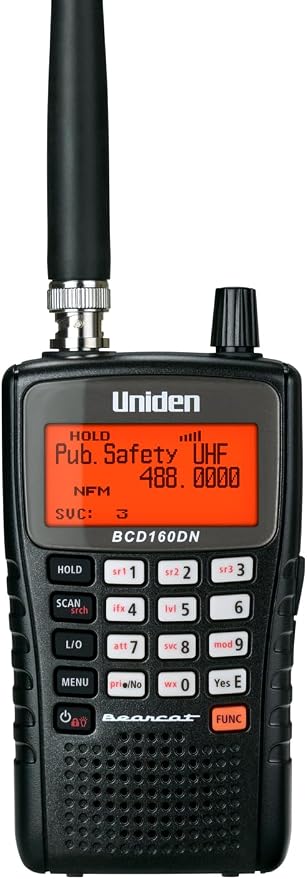
People who enjoy scanning public safety and digital radio signals will find the Uniden Bearcat BCD160DN fits their needs well. Its strongest point lies in quickly identifying codes and frequencies, making it a solid choice for hobbyists wanting clear access to digital signals without trunking complexity.
Setting up the scanner involves connecting it via USB for programming, which is pretty straightforward once you know the system. Day-to-day use benefits from features like the Band Scope and Rapid System/Channel Number Tagging, helping you lock onto active channels faster. The instant detection of CTCSS tones and DCS codes means you don’t waste time guessing system settings during live monitoring.
Performance-wise, it picks up DMR and NXDN digital signals right out of the box and can be updated to also decode APCO P25 Phase 1 & 2. The device handles conventional digital decoding well, although the lack of trunking support limits its use if you want access to those systems. Its build feels solid and portable for handheld use.
Praise often highlights its quick decoding abilities, while some mention the absence of trunking as a drawback.
Many users appreciate how quickly digital and analog codes are decoded, making tuning simple and saving time during scans. On the downside, the absence of trunking support is frequently noted as a limitation for those wanting deeper coverage of certain radio systems.
The unit suits hobbyists focused on conventional digital scanning and straightforward code detection. Anyone needing trunking system support or encrypted signal decoding should look elsewhere for more advanced options.
Pros
- Quick detection of CTCSS tones and DCS codes
- Supports multiple digital formats out of the box
- Band Scope feature helps find active signals fast
- Solid and compact handheld design
Cons
- No trunking support limits wider digital access
- Encrypted signals cannot be decoded
| Specification | Details |
|---|---|
| Scanner Type | Radio Scanner |
| Connection Type | USB |
| Digital Decoding | DMR, NXDN, APCO P25 (Phase 1 & 2 with update) |
| Exclusive Features | Band Scope, Rapid System/Channel Number Tagging |
| CTCSS/DCS Decode | Instant detection and display |
10. Uniden SDS200 TrunkTracker X Digital Scanner

Combining True I/Q technology with a user-friendly interface, the Uniden SDS200 TrunkTracker X stands out for its ability to handle complex digital simulcast systems. Ideal for those wanting reliable scanning without complicated programming, it offers a clear and customizable display that makes monitoring radio traffic straightforward.
Setup is simplified by the HomePatrol Database, which comes preloaded with radio systems across the US and Canada. Updating the database is easy through Sentinel software and happens weekly, keeping your scanner up-to-date. The large 3.5 color display lets you adjust what you see and the colors for different fields, making daily use more intuitive and allowing quick identification of channels.
Performance is strong, handling difficult digital signals with clarity and accuracy. The device’s build feels solid, with LED backlighting improving visibility. Reviews often highlight how well it picks up simulcast systems, though some mention the USB connection as less convenient compared to wireless options.
The scanner’s responsiveness and reliable updates are often praised, while the learning curve for some settings can be a drawback.
The scanner is appreciated for its clear reception in difficult digital simulcast conditions and the ease of keeping the database current with weekly updates. Users commonly note some difficulty getting familiar with certain settings despite the HomePatrol interface simplifying much of the setup.
Anyone looking for a reliable handheld scanner with strong digital capabilities and straightforward access to nationwide radio systems will be satisfied. Those wanting wireless connectivity or a less technical experience might want to explore other options.
Pros
- Handles digital simulcast systems well
- Fully customizable 3.5″ color display
- Regular weekly database updates
- Solid build with LED lighting
Cons
- USB connection only, no wireless option
- Some features have a learning curve
| Specification | Details |
|---|---|
| Scanner Type | Radio Scanner |
| Connection Type | USB |
| Resolution | scanner |
| Standard Sheet Capacity | 10 |
| Light Source Type | LED |
| Media Type | USB |
11. Brother DS-640 Mobile Document Scanner
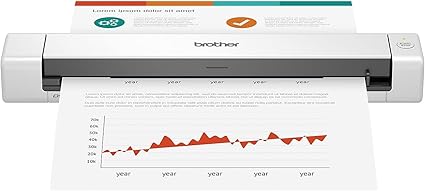
Brother DS-640 Mobile Document Scanner stands out for quick scanning wherever you go. It suits anyone needing a compact, portable scanner that delivers both color and black-and-white scans at the same speed.
Setup is straightforward, just plug it into a PC or laptop using the included micro USB 3.0 cable. The lightweight design means it fits easily into bags or purses, making it handy for travel or work on the move.
Scanning feels consistent whether you’re dealing with business cards, receipts, or plain paper thanks to its single-sheet feed.
Scanning speeds reach up to 16 pages per minute, with no slowdown when scanning color documents. The build is compact and light, weighing only about 1.5 pounds, so carrying it around is no burden. Most praise highlights how fast and portable it is, while some wish it had a higher resolution or larger sheet capacity.
High praise goes to the fast, consistent scan speed in both color and black-and-white modes, making document handling swift on the go. The common complaint centers on the low resolution and single-sheet capacity, which can slow things down for larger jobs.
Anyone needing quick scans of various media types while traveling or working remotely will appreciate this scanner. Those requiring higher resolution or bulk scanning should consider other, larger models.
Pros
- Scans color and black-white at 16ppm
- Ultra-compact and lightweight at 1.5lbs
- Powered via USB, no outlet needed
- Supports various media types easily
Cons
- Only one sheet capacity
- Resolution limited to 300 dpi
| Specification | Details |
|---|---|
| Scanner Type | Business Card, Document |
| Connection Type | USB |
| Resolution | 300 dpi |
| Standard Sheet Capacity | 1 |
| Media Type | Business Card, Embossed Card, ID Card, Laminated Card, Plain Paper, Plastic Card, Receipt |
12. Uniden Bearcat BCD260DN Base/Mobile Digital Scanner

Using this scanner feels straightforward and reliable for anyone serious about tracking emergency and public service frequencies. Designed with a good mix of features and convenience, it suits those wanting fast access to a wide range of signals without fuss.
Its standout feature is the Band Scope Rapid System, which really speeds up hunting down elusive radio signals.
Setting it up is pretty simple because it comes pre-programmed with common service bands like weather alerts, aviation, and police. Daily use involves navigating through a well-laid-out menu system that doesn’t require you to be a tech wizard.
The USB connection helps with easy updates and managing frequencies on a computer, while the search functions let you scan different types of channels efficiently.
Performance-wise, the scanner picks up on narrowband signals well and covers a broad spectrum including emergency, marine, and railroad communications. The build feels solid for desktop or mobile use, though some might find the interface a bit dated compared to newer models.
Most praise comes from its quick signal detection, but the common complaint revolves around the learning curve for mastering all its functions.
Quick detection of elusive signals stands out as the scanner’s best feature, making it a reliable tool in emergencies and regular listening. At the same time, mastering all the functions can take some time, with the interface not being the most intuitive available.
Those who want broad and fast access to multiple public service bands will find this scanner well suited. People looking for a simpler or more modern touchscreen experience should look for alternatives that match their style better.
Pros
- Pre-programmed emergency and service bands included
- Fast signal detection with Band Scope Rapid System
- Wide coverage including weather alerts and railroad
- USB connection for easy updates and control
Cons
- Learning curve for full feature use
- User interface feels somewhat dated
| Specification | Details |
|---|---|
| Scanner Type | Radio Frequency scanner |
| Connection Type | USB |
| Resolution | 300 dpi |
| Pre-programmed Bands | Emergency, Aviation, Marine, Railroad, NASCAR, and non-digital ambulance, police, fire |
| Direct Frequency Access | 10,000 frequencies |
Best Civilian Scanners Compared Side by Side
| Product | Channels | Frequency Range | Power Source | Water Resistance |
|---|---|---|---|---|
| Uniden Bearcat BC125AT | 500 | 25-54,108-174,225-512 MHz | 2 AA batteries included | Not Water Resistant |
| Uniden SDS100 Scanner | – | – | Battery Powered | – |
| Uniden BCD325P2 Scanner | – | – | – | – |
| Uniden SDS150 Scanner | – | – | Battery Powered | – |
| Epson Workforce ES-50 | – | – | USB powered | – |
| Uniden BC365CRS Scanner | – | – | 3 AA batteries | – |
| FOXWELL NT301 OBD2 | – | – | USB powered | – |
| Tera Wireless Barcode Pro | – | – | 1 Lithium Ion battery | – |
| Uniden Bearcat BCD160DN | – | – | – | – |
| Uniden SDS200 Scanner | – | – | – | – |
| Brother DS-640 Scanner | – | – | USB powered | – |
| Uniden Bearcat BCD260DN | – | – | USB powered | – |
- Channels500
- Frequency Range25-54,108-174,225-512 MHz
- Power Source2 AA batteries included
- Water ResistanceNot Water Resistant
- Channels–
- Frequency Range–
- Power SourceBattery Powered
- Water Resistance–
- Channels–
- Frequency Range–
- Power Source–
- Water Resistance–
- Channels–
- Frequency Range–
- Power SourceBattery Powered
- Water Resistance–
- Channels–
- Frequency Range–
- Power SourceUSB powered
- Water Resistance–
- Channels–
- Frequency Range–
- Power Source3 AA batteries
- Water Resistance–
- Channels–
- Frequency Range–
- Power SourceUSB powered
- Water Resistance–
- Channels–
- Frequency Range–
- Power Source1 Lithium Ion battery
- Water Resistance–
- Channels–
- Frequency Range–
- Power Source–
- Water Resistance–
- Channels–
- Frequency Range–
- Power Source–
- Water Resistance–
- Channels–
- Frequency Range–
- Power SourceUSB powered
- Water Resistance–
- Channels–
- Frequency Range–
- Power SourceUSB powered
- Water Resistance–
How to Choose the Right Civilian Scanner
Choosing a good civilian scanner depends on factors like frequency range, ease of use, and reception clarity, as these affect what you can monitor and how smoothly the device operates. Getting these right ensures reliable performance and avoids wasting money on features you won’t need.
Frequency Range and Coverage
Many scanners miss out on certain signals simply because they don’t cover all the necessary frequency bands. Basic models might only handle VHF or UHF, leaving out important transmissions that happen outside these ranges.
Local and regional channels also vary, so a device that supports a broad spectrum including both analog and digital signals will catch more broadcasts. Some transmissions might be digital only, which older scanners can’t pick up, making a wide frequency range critical for effective monitoring.
A scanner with frequency coverage from roughly 25 MHz to 1300 MHz can handle most civilian frequencies, including VHF low and high bands plus UHF. Look for one that explicitly supports both analog and various digital modes like APCO P25 or DMR if those are relevant to your area. Having compatibility with local emergency, aviation, and public service bands makes a noticeable difference in actual use.
Scanning Speed and Search Functions
Waiting ages for a scanner to move between channels tests patience, especially during active events. A good unit scans through channels quickly, pausing on active transmissions without delay.
Manual scanning should respond instantly to user input, while automatic search modes can sort through hundreds of channels efficiently without bogging down.
Customizable search parameters help tailor scans to specific frequency blocks or signal types. Priority channels that interrupt scanning when they become active are useful for critical updates. Responsiveness in both manual and automatic modes depends on the device’s processing power and software optimization, scanners lagging behind can miss key communications or create frustration.
User Interface and Display
It’s tough to read a screen that’s dim or washed out in sunlight, especially if you use the scanner outdoors. Displays with adjustable backlighting or high contrast make a clear difference. Menus should be straightforward, avoiding deep nested options that slow channel programming and settings changes.
Easy navigation and intuitive controls like dedicated buttons for scanning, volume, and channel selection speed up everyday use. Some models offer remote apps or Bluetooth for control via smartphones, which can be handy when the scanner is placed out of reach. User interface smoothness impacts how quickly you can respond to what’s happening.
Portability and Power Options
Carrying a heavy or bulky scanner limits its use in the field or on the go. Compact units weighing under two pounds fit comfortably in a bag and won’t tire your arm during extended handheld use. Battery performance also shapes experiences, low capacity means frequent interruptions unless you bring extras.
Look for scanners that accept rechargeable batteries with decent life (around 10 hours or more) and can switch to replaceable ones for flexibility. Having the option to run on AC power or connect to a vehicle’s power outlet provides versatility for both stationary and mobile use. These features add convenience beyond basic handheld operation.
Audio Quality and Output Options
Clear audio is crucial when background noise competes with weak signals. Scanners with powerful, well-tuned speakers ensure transmissions come through intelligibly, even in busy environments. Low-quality speakers make important messages difficult to understand and strain listening over time.
Headphone jacks allow private listening or improved clarity with external audio gear, which can be valuable in loud settings. Some units also offer audio recording capabilities or alert tones for specific transmissions, which can help capture important broadcasts or notify the user without constant monitoring.
Multiple audio output options add flexibility depending on where and how you use the scanner.
Tips for Optimizing Scan Performance in Different Environments
Signal quality can vary widely between urban, suburban, and rural areas, so adjusting your scanner settings based on location is important. Using a directional antenna can improve reception in rural areas where signals are weaker and more spread out. In cities, switching to a scanner with better digital decoding capabilities helps capture encrypted or digitally modulated transmissions.
Here are ways to get better results from your civilian scanner:
- Update your scanner’s firmware regularly to support the latest protocols.
- Program frequency lists specific to your area or points of interest.
- Use external antennas to boost range, especially if indoor reception is poor.
- Avoid placing the scanner near electronic devices that cause interference.
Optimizing these factors according to your environment can mean the difference between clear reception and static. Sometimes small tweaks to antenna placement or frequency selection yield noticeable improvements.
Common Mistakes to Avoid When Using Civilian Scanners
Skipping firmware updates often results in missing out on new frequency databases or bug fixes. Many users rely on default factory programming, which might not cover local or new scanner bands. Not verifying frequencies actively can cause you to tune into outdated or inactive channels.
Other mistakes to avoid:
- Using the scanner too close to metal objects or inside buildings with thick walls that block signals.
- Neglecting regular maintenance like cleaning contacts and checking cables.
- Ignoring manual instructions for setup and channel programming.
- Overloading the scanner memory with unnecessary frequencies, which can slow scanning speed.
Taking time to learn how your device works and maintaining it properly can improve performance and longevity. Careless placement and lack of updates are the main reasons for poor scanner experiences.
Comparing Civilian Scanners with Software-Based Alternatives
Traditional civilian scanners are built to decode and process radio signals directly, giving users immediate access to local transmissions without needing an internet connection. They generally offer better privacy since you are listening to over-the-air signals only.
Software-based alternatives use an internet connection to access streaming radio feeds, which can cover a wider geographic area. These solutions often provide advanced search functions and user-friendly interfaces on phones or computers.
Key differences include:
- Portability: Hardware scanners can be used anywhere with signal, no need for Wi-Fi or data.
- Signal diversity: Software scanners rely on what others share; hardware picks up direct transmissions.
- Latency: Dedicated scanners display live signals with minimal delay, while software streams may lag.
The choice between hardware and software depends on personal preferences, usage contexts, and whether constant internet access is available.
People Also Asked
How Do I Set up a Civilian Scanner After Purchase?
Begin by unpacking the scanner and inserting batteries or plugging it into a power source. Follow the manual to program frequencies or use automatic scanning functions. Spending time with the manual helps avoid frustration and ensures correct setup.
What Safety Precautions Should I Follow When Using a Scanner?
Avoid scanning sensitive or restricted frequencies as this can be illegal in some areas. Keep the device away from moisture and extreme temperatures to prevent damage. Using it in well-ventilated spaces prevents overheating during extended use.
Will This Scanner Work with My Current Radio System?
The scanner is designed to pick up a wide range of public and police frequencies, but it won’t directly connect to or control your radio system. Use it independently to monitor signals rather than trying to sync with your radio equipment.
How Long Does a Typical Civilian Scanner Last with Regular Use?
Typical civilian scanners last several years with daily use if treated carefully. Regularly cleaning the unit’s contacts and protecting it from drops helps maintain functionality. Replacing batteries before they leak can also extend the device’s life.
What Are Common Problems Users Face with Civilian Scanners?
Common problems include difficulty programming frequencies and weak or no signal reception. Interference from nearby electronics and antenna issues often cause poor performance. Keeping the antenna clear of obstructions usually improves signal quality.
Conclusion
Choosing the right civilian scanner depends mostly on range coverage, ease of use, and the kind of signals or frequencies you need to monitor. It’s important the scanner captures what matters in your area, whether that’s local emergency channels or air traffic. Also consider how simple it is to program and operate since that affects your experience daily.
Think about where you will use the scanner and how often since size and portability might be important. Set a budget that fits your needs without overpaying for features you won’t use.
Check the comparison table and detailed reviews above to find the model that fits your setup and goals best.