
Top 12 Best KWS Scanner You Can’t Afford to Miss!
Most people searching for the best kws scanner know the frustration of using one that either misses key signals or delivers poor image clarity. A cheap or poorly chosen scanner can create more downtime with constant readjustments and missed codes, causing delays especially when quick diagnostics matter. This common issue often stems from overlooked features that affect how well the scanner reads and processes information in real time.
The main factors that separate a reliable kws scanner from a less effective one include scan speed, compatibility with multiple protocols, and ease of interface use. Scan speeds typically range from 20 to 50 codes per second, and anything slower can inhibit efficient diagnostics.
A good scanner supports a wide range of car models and protocols like CAN, KWP2000, and ISO standards. Also, a well-designed display with clear, concise readouts and straightforward controls makes the device easier to operate on the spot without confusion. Solid build quality ensures durability and frequent use without failure.
Need a Quick Check?
| Image | Product | Price |
|---|---|---|
Our Top Picks 1  | Autel MaxiCOM MK900BT | Check Price |
Our Top Picks 2  | THINKCAR THINKSCAN 689BT | Check Price |
Our Top Picks 3  | Uniden Bearcat BC125AT | Check Price |
Our Selected Top 12 Kws Scanner Picks for Every Need
This list features a carefully chosen selection of skilled words scanners designed for various needs and preferences. Each review explains how the device performs, highlights its strengths and weaknesses, and identifies the types of users who will benefit most from it.
1. Autel MaxiCOM MK900BT Scanner
Autel MaxiCOM MK900BT is a professional diagnostic scanner designed for mechanics and serious car enthusiasts. Its biggest strength lies in its comprehensive vehicle coverage and Bluetooth connection through the MaxiVCI V150, making wireless diagnostics straightforward and efficient.
Getting started involves connecting the MaxiVCI V150 Bluetooth adapter to your vehicle, then syncing it with the main MK900BT tablet. The device comes with a power adapter, USB Type-C cable, and a carrying case, ensuring everything needed is included.
Day-to-day use benefits from a quick reference guide and soft cloth for screen cleaning, while the 1-year free software updates keep the system current without much hassle.
Performance excels with a solid build that weighs 600 grams, lending a good balance between portability and durability. The main unit provides clear diagnostic results, but some users note the occasional charging issue or Bluetooth connector malfunction. Support is accessible through direct contact, which helps resolve problems promptly, though some find language options and subscription renewal less intuitive.
The scanner handles vehicle diagnostics well, and the included Bluetooth adapter allows convenient wireless connection. Users often praise the support for resolving issues quickly. Common drawbacks involve problems with charging and some confusion around subscription renewals and language settings.
People needing a reliable, versatile scanner with strong vehicle coverage will appreciate this unit. Those seeking a simpler or less tech-intensive option might want to explore other models. Support and updates ensure it remains useful beyond the initial year.
Pros
- Bluetooth MaxiVCI V150 adapter for wireless use
- Includes carrying case and all essential accessories
- 1-year free software updates keep features current
- Detailed quick reference guide simplifies operation
Cons
- Occasional charging and power-on failures reported
- Subscription renewal process can be confusing
| Specification | Details |
|---|---|
| Brand Name | Autel |
| Included Components | MK900BT Main Unit, MaxiVCI V150, Power Adapter, USB Type-C Cable, Soft Cloth, Quick Reference Guide, Carrying Case |
| Item Weight | 600 g |
| Manufacturer Warranty | 1 Year |
| Model Number | Newest MaxiCOM MK900BT |
2. THINKCAR THINKSCAN 689BT PRO OBD2 Scanner
Feels like having a professional mechanic right in your driveway, perfect for people who want clear and reliable car diagnostics. Its biggest strength lies in the detailed reports and easy connection to most vehicles, making complex car issues more understandable.
Setting it up involves a simple update to the latest software for smooth operation, then connecting via Bluetooth to your phone or tablet. The included charger and carrying bag make it easy to keep the scanner ready and protected.
Daily scans and checks are straightforward, with tutorial support available for first-time users to guide through every step.
Scan results come fast and offer in-depth codes and live data, making it simple to spot problems early. Build quality feels solid and durable, fitting comfortably in hand with a clear screen. Most praise centers on how user-friendly the interface is.
Common complaints mention receiving a used device when ordered via Amazon resellers, though replacements are offered.
Most users appreciate the clear diagnostic reports and user-friendly interface that help them understand vehicle issues without professional jargon. However, receiving a used or returned device when ordering through some channels is a frequent concern, though new replacements are available.
Those who want detailed, accessible car diagnostics and don’t mind updating software will find it suitable. People looking for a device guaranteed brand-new without any chances of returns might want to consider alternatives.
Pros
- Easy Bluetooth connection to mobile devices
- Comes with comprehensive charging options
- Includes useful carrying bag for protection
- Support resources are clear and accessible
Cons
- Possibility of receiving a returned device from Amazon
- Software update required before first use
| Specification | Details |
|---|---|
| Brand Name | thinkcar |
| Included Components | 3-in-1 Charger, Carrying Bag, User Manual, J2534 VCI, THINKSCAN 689BT PRO, Type-C Charging Cable |
| Model Number | THINKSCAN 689BT PRO |
| Manufacturer Warranty | 1 Year Warranty |
3. Uniden Bearcat BC125AT Analog Handheld Scanner
Compact and straightforward, the Uniden Bearcat BC125AT suits anyone looking for an analog scanner with plenty of channels and easy readability. Its strong point is the ability to quickly capture nearby signals using Close Call RF capture technology, making it great for staying updated on local transmissions.
Setup is simple, powered by two AA batteries that last around 10 hours, so you can take it on the go without worrying about constant charging. The digital display with alpha-tagged channels helps keep track of signals clearly, and the Do Not Disturb Mode stops interruptions during active transmissions.
Its compatibility with personal computers allows for some flexibility in managing channels.
It excels at picking up analog signals across multiple frequency ranges, especially in UHF, with a range of up to 50 kilometers. The compact design makes it easy to carry, but it lacks water resistance, so caution is needed outdoors.
Most users appreciate its reliable signal capture, while the main drawback is the inability to monitor digital radio systems as some agencies have moved to digital trunking.
The scanner’s best feature is its quick tuning to nearby analog signals with Close Call technology, appreciated by those who want real-time updates. On the downside, it cannot monitor digital systems like Project 25 or DMR, which limits its use in areas that have upgraded emergency communications. Also, the lack of water resistance means it requires careful handling outdoors.
This device suits users focused on analog scanning and those who prioritize portability and simple operation. Individuals needing to monitor digital trunking systems or who require a weather-resistant model should consider alternative scanners that support those features.
Pros
- 500 alpha-tagged channels for easy identification
- Close Call RF capture locates nearby transmissions
- Do Not Disturb Mode prevents interruptions
- Compatible with personal computers
Cons
- Not compatible with digital radio systems
- Not water resistant
| Specification | Details |
|---|---|
| Number of Channels | 500 |
| Frequency Range | 25-54 MHz, 108-174 MHz, 225-380 MHz, 400-512 MHz (UHF) |
| Battery Average Life | 10 hours |
| Voltage | 3 volts |
| Number of Batteries | 2 AA batteries required (included) |
4. KINGBOLEN K7 Bidirectional OBD2 Scanner

Compact plastic casing with a straightforward design makes the KINGBOLEN K7 Bidirectional OBD2 Scanner easy to handle and reliable for anyone needing vehicle diagnostics. Ideal for advanced DIYers and professional technicians, its standout feature is lifetime free software updates, which saves money over time without recurring fees.
Connecting the scanner is simple thanks to Bluetooth compatibility, allowing quick pairing with modern devices. The lifetime free upgrades mean you don’t have to worry about ongoing costs or outdated software.
Day-to-day use includes checking engine codes and real-time data, with support for newer vehicle protocols like CAN FD, important for recent GM models to catch issues accurately and faster.
Performance-wise, the scanner delivers precise diagnostics and supports a broad range of cars due to its updated CAN FD protocol. The build feels solid though not overly heavy, making it portable and durable.
Frequent praise highlights the value of free lifetime updates, while the most common complaint concerns occasional connectivity hiccups when pairing with some devices.
Most users appreciate the lifetime free updates that keep the scanner current without additional fees. However, some experience intermittent Bluetooth connection problems that can interrupt diagnostics temporarily.
The scanner suits those wanting in-depth vehicle diagnostics on newer models, especially GM, without ongoing costs. Users needing ultra-rugged gear or flawless wireless performance might look for alternatives.
Pros
- Lifetime free software updates included
- Supports CAN FD for newer GM models
- Bluetooth wireless connection
- Durable plastic build
Cons
- Occasional Bluetooth connection issues
- Not heavy-duty for harsh environments
| Specification | Details |
|---|---|
| Brand Name | KINGBOLEN |
| Model Number | KINGBOLEN K7 Bluetooth OBD2 Scanner |
| Manufacturer Part Number | KBLB05 |
| Unit Count | 1 Count |
| Manufacturer Warranty Description | 1 year |
5. Innova 5610 Bidirectional OBD2 Scan Tool
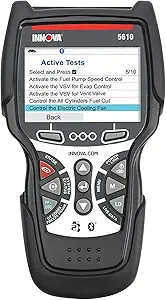
Recognized for its ability to display live data from advanced vehicle systems like ABS and SRS, the Innova 5610 is ideal for anyone looking for a reliable, professional-grade car diagnostic tool. Its major strength lies in bidirectional functionality, letting you run dealership-level re-learn procedures with ease.
Setting up the device is straightforward: connect the OBD2 cable to your vehicle, and you’re ready to start diagnosing issues. Day-to-day use benefits from clear access to real-time OBD2 and OEM live data.
The included protective boot and storage pouch make it simple to keep everything organized and safe between uses. The USB cable also helps in transferring data or updating the tool’s software.
Performance-wise, the tool offers detailed diagnostics that can handle engine, transmission, and safety systems. It reads and clears trouble codes effectively, which makes troubleshooting more accurate.
Built fairly solid with a protective boot, it feels durable enough for regular use. The most common praise focuses on its advanced special reset functions, while some reviews mention that it can be a bit heavy for handheld use over long periods.
Many appreciate the advanced reset capabilities that make diagnostics feel closer to dealership precision. However, the weight of the unit is often mentioned as tiring during longer sessions. Its solid build offers confidence but comes at the cost of portability.
Those needing a professional, in-depth diagnostic tool that covers a range of vehicle systems will find this very useful. Drivers seeking a lighter, more compact scanner for occasional use might want to look at simpler models instead.
Pros
- Bidirectional scan tool with real-time data access
- Supports advanced systems like ABS and SRS
- Includes protective boot and storage pouch
- Allows dealership-level reset procedures
Cons
- Relatively heavy for prolonged handheld use
- May require software updates for newer vehicles
| Specification | Details |
|---|---|
| Model Number | 5610 |
| Unit Count | 1 Count |
| Item Weight | 1.3 pounds |
| Included Components | Code Reader with Protective Boot, Manual, OBD2 Cable, Soft Pouch, USB Cable |
| Brand Name | Innova |
| Manufacturer Part Number | 5610 |
6. BLCKTEC 460T OBD2 Diagnostic Scanner

Great for home mechanics and professionals, the BLCKTEC 460T offers broad diagnostics covering all vehicle systems. It stands out for supporting all 10 OBD2 modes and plenty of advanced features that help identify and clear codes beyond just the engine. This tool suits those who want thorough insights and reset options in one device.
Setup takes a few minutes with the included quick start guide and OBD2 cable. Once plugged in, it quickly reads trouble codes across engine, transmission, ABS, and SRS systems.
Workshop reset tools come in handy after repairs or maintenance, and displaying live data helps monitor your car’s health in real time. Compatibility needs checking beforehand to ensure all features work with your specific vehicle.
It performs diagnostics reliably and covers a wide range of functions, making it useful for deeper troubleshooting than basic code readers. The build feels durable enough for regular garage use, and the included storage case keeps everything organized.
Most praise goes to the all-system diagnostics feature, while a common complaint is that not every function is compatible with all car models.
The ability to diagnose and clear codes for engine, transmission, ABS, and SRS systems is frequently praised, providing comprehensive insights. However, many users note that some advanced features are limited by their vehicle’s compatibility, requiring a check before purchase.
Anyone needing an all-in-one scanner to handle multiple systems and reset functions will find this tool useful. Those with less common or very new vehicles should verify compatibility or consider simpler options to avoid missing features.
Pros
- Supports all 10 OBD2 modes
- Reads and clears multiple system codes
- Includes workshop reset tools
- Comes with storage case and cable
Cons
- Function availability depends on vehicle
- Not fully compatible with every car model
| Specification | Details |
|---|---|
| Model Number | 460T |
| Number of Items | 1 |
| Included Components | Tool, OBD2 Cable, Storage Case, Quick Start Guide |
| Manufacturer Warranty Description | 2 year limited manufacturer warranty |
| Manufacturer | McGaaw, LLC |
7. Tera Wireless Barcode Scanner Pro Version

Handling inventory or checkout lines often needs a scanner that’s quick and easy to customize. Suited for anyone needing smooth wireless scanning across multiple devices, it stands out most for its unique screen settings allowing full control over language, sound, and connection preferences.
Setting up involves pairing it via Bluetooth, 2.4G wireless, or USB cable, which works well on desktops, laptops, smartphones, and tablets. Daily use benefits from the ability to adjust audio volume and language on the screen, making it clear and comfortable to operate. Being battery powered with rechargeable lithium ion, the scanner fits into busy routines without frequent downtime.
Scanning happens at a rate of 650 scans per second, which keeps things moving fast in busy environments. The build feels solid in hand, designed to last daily use.
Praise often highlights the personalized screen settings as a real help, but some users mention it could improve battery life or connection stability under heavy use.
The biggest strength is the ability to customize screen settings for language and volume, which makes daily scanning more user-friendly. The most frequent complaint revolves around battery longevity and occasional connection instability during prolonged use.
This scanner suits users needing flexible connectivity and personalized operation on various devices. Those prioritizing extended battery life or highly stable connections in intense environments might want to explore other options.
Pros
- Customizable screen language and volume settings
- Multiple connection options: Bluetooth, wireless, USB
- Works with many device types
- Includes charging cradle and cable
Cons
- Battery life could last longer during heavy use
- Some customers have experienced occasional connection drops
| Specification | Details |
|---|---|
| Connectivity Technology | 2.4G Wireless, Bluetooth, USB Cable |
| Compatible Devices | Desktop, Laptop, Smartphone, Tablet |
| Power Source | Battery Powered |
| Number of Batteries | 1 Lithium Ion battery (included) |
| Scan Rate | 650 seconds |
8. WoneNice USB Wired Barcode Scanner

With a scanning speed of 200 scans per second, this wired barcode scanner is built for quick and efficient operation. It suits businesses, shops, and warehouses that need reliable, fast barcode reading without fuss.
Its plug-and-play design makes it especially practical for anyone wanting straightforward setup and usage.
Setup is literally just plugging it into any USB port, no complicated installations or drivers needed. Daily use is smooth because it works across Windows, Mac, and Linux.
The visible laser guides your aim at a 55° inclination and 65° elevation angle, helping to accurately scan barcodes every time. Compatibility with common software like Word and Excel adds flexibility for different work environments.
The scanner does its job at a fast pace, handling most types of barcodes with ease thanks to the 650-670nm visible laser. Its build is corded, which means a steady power source and connection, though it limits mobility.
Many praise its ease of use and consistent performance, while some find the cord restrictive in larger spaces or for mobile needs.
The scanner receives praise for its quick and reliable scanning performance paired with a simple USB connection that makes setup easy. The most frequent complaint is about the corded design, which can get in the way during use in more mobile situations.
Businesses requiring a dependable barcode scanner that stays connected and handles bulk scanning at a fast rate will be pleased with this device. Those who need wireless freedom or plan to move around a lot should consider other models better suited for mobile workflows.
Pros
- Instant plug and play with any USB port
- Works across Windows, Mac, and Linux
- High-speed scanning with 200 scans per second
- Compatible with standard software like Excel and Word
Cons
- Cord limits mobility in large spaces
- Design may feel basic compared to wireless models
| Specification | Details |
|---|---|
| Scan Rate | 200 scans/s |
| Connectivity Technology | USB Cable |
| Operational Light Source | Visible Laser 650-670nm |
| Real Angle of View | 55 degrees |
| Compatible Devices | Laptop |
| Power Source | Corded Electric |
9. Epson WorkForce ES-400 II Document Scanner

People dealing with regular stacks of paperwork will find this scanner a solid choice for productivity. Suited for busy offices or home setups, it stands out mainly for its 50-sheet Auto Document Feeder, helping to breeze through large jobs quickly.
Setting it up involves a straightforward USB connection, and the included Epson ScanSmart Software simplifies scanning, previewing, emailing, and cloud uploads. The automatic file naming feature keeps your files organized without extra effort, which makes daily tasks less time-consuming.
It’s designed to fit easily on a desk without taking up too much space.
Scanning quality at 300 dpi with a CCD sensor delivers clear results suitable for most office needs. The build feels sturdy with an LED light source that stays cool during use.
One of the best points is how well it integrates with existing document management software via the TWAIN driver. The main drawback comes from the color depth being limited to 8 bpp, which isn’t ideal for richer color scanning needs.
The scanner is praised for speeding through stacks of paper with its 50-sheet feeder and fast software, making it easy to stay productive. The most frequent complaint points to the color depth of 8 bpp, which may not meet needs requiring richer color scanning.
Anyone needing quick, reliable document scanning for offices or home use will appreciate this model. It fits well with standard workflows but might fall short for users needing higher color detail or wireless connectivity. Those require a scanner with better color capabilities or network options.
Pros
- 50-sheet Auto Document Feeder for fast processing
- Automatic file naming boosts workflow efficiency
- Includes Epson ScanSmart Software for easy use
- Integrates with business software via TWAIN driver
Cons
- Color depth limited to 8 bits per pixel
- Only USB connection, no wireless option
| Specification | Details |
|---|---|
| Scanner Type | Document |
| Connection Type | USB |
| Resolution | 300 dpi |
| Standard Sheet Capacity | 50 |
| Optical Sensor Technology | CCD |
| Color Depth | 8 bpp |
10. Uniden Bearcat BCD160DN Digital Handheld Scanner

Setting a high bar in handheld digital scanners, the Uniden Bearcat BCD160DN stands out with its quick system and channel tagging features. Ideal for anyone serious about spotting elusive radio signals, it focuses on delivering detailed signal decoding and versatility right from the start.
Getting started involves straightforward USB connectivity, making loading channels and updates pretty simple. Daily operation benefits from rapid detection of CTCSS and DCS codes, which takes guesswork out of locking onto the right frequency. Features like narrow-band reception and multiple search options mean it isn’t just powerful but tuned to run swiftly in real situations.
Signal decoding covers digital modes like DMR, NXDN, and with a firmware update, APCO P25. It handles these without trunking or encrypted signal decoding, so clarity in those areas impresses. The handheld body feels solid enough for regular use but could be less bulky for longer carry.
High marks go to its decoding speed and reliability, while some mention tricky learning curves for advanced setups.
Reviews highlight fast and reliable digital decoding as the main strength, helping users spot signals quickly. The most common drawback revolves around the complexity of understanding and configuring advanced features, which can take time to master.
Anyone looking for quick, accurate digital scanning with a good range of supported formats will find it a solid choice. Those needing trunking support or simpler setups might want to consider alternatives better tailored to their needs.
Pros
- Quick CTCSS and DCS tone detection
- Supports multiple digital decoding formats
- Comprehensive search features included
- USB connection simplifies updates and data transfer
Cons
- No trunking or encrypted signal decoding
- Learning curve can be steep for complex features
| Specification | Details |
|---|---|
| Scanner Type | Radio Scanner |
| Connection Type | USB |
| Digital Decoding Support | DMR, NXDN, APCO P25 (firmware update) |
| Exclusive Features | Band Scope, Rapid System/Channel Number Tagging |
| Narrow-band Reception | Yes |
11. Autel MaxiCOM MK900 Scanner

Autel MaxiCOM MK900 delivers advanced vehicle diagnostics for professional mechanics and serious DIYers. It excels in providing a wide range of active tests and system coverage that go well beyond simple code reading, making it a solid choice for shops that demand thorough and detailed insights into many car systems.
Setup is straightforward with included cables and a carrying case to keep everything organized. Daily work benefits from features like 3,000+ active tests, pre/post diagnostics reports, and an AutoVIN 2.0 scanner that quickly identifies the vehicle.
Wi-Fi print and remote desktop add real convenience when sharing results or troubleshooting remotely.
It handles complex diagnostics with accuracy and speed. The construction feels durable and designed for frequent use. Many appreciate its extensive testing capabilities, but some find the weight of 920 g a bit on the heavier side for handheld use.
The unit balances solid build quality with the feature-rich software interface well.
Users highlight the depth of diagnostics and extensive active testing as major strengths, making it reliable for professional use. The most common drawback noted is the device’s weight, which can make prolonged handheld operation less comfortable.
Those requiring broad system coverage and detailed testing will find this tool fitting well for their needs. Individuals looking for a lightweight or simpler scanner might want to consider models with fewer features and a lighter build.
Pros
- Extensive active tests over 3,000 available
- Comes with comprehensive accessories and carrying case
- Supports all system diagnosis and advanced communication protocols
- Includes 1 year of free software updates
Cons
- Relatively heavy at 920 grams for handheld use
- May have a learning curve due to advanced features
| Specification | Details |
|---|---|
| Model Number | Autel MaxiCOM MK900 |
| Item Weight | 920 g |
| Active Tests | 3,000+ |
| Included Components | Main Unit MK900, Main Cable, Power Adapter, USB Type-C Cable, Soft Cloth, Quick Reference Guide, Carrying Case |
| Manufacturer Warranty | 1 Year Update Included |
| Number of Hot Services | 40+ |
12. Uniden Bearcat BCD260DN Base/Mobile Digital Scanner

Feeling confident scanning a wide range of emergency and public service bands comes naturally with this radio frequency scanner. Perfect for hobbyists or professionals who rely on quick access to multiple communication channels, its standout feature is the ease with which you can tag and search elusive signals.
Setup is straightforward since it arrives pre-programmed with essential service bands like weather alerts and emergency services. Day-to-day use is smooth thanks to features like Band Scope and Channel Number Tagging, which speed up signal detection. Connecting via USB allows for easy updates and data management, making the scanner reliable for continuous monitoring without extra hassle.
Performance matches its promise by consistently picking up signals across aviation, marine, railroad, and emergency channels with clarity. The build feels solid and designed for real-world environments. The best feedback highlights its fast and accurate scanning capabilities.
Some mention the learning curve with advanced settings as a drawback, requiring a bit of patience to master.
Fast, accurate scanning and tagging set this scanner apart, though mastering its full feature set takes time for new users. The wide band coverage and pre-programmed frequencies provide convenience without constant manual input. Its design stands up well but may not feel compact enough for everyone’s preference.
Those who need quick access to multiple public safety and transportation channels will appreciate this scanner’s capabilities. Users wanting something plug-and-play with minimal setup may find it excellent. Individuals looking for a smaller, simpler unit might want to explore other options instead.
Pros
- Pre-programmed with essential service bands
- USB connection for easy updates
- Direct access to 10,000 frequencies
- Features like Band Scope speed up scanning
Cons
- Advanced settings have a learning curve
- Build could feel bulky for some users
| Specification | Details |
|---|---|
| Scanner Type | Radio Frequency scanner |
| Connection Type | USB |
| Resolution | 300 dpi |
| Pre-programmed Bands | Emergency, Aviation, Marine, Railroad |
| Access to Frequencies | 10,000 frequencies |
Top Keyword Scanners Compared Side by Side
| Product | Brand | Weight | Power Source | Warranty |
|---|---|---|---|---|
| Autel MaxiCOM MK900BT | Autel | 600 g | – | – |
| THINKCAR THINKSCAN 689BT | thinkcar | – | – | – |
| Uniden Bearcat BC125AT | Uniden | 2 AA batteries | Battery | – |
| KINGBOLEN K7 OBD2 Scanner | KINGBOLEN | – | – | 1 year |
| Innova 5610 Scan Tool | Innova | 1.3 pounds | – | – |
| BLCKTEC 460T OBD2 Scanner | BLCKTEC | – | – | 2 year limited |
| Tera Wireless Barcode Pro | – | – | Battery powered | – |
| WoneNice USB Barcode Scanner | – | – | Corded electric | – |
| Epson WorkForce ES-400 II | Epson | – | USB powered | – |
| Uniden Bearcat BCD160DN | Uniden | – | USB powered | – |
| Autel MaxiCOM MK900 | Autel | 920 g | – | – |
| Uniden Bearcat BCD260DN | Uniden | – | USB powered | – |
- BrandAutel
- Weight600 g
- Power Source–
- Warranty–
- Brandthinkcar
- Weight–
- Power Source–
- Warranty–
- BrandUniden
- Weight2 AA batteries
- Power SourceBattery
- Warranty–
- BrandKINGBOLEN
- Weight–
- Power Source–
- Warranty1 year
- BrandInnova
- Weight1.3 pounds
- Power Source–
- Warranty–
- BrandBLCKTEC
- Weight–
- Power Source–
- Warranty2 year limited
- Brand–
- Weight–
- Power SourceBattery powered
- Warranty–
- Brand–
- Weight–
- Power SourceCorded electric
- Warranty–
- BrandEpson
- Weight–
- Power SourceUSB powered
- Warranty–
- BrandUniden
- Weight–
- Power SourceUSB powered
- Warranty–
- BrandAutel
- Weight920 g
- Power Source–
- Warranty–
- BrandUniden
- Weight–
- Power SourceUSB powered
- Warranty–
How to Choose the Right KWS Scanner
Choosing the right KWS scanner depends on its scanning speed, accuracy, and compatibility with your systems. Prioritizing these factors ensures efficient data capture and reduces errors, which saves time and prevents costly mistakes during operation.
Scan Frequency and Coverage
Many scanners advertise wide frequency ranges, but only those covering the bands you actually need make a difference. Missing out on key frequencies means you’ll miss important transmissions, which quickly becomes frustrating if you rely on the device for real-time updates. Devices that handle both digital and analog signals allow access to a broader variety of sources, important because some systems still broadcast analog while others have switched over.
Fast scanning with accurate frequency jumps matters for catching brief transmissions. Slow units can make you wait unnecessarily and might skip over short bursts of activity. Look for devices covering at least 25 MHz to 1.3 GHz, with digital decoding and a scan rate around 300 channels per second or better.
A good scanner delivers solid coverage and speeds through signals without lag.
Display and User Interface
Reading the screen outside on a sunny day or in a dim room can be frustrating with a poor display. Clear characters with backlighting or adjustable brightness help avoid squinting or guesswork.
Small, dense text or icons can make navigating menus slow and error-prone during quick operations.
The best experience comes from a clean, logically arranged interface offering quick access to presets, priority channels, and scanning modes. Physical buttons combined with a responsive menu system reduce the learning curve.
Customizable scan lists or favorites improve efficiency by allowing you to focus only on the relevant bands and save time.
Portability and Power Options
Heavy or bulky scanners get tiring fast, especially during extended use outdoors or in vehicles. A compact, lightweight design around 1 to 2 pounds fits well in the hand or clips neatly in a car. Battery life directly affects convenience; units running through 8 to 10 hours on rechargeable batteries reduce interruptions, ideal for long monitoring sessions.
Having the option to switch between rechargeable and disposable batteries offers flexibility for travel or emergency use. External power options and car adapters extend usage without worrying about battery drain. These features keep the scanner running through long outings or shifts without unexpected power loss.
Audio Quality and Output
Loudspeaker volume and clarity make a difference when trying to hear transmissions over background noise or from a distance. Cracking static or muffled sound makes understanding messages difficult, defeating the purpose of scanning.
Clear audio helps pick up faint or distant signals more easily.
Headphone jacks allow private listening, preventing disturbances or distractions in public or shared spaces. External speaker connections provide options for higher volume and better sound quality.
Noise reduction features or filters that minimize interference improve the listening experience significantly.
Programming and Connectivity
Typing frequencies manually can be tedious and error-prone without a clear system for input. Programmability via USB or software makes updating large lists faster and less frustrating. This matters most when scanning many channels or switching between scanning profiles frequently.
Compatibility with PC or mobile apps simplifies managing updates, especially for scanners supporting complex digital trunked systems or encryption where manual input isn’t practical. Support for digital systems ensures access to modern transmissions common in public safety and commercial bands, expanding the unit’s usefulness.
Tips for Maximizing Accuracy with KWS Scanners
Regular calibration is essential for keeping a KWS scanner accurate over time. These devices rely on precise internal sensors that can drift with use or environmental changes. Setting up a maintenance schedule ensures the scanner remains reliable. Proper placement of the scanner during use also impacts accuracy.
Avoid positioning it at awkward angles or on uneven surfaces to prevent data distortion. Make sure the scanning surface is clean and free of debris, as dirt can interfere with the sensor’s ability to capture details correctly.
Adjusting the device settings according to the specific material or object being scanned improves results. Some KWS scanners allow sensitivity or resolution tweaks, using these features helps tailor the scan to the job at hand.
Common Mistakes to Avoid When Using a KWS Scanner
Using a KWS scanner without properly configuring the device often leads to poor results. Leaving the scanner on default settings can cause missed details or inaccurate measurements. Another common mistake is neglecting the surrounding environment; strong lighting or reflective surfaces introduce scanning errors.
Holding the scanner too far from the target or moving it too quickly during operation often causes incomplete captures or blurry outputs. Skipping routine maintenance such as cleaning the lenses or updating firmware can reduce performance. Overlooking user manual instructions for specific materials or scan types also affects outcomes.
Consistent attention to these factors helps prevent frustration and improves the quality of each scan.
Comparing KWS Scanners with Other Industrial Scanning Technologies
KWS scanners differ from other industrial scanning methods mainly in their operational focus and application. Unlike laser scanners that emit beams for surface mapping, KWS scanners often employ specific wave sensors to detect material properties beneath surfaces. Compared to traditional barcode or RFID readers, KWS technology is generally better suited for structural analysis rather than just identification. Some other industrial scanners prioritize speed or range, while KWS models emphasize precision at close range for detecting fine details.
Though more specialized, KWS scanners can provide data that those other types might miss, especially in quality control or material inspection scenarios. Knowing these distinctions helps in choosing the right technology based on the task.
People Also Asked
How Do I Properly Care for My Kws Scanner?
Keep your kws scanner clean and store it in a dry place when not in use. Wiping the scanner lens regularly with a soft, lint-free cloth prevents dust buildup that can affect performance.
What Size Scanner Is Compatible with My Device?
Choose a scanner size that matches your device’s scanning window to ensure full coverage without cutting off parts of the image. Check your device’s specifications or manual for recommended dimensions.
Are Kws Scanners Safe to Use Around Children?
Kws scanners generally use low-intensity lasers, making them safe around children if handled properly. Always supervise children during use to avoid accidental eye exposure or damage.
How Long Does a Typical Kws Scanner Last on Average?
A typical kws scanner lasts several years under normal usage conditions. Regular maintenance like cleaning the lens and avoiding drops can extend its lifespan.
What Are Common Problems Encountered with Kws Scanners?
Common problems include scanning errors due to dirty lenses, battery issues, and connectivity drops. Frequent cleaning and keeping the scanner charged can help reduce these issues.
Conclusion
Choosing a keyword scanner mainly depends on accuracy, speed, and ease of use. Accurate results help you find the right terms quickly. Fast scanning saves time when researching.
An interface that’s simple to use lowers frustration and makes your workflow faster.
Consider how much you will use the scanner and what you can realistically afford. Match the tool to your specific needs and workspace to avoid overpaying or underutilizing features.
Check the comparison table and the detailed reviews above to help pick one that fits your situation best.
