
Top 10 Best Police Scanner You Can’t Miss Today!
Trying to catch clear police broadcasts with a cheap scanner often leads to frustrating signal drops or confusing static. A best police scanner cuts through interference with sharper reception, reliable frequency coverage, and minimal lag.
Without these core functions, you might miss critical updates whether parked at home or monitoring an emergency in the neighborhood.
Durability and antenna quality matter most in a police scanner, as rough handling and weak signals are common issues. Scanners with metal housings and telescoping antennas tend to last longer and pick up longer-range transmissions. Battery life is another big factor, units with at least 8 hours of runtime avoid the annoyance of frequent recharging.
Also, the device’s ability to scan multiple bands, like VHF and UHF, helps capture a wider range of local emergency channels.
Need a Quick Check?
| Image | Product | Price |
|---|---|---|
Our Top Picks 1  | Uniden Bearcat BC125AT | Check Price |
Our Top Picks 2  | Uniden SDS100 Scanner | Check Price |
Our Top Picks 3  | Uniden SDS200 Base Scanner | Check Price |
Our Selected Top 10 Police Scanner Worth Considering
These top 10 police scanners offer a range of features suitable for different users, from beginners to enthusiasts. Each review explains how the scanner performs, highlights its strengths and weaknesses, and identifies who will benefit most from using it.
1. Uniden Bearcat BC125AT Handheld Scanner
Compact and capable, the Uniden Bearcat BC125AT fits well for anyone wanting a solid analog police scanner without the digital complexity. Its biggest strength lies in quickly capturing nearby transmissions using Close Call RF capture technology, making sure you stay updated on important signals around you.
Setting it up involves loading up to 500 alpha-tagged channels, which helps keep your frequencies organized. The digital display makes tuning through channels straightforward. Day-to-day use is smooth thanks to Do Not Disturb Mode, which avoids interruptions during active transmissions.
Powered by two AA batteries, it offers about 10 hours of listening time, making it practical for extended outings.
The scanner does a reliable job picking up analog signals across VHF and UHF bands, covering police, fire, and emergency frequencies efficiently. Its build is compact but not water-resistant, so handling with care outdoors is needed. Positive notes highlight the instant tuning of nearby signals, while the lack of digital trunking support stands out as a limit in cities shifting to modern systems.
The scanner’s immediate tuning to local analog signals is a key strength for following nearby police or fire transmissions. Its main limitation comes from not handling digital systems, which some agencies have already switched to, restricting signal options in certain areas.
People focused on traditional analog frequencies in suburban or rural locations will find this scanner more than suitable. Those living in large cities with digital trunking setups would need to look for digital-compatible models to keep up with current emergency communications.
Pros
- Close Call RF capture locates nearby signals fast
- 500 alpha-tagged channels for organized scanning
- 10 hours of battery life with standard AA batteries
- Compact size fits comfortably in hand
Cons
- Does not support digital trunking systems
- Not water resistant, must avoid wet conditions
| Specification | Details |
|---|---|
| Number of Channels | 500 |
| Frequency Range | 25-54 MHz, 108-174 MHz, 225-380 MHz, 400-512 MHz (UHF) |
| Battery Life | 10 hours |
| Power Supply | 2 AA batteries (included) |
| Tuner Type | UHF |
2. Uniden SDS100 Digital Handheld Scanner
Trying to catch clear signals from police and emergency channels can be tricky, especially in crowded or weak-signal areas. The Uniden SDS100 Digital Handheld Scanner suits anyone needing a reliable device with strong digital performance for scanning local radio systems. Its biggest strength lies in handling difficult signals better than other scanners out there.
Setup is straightforward thanks to the HomePatrol Database, which lets you start by entering your zip code. Daily use involves a fully customizable color display, allowing you to focus on the info you want quickly.
Updating frequencies is easy through the Sentinel software and a weekly database update, keeping you current without fuss.
Reception quality is impressive, excelling at picking up weak or simulcast digital signals in challenging RF environments. The handheld scanner feels solid without being cumbersome, and the microSD card adds plenty of storage flexibility. Strong praise highlights its superior digital performance, while the most frequent complaint concerns the learning curve for more advanced programming.
People praise the scanner for its ability to perform better than others in digital and simulcast environments, making it reliable for tough signal conditions. Many find programming more complex features a bit difficult at first, requiring a learning period to get comfortable.
The scanner works well for anyone focused on digital police and emergency signals who values regularly updated database support. Users wanting simpler, plug-and-play devices might prefer a model with less technical setup.
Pros
- Strong digital performance in weak-signal areas
- Customizable color display for easy information access
- Includes updatable HomePatrol Database
- USB connection for straightforward updates
Cons
- Advanced programming can be challenging to learn
- Only one standard sheet capacity may limit documentation
| Specification | Details |
|---|---|
| Scanner Type | Digital Handheld Scanner |
| Connection Type | USB |
| Resolution | 24 Bits |
| Color Depth | 24 |
| Media Type | MicroSD Card |
3. Uniden SDS200 TrunkTracker X Base/Mobile Scanner
Combining Software Defined Radio with True I/Q technology, this scanner offers excellent performance with digital simulcast systems. It suits anyone serious about radio monitoring who needs a customizable, bright color display to track multiple channels clearly. The standout feature is its 3.5 fully customizable color display, which you can tailor to show just the details you want.
Setup is straightforward with a large HomePatrol database including all known US and Canadian systems, updated weekly via USB using Sentinel software. Day-to-day use benefits from the ability to quickly see and organize scanned information thanks to the color-coded display fields.
The scanner’s connection via USB makes updating and connecting easy without fuss.
Performance impresses, especially in handling challenging digital simulcast signals with clear, reliable reception. Built solidly for both base and mobile use, it feels durable enough for regular handling.
Strong praise points to its accuracy and ease of channel discovery. A common complaint is that the display and menu system can feel complex at first glance, requiring a time investment to master.
Clear signal reception and the large customizable display receive the most praise, allowing precise tracking of multiple channels. The main drawback is the initial learning curve navigating the menu and display settings. It requires some patience to unlock its full potential.
Individuals who need advanced radio scanning with detailed control will appreciate this model. People seeking a simpler, more beginner-friendly device might find it overly complex and should look for a less technical scanner.
Pros
- Large 3.5″ customizable color display
- Includes comprehensive HomePatrol database
- Supports digital simulcast systems well
- Frequent database updates via USB
Cons
- Display/menu system can be confusing initially
- More technical than basic scanners
| Specification | Details |
|---|---|
| Scanner Type | Radio Scanner |
| Connection Type | USB |
| Resolution | scanner |
| Standard Sheet Capacity | 10 |
| Light Source Type | LED |
| Media Type | USB |
4. Whistler WS1025 Analog Desktop Scanner
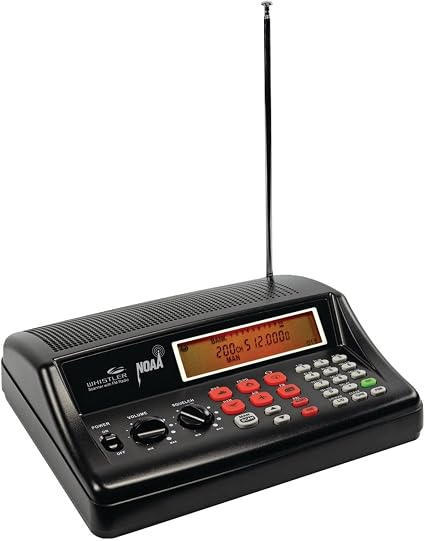
Experienced scanner enthusiasts looking for a desktop model will find the Whistler WS1025 a solid choice. Its biggest strength lies in handling priority channels smoothly, which is great for keeping an ear on important communications without constantly monitoring every frequency.
Setup involves connecting via Bluetooth, which is straightforward once you’re familiar with desktop scanners. The scan delay feature lets you catch replies by pausing for two seconds before jumping to another channel. Prioritizing a specific channel every two seconds makes sure critical signals don’t get missed.
The tuning option helps discover new or unlisted frequencies, starting right where you want it to.
Performance-wise, it scans analog frequencies well and keeps up with fast-changing signals. The build feels sturdy enough for desktop use but isn’t overly fancy in design. The strongest point mentioned in reviews is how reliably it locks onto active channels.
Common complaints revolve around occasional interface quirks that take some time to get used to.
Reviews highlight the scanner’s dependable priority channel monitoring as a major plus. At the same time, the interface complexity causes frustration until you get the hang of it. It works well for hands-on users who want control over finding and listening to frequencies.
That makes it ideal for those who know their way around desktop scanners and want detailed frequency management. People new to scanning or looking for digital signal support might want to consider other options better suited to their needs.
Pros
- Priority channel checks every two seconds
- Scan delay captures reply messages
- Tune function finds new frequencies
- Bluetooth connection simplifies setup
Cons
- Interface can be tricky for beginners
- Limited to analog scanning only
| Specification | Details |
|---|---|
| Scanner Type | Radio |
| Connection Type | Bluetooth |
| Scan Delay | 2 seconds |
| Light Source Type | LED |
| Resolution | 200 dpi |
5. Uniden BC365CRS Scanner with Alarm Clock

Offering a unique combination of a police scanner, alarm clock, and FM radio in one tabletop device, the Uniden BC365CRS suits anyone looking for an affordable way to keep tabs on analog emergency channels while also using a reliable alarm clock. Its standout feature is the ability to scan up to 500 channels across various services, making it versatile for daily use.
Setting up the scanner is straightforward with preset channels covering popular police, fire, weather, and marine frequencies. Daily use revolves around simple push-button controls and quick access to saved FM stations. The alarm clock function adds convenience, giving you a single device for multiple needs on your desk or nightstand.
It runs on corded electric power with a backup of 3 AA batteries, ensuring reliability.
Performance at scanning analog signals is solid, capable of handling up to 500 channels tuned in with ease. The build is designed for tabletop use with a push-button interface and a moderate audible noise level at 50 dB. Reviews commonly mention the clear sound quality as a strong point, while a frequent drawback is the reliance on analog signals only, which limits coverage in some areas using digital communications.
Many praise the clear reception of multiple analog channels alongside the alarm clock function as a convenient combination. On the downside, users often mention the scanner’s inability to pick up digital signals, which restricts access to some police and emergency communications these days.
Those who want a basic analog scanner paired with an alarm clock and FM radio will find it suits their needs well. Anyone needing access to digital frequencies or who prefers a portable, battery-only device might want to explore other options instead.
Pros
- Includes alarm clock and FM radio functions
- Pre-set channels for quick setup
- Runs on both corded power and batteries
- Simple push-button controls
Cons
- Only scans analog channels, no digital support
- Requires external power with batteries as backup
| Specification | Details |
|---|---|
| Power Source | Corded Electric |
| Number of Channels | 500 |
| Control Method | Push Button |
| Battery Description | Alkaline |
| Number of Batteries | 3 AA batteries required |
| Mounting Type | Tabletop Mount |
| Audible Noise | 50 dB |
6. Uniden Bearcat SR30C Compact Handheld Scanner

Uniden Bearcat SR30C Compact Handheld Scanner lets you listen to a wide range of frequencies easily. Best for anyone wanting a compact, affordable scanner that covers popular channels like police, fire, and weather.
Its biggest strength is how many preset frequencies it offers, making scanning straightforward right from the start.
Setting up the SR30C is simple thanks to the ten pre-programmed service banks, covering everything from emergency services to marine and ham radio. Day-to-day use involves just turning it on and choosing a preset bank, so you don’t waste time hunting for frequencies.
It runs on AA batteries or USB power, giving flexibility for both home and portable use. PC programming lets you quickly customize channels when needed, which helps keep things organized.
This scanner picks up over 32,000 frequencies, performing well in catching local and some distant signals. It’s built compact and lightweight enough to carry around comfortably.
The Clear Call RF Capture feature helps lock onto strong nearby signals quickly. Common praise focuses on its ease of use and reliable scanning, while some note the mono audio output limits sound clarity and the 1-band tuner restricts overall frequency coverage.
The scanner gets high marks for how easy it is to start listening right away with its pre-loaded channels and simple interface. Most users mention the limited audio output and band support as downsides for those wanting more advanced scanning options.
Ideal for casual listeners who want to monitor common emergency and weather channels without fuss. Not suited for users needing multi-band support or higher fidelity audio for detailed signal clarity.
Pros
- Preprogrammed banks for easy channel access
- Runs on AA batteries or USB power
- Compact and easy to carry
- PC programming support included
Cons
- Mono audio limits sound quality
- Supports only 1 radio band
| Specification | Details |
|---|---|
| Frequency | 32000 MHz |
| Radio Bands Supported | 1-Band |
| Power Source | USB, Battery-Powered |
| Additional Features | Close Call RF Capture, Turbo Search, PC Programming |
| Connectivity Technology | USB |
| Number of Batteries | AA batteries required |
7. Whistler WS1065 Digital Trunking Desktop Scanner

Using a police scanner that quickly adapts to changing signals makes a huge difference, especially in busy or tricky radio environments. A digital trunking desktop scanner suits someone who wants reliable real-time tracking without constantly fiddling with settings. Its key strength is the automatic adaptive digital tracking that keeps up smoothly with shifting signals.
Setting it up is straightforward, especially with the Wi-Fi connection that keeps things flexible. The alert LED offers multiple colors you can program, which helps you notice important transmissions at a glance. Audible alarms can be adjusted to make sure you don’t miss anything critical.
Day-to-day, the scanner adjusts audio levels automatically and filters out noise using NAC filters, so listening stays clear without manual intervention.
Performance-wise, it manages the main task of decoding P25 signals very well, adapting over 50 times each second to signal changes. The build feels solid enough for desktop use, with a clear and functional design.
Most praise points to its adaptability and consistent reception. However, some mention that the display resolution at 200 is basic compared to other units, which might affect viewing detailed info.
Real-time adaptive tracking ensures solid P25 signal reception by adjusting constantly without manual input. Most users highlight this as key to clear, consistent listening. Common complaints focus on the basic display resolution and the limited media type, which might feel outdated in comparison to more modern units.
People who want easy, accurate trunking scanning with clear alerts will appreciate this model. Those looking for higher display detail or more versatile media handling should consider alternatives.
Pros
- Adaptive digital tracking over 50 times per second
- Customizable LED with up to 8 user-defined colors
- Automatic audio adjustment on digital systems
- NAC filtering to remove unwanted transmissions
Cons
- Display resolution is quite basic at 200
- Media type limited to paper, no other options
| Specification | Details |
|---|---|
| Scanner Type | Radio |
| Connection Type | Wi-Fi |
| Resolution | 200 |
| Media Type | paper |
8. Uniden BCD996P2 Digital Mobile TrunkTracker Scanner

A powerful mobile radio scanner suited for serious hobbyists or professionals, offering extensive channel capacity and weather alert features. Its strongest point is the integration of TrunkTracker V technology, which makes it easy to follow complex police communications.
Setting up involves connecting it to a 12-volt power source and syncing with compatible smartphones via IR technology. Daily use highlights include the Close Call RF Capture feature, which picks up nearby transmissions without interrupting current channels thanks to the Do-Not-Disturb function.
Location Based Scanning ensures you receive relevant signals depending on your area, making it reliable for staying informed on local radio traffic and severe weather alerts.
Performance is solid with clear stereo audio output through the LCD or LED display interface. Built with durable radio frequency hardware, it feels sturdy despite not being water resistant.
The frequent praise centers on its effective weather alert system and high channel capacity, while users often mention the lack of water resistance as its main drawback.
Many users appreciate the detailed weather alerts and the ability to track complex trunked radio systems accurately. However, the scanner’s lack of water resistance is noted often, limiting its use in wet or rugged conditions.
People needing to monitor extensive police and emergency communications in a vehicle or dry environment will find this scanner highly capable. Those requiring multi-band options or outdoor durability might want to look for other models.
Pros
- Large channel capacity with 25,000 channels
- Effective severe weather alerts with S.A.M.E.
- Close Call Do-Not-Disturb stops unwanted interference
- Compatible with smartphones for added control
Cons
- Not water resistant for outdoor use
- Single band radio limits some frequency options
| Specification | Details |
|---|---|
| Radio Bands Supported | 1-Band |
| Frequency | 25 MHz |
| Power Source | 12 volts Direct Current (DC) |
| Connectivity Technology | IR |
| Additional Features | Close Call RF Capture Technology, TrunkTracker V technology, S.A.M.E. weather alert, Location Based Scanning |
| Audio Output Mode | Stereo |
9. Uniden Bearcat BCD160DN Handheld Digital Scanner
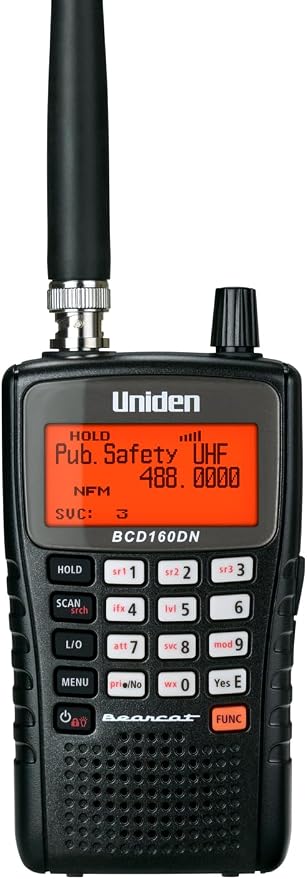
Built with a sturdy handheld design, the Uniden Bearcat BCD160DN is made for anyone wanting to catch clear and sharp digital signals on the go. It suits those after detailed signal detection with smart decoding features as its biggest advantage.
Setting it up is straightforward through USB connection, and daily scanning feels precise thanks to Narrow-band Reception and Rapid Decode for CTCSS tones and DCS codes. Tagging channels by system number speeds up tracking, while searching for signals is faster with the Band Scope feature. It’s ready right out of the box with support for DMR and NXDN digital formats, and updates bring even more decoding options.
Performance delivers clear digital audio for conventional signals, though trunking isn’t supported. Its casing feels solid without being too heavy for handheld use.
Reviews often praise how quickly it detects codecs but note that it can’t decode encrypted transmissions. The main drawback is no trunking capability, which limits some users’ scanning needs.
Quick detection of tones and codes makes scanning efficient and less time-consuming. The lack of trunking support limits its use in more complex radio systems, and it cannot handle encrypted transmissions.
People seeking digital decoding for conventional radio signals will find it capable and user-friendly. Those needing to monitor trunked networks or secure encrypted channels should look for other models offering those features.
Pros
- Quickly detects CTCSS and DCS codes
- Supports common digital formats out of the box
- Band Scope feature speeds signal detection
- Solid handheld design feels durable
Cons
- No trunking support
- Cannot decode encrypted signals
| Specification | Details |
|---|---|
| Scanner Type | Radio Scanner |
| Connection Type | USB |
| Digital Decoding | DMR, NXDN, APCO P25 (after update) |
| CTCSS/DCS Rapid Decode | Yes |
| Trunking Support | No |
10. Uniden BCD325P2 Handheld TrunkTracker V Scanner

Recognized for its ability to scan 25,000 channels, this handheld police scanner is suitable for anyone looking to monitor local radio traffic in detail. The standout feature is its Close Call RF capture technology, which automatically picks up signals closest to you, ensuring you stay updated on nearby activity without fuss.
Setting up the scanner is straightforward thanks to the Quick-Key System Access, letting you save and access your favorite systems with ease. Its GPS compatibility adds accuracy to location-based scanning, and the Advanced Dynamic Memory System helps organize channels effectively.
Daily use feels convenient since it quickly tunes to relevant signals, reducing the need for manual searching.
Performance-wise, it captures a wide range of signals, including the latest APCO Project 25 Phase II systems, meeting the demands of users interested in public safety communications. The build is solid and handheld, although some find the black matte finish a bit prone to showing fingerprints. Many users highlight its precise scanning as a major plus, while common complaints include occasional complexity in menu navigation.
Strongest praise goes to its ability to quickly tune to nearby signals with the Close Call RF capture technology. The most common complaint revolves around the scanner’s menu system, which some find difficult to manage during setup or adjustments.
Those who want detailed access to public safety channels and value proximity-based scanning will appreciate this device. Users seeking a simpler interface or a scanner with less visible wear might consider other options instead.
Pros
- Close Call RF Capture for nearby signals
- Quick-Key System Access for fast channel selection
- Supports APCO Project 25 Phase II systems
- GPS compatible for accurate location scanning
Cons
- Menus can be confusing to find your way around
Specification Details Scanner Type Radio Connection Type gps Resolution 2400 dpi Wattage 20 watts Media Type USB Best Police Scanners Comparison Table
Product Frequency Range Power Source Connectivity Additional Features Uniden Bearcat BC125AT 25-54,108-174,225-512 MHz 2 AA Batteries – Digital Display Uniden SDS100 Scanner – – USB Digital Handheld Scanner Uniden SDS200 Base Scanner – – USB LED Light Source Whistler WS1025 Desktop – – Bluetooth Desktop Scanner Uniden BC365CRS Alarm Scanner – Corded Electric, 3 AA – Ultrasonic Sensor Uniden Bearcat SR30C 32000 MHz USB, Battery Powered USB Close Call, Turbo Search Whistler WS1065 Trunking – – Wi-Fi Trunking Scanner Uniden BCD996P2 Mobile 25 MHz 12V DC IR Close Call, TrunkTracker Uniden Bearcat BCD160DN – – USB – Uniden BCD325P2 Scanner – – GPS High Resolution Scanner 1. Uniden Bearcat BC125AT- Frequency Range25-54,108-174,225-512 MHz
- Power Source2 AA Batteries
- Connectivity–
- Additional FeaturesDigital Display
2. Uniden SDS100 Scanner- Frequency Range–
- Power Source–
- ConnectivityUSB
- Additional FeaturesDigital Handheld Scanner
3. Uniden SDS200 Base Scanner- Frequency Range–
- Power Source–
- ConnectivityUSB
- Additional FeaturesLED Light Source
4. Whistler WS1025 Desktop- Frequency Range–
- Power Source–
- ConnectivityBluetooth
- Additional FeaturesDesktop Scanner
5. Uniden BC365CRS Alarm Scanner- Frequency Range–
- Power SourceCorded Electric, 3 AA
- Connectivity–
- Additional FeaturesUltrasonic Sensor
6. Uniden Bearcat SR30C- Frequency Range32000 MHz
- Power SourceUSB, Battery Powered
- ConnectivityUSB
- Additional FeaturesClose Call, Turbo Search
7. Whistler WS1065 Trunking- Frequency Range–
- Power Source–
- ConnectivityWi-Fi
- Additional FeaturesTrunking Scanner
8. Uniden BCD996P2 Mobile- Frequency Range25 MHz
- Power Source12V DC
- ConnectivityIR
- Additional FeaturesClose Call, TrunkTracker
9. Uniden Bearcat BCD160DN- Frequency Range–
- Power Source–
- ConnectivityUSB
- Additional Features–
10. Uniden BCD325P2 Scanner- Frequency Range–
- Power Source–
- ConnectivityGPS
- Additional FeaturesHigh Resolution Scanner
How to Choose the Right Police Scanner
Choosing the right police scanner depends on factors like frequency range, ease of use, and audio clarity, which ensure reliable and quick access to alerts. Selecting a model that fits your needs helps avoid frustration, saving both time and money in the long run.
Frequency Coverage
Trying to catch all local emergency communications without the right frequency coverage can lead to missing critical updates. Many areas use a combination of VHF and UHF bands to broadcast police, fire, and EMS signals, so a scanner that supports only one band limits what you can hear.
Older models might handle analog signals well but fail on newer digital modes like APCO P25, which are becoming common for many agencies.
A dependable scanner covers both VHF and UHF, and can handle digital and analog signals depending on the local radio infrastructure. Channels typically span ranges like 25-54 MHz, 108-174 MHz, and 400-520 MHz, which supports most emergency services.
Without this flexibility, you risk gaps in monitoring or need multiple devices to stay current with local transmissions.
Scan Speed and Performance
Waiting too long for a scanner to cycle through frequencies can cause you to miss urgent broadcasts. Some older scanners move slowly from channel to channel or take a frustrating amount of time to lock onto a busy frequency.
Fast scan speeds paired with quick locking keep you tuned into live transmissions rather than hunting for them.
Look for a scanner that scans at least 200 to 300 channels per second and locks immediately on active talk groups. Models with built-in buffering or recording help catch short calls you might otherwise miss while the scanner cycles. This feature is especially useful in areas with lots of traffic because it lets you go back to the last few seconds of audio.
User Interface and Ease of Use
Using a scanner with a complicated interface can quickly become annoying during emergency situations when time is critical. Buttons that aren’t well labeled, menus that require multiple steps to program, or displays that are difficult to read in daylight all slow down access to important channels.
Good units provide straightforward controls, multiple preset buttons, and search functions for easy navigation. A high-contrast display or backlight helps maintain readability outdoors or in low-light settings. These features let you react quickly and avoid fumbling with complex setups.
Portability and Power Options
A bulky or heavy device becomes a burden when you need to carry it for hours or use it handheld for long periods. Some older scanners are heavy and clunky, while newer portable models weigh a few ounces and fit easily in a pocket or hand.
Battery life plays a big role in how long you can use the scanner away from power sources. Units with rechargeable lithium-ion batteries often last 8+ hours on a charge and may support USB charging on the go.
Having the option for replaceable batteries is also practical for extended outings. External power inputs can keep the device running in vehicles or at a base station without draining batteries.
Additional Features and Connectivity
The ability to connect your scanner to a smartphone or computer adds convenience, allowing remote monitoring and easier channel management. Some scanners link through apps, which can send alerts for priority or emergency transmissions, reducing the need to watch the device constantly.
Audio clarity is important whether you’re listening through built-in speakers or headphones. A standard headphone jack enables private listening, and some models offer adjustable volume and tone controls. Solid audio quality helps catch every word clearly, which is essential in noisy environments or when the signal is weak.
Effective Usage Tips for Maximizing Your Police Scanner’s Performance
Positioning your police scanner in an open area free from electronic interference helps improve signal clarity. Antennas play a major role; a telescoping antenna often picks up more frequencies than a fixed one.
Regularly updating the scanner’s software or firmware keeps it compatible with changes in frequency allocations.
It’s practical to program frequently monitored channels to your scanner’s memory to avoid constant manual tuning. Most modern scanners support scanning multiple bands, so consider setting up priority channels for emergency services. Using the scanner during off-peak hours can reveal transmissions not commonly heard during busy times.
- Adjust squelch levels to minimize background static without missing faint signals
- Use external antennas when possible for better reception in buildings or remote areas
- Keep the volume at a level where you can hear alerts clearly without distortion
Patience in trying different locations and settings will improve your scanner’s effectiveness significantly.
Maintaining and Caring for Your Police Scanner to Ensure Longevity
Regularly cleaning your police scanner’s contacts and buttons helps maintain proper function over time. Avoid exposing the device to moisture or extreme temperatures, as these conditions can damage internal components.
Using a soft cloth to wipe the exterior prevents dust buildup that might block vents or buttons.
Removing batteries when storing the scanner for long periods prevents leakage and corrosion. Checking antenna connections intermittently ensures they remain tight and free from damage or rust.
Most scanners come with reset functions to restore default settings if software glitches occur, but overuse of resets might lead to loss of programmed channels.
- Store the scanner in a padded case to protect it from drops or impacts
- Replace batteries promptly when you notice decreased battery life or performance
- Keep firmware updated following manufacturer recommendations
Consistent, simple care extends the scanner’s lifespan and reliability in practical daily use.
Common Mistakes to Avoid When Using a Police Scanner for the First Time
Rushing into scanning without properly programming channels can lead to frustration and missed transmissions. Avoid keeping the volume too low or too high, which can either cause you to miss important calls or make listening uncomfortable.
Another mistake is neglecting to check local regulations regarding scanner use, as some areas have restrictions.
Some users try to rely solely on the scanner’s default memory, missing the opportunity to customize it for their area. Not securing the antenna firmly or using one that doesn’t suit the frequency range reduces reception quality.
Users new to police scanners often do not adjust squelch settings, resulting in excessive static noise.
- Don’t ignore the importance of proper antenna choice and placement
- Don’t scan in areas with known signal blocking unless you plan external antenna use
- Don’t ignore battery health; weak batteries cause intermittent shutdowns
Starting carefully with these points in mind ensures a smoother and more useful scanning experience.
People Also Asked
How Do I Properly Use a Police Scanner for Beginners?
Start by learning local frequencies and how to program them into your scanner. Using the manual or app can speed this up. Keep the volume moderate to avoid missing important calls.
Are Police Scanners Safe to Use Around Children and Pets?
Police scanners are safe near children and pets since they don’t emit harmful radiation. However, loud noises from transmissions might startle them, so place the scanner where sound won’t cause stress.
What Size Police Scanner Antenna Works Best for Reception?
A longer antenna, around 15 to 20 inches, generally improves reception on handheld scanners. Using the antenna fully extended and pointing it vertically often yields clearer signals.
How Long Does a Typical Police Scanner Last Before Replacement?
A police scanner can last many years with proper care, but batteries and internal parts might need replacement every few years. Regularly updating firmware and cleaning contacts extends its service life.
What Common Problems Should I Troubleshoot with My Police Scanner?
Common issues include poor reception, dead batteries, or outdated frequency lists. Double-check antenna connections and update frequency settings to fix most problems. Restarting the scanner can also resolve minor software glitches.
Conclusion
Choosing the right police scanner comes down to how clearly it picks up signals, how easy it is to use, and whether it covers the frequency range you need. You want a device that holds a stable connection and has intuitive controls so you spend less time fiddling with settings and more time listening. Battery life matters, too, especially if you plan to use it outdoors or away from power sources.
Consider where you’ll use the scanner most often and how much you want to spend. Smaller spaces might not need a long-range option, while heavy use justifies investing in a more durable model.
Check the comparison table and the picks above to find a scanner that fits your setup and listening habits without extra features you won’t need.
