Top 10 Best Radio Scanner That Will Blow Your Mind Today
Many people who rely on a radio scanner know how frustrating it can be to miss important transmissions because their device fails to pick up certain frequencies or suffers from poor reception. A cheap or poorly chosen scanner may also struggle with slow scanning speeds or limited channel memory, making it less effective in critical situations.
The best radio scanner offers reliable reception across a wide band of frequencies and handles multiple channels smoothly without lag.
Key factors that distinguish a quality radio scanner include frequency coverage, scanning speed, and ease of programming. A good scanner typically covers from VHF (around 25 MHz) up to UHF (about 1.3 GHz), ensuring access to a broad range of signals. Scanning speeds over 200 channels per second improve response time.
Ease of programming channels, whether through software or a simple interface, can save time and reduce errors, especially for users who regularly change or update their monitored frequencies.
Need a Quick Check?
| Image | Product | Price |
|---|---|---|
Our Top Picks 1  | Uniden BC125AT Analog | Check Price |
Our Top Picks 2  | Uniden SDS200 Digital | Check Price |
Our Top Picks 3 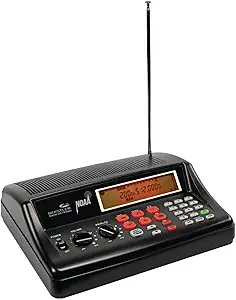 | Whistler WS1025 Analog | Check Price |
Our Selected Top 10 Radio Scanner Picks for Every Need
This list features a variety of radio scanners designed for different uses and experience levels. Each review explains how the scanner performs, highlights its key advantages and drawbacks, and suggests the types of users it best suits, helping readers find the right option for their needs.
1. Uniden Bearcat BC125AT Analog Handheld Scanner
Designed with a compact and lightweight plastic body, this analog handheld scanner suits anyone needing quick access to local radio communications. Its standout feature is the Close Call RF capture technology, helping catch signals from nearby transmitters instantly, ideal for staying informed on-the-go without carrying bulky gear.
Setting it up involves programming up to 500 alpha-tagged channels, which helps keep things organized. The digital display makes menu navigation clear, making day-to-day tuning straightforward. Powered by two AA batteries, it offers about 10 hours of use, which fits well with casual or extended listening sessions without frequent recharging or swapping batteries.
Radio scanning performance covers a versatile frequency range from 25 to 512 MHz (UHF included), capturing most analog transmissions reliably. The build is functional but not water resistant, so keeping it dry is important.
Strong praise often highlights its signal detection abilities, while the main complaint revolves around its inability to monitor any digital radio systems, limiting use in areas with digital upgrades.
Signal detection through Close Call RF technology stands out, capturing nearby channels fast. On the downside, the lack of digital scanning limits its usefulness in areas using newer digital systems, which some find disappointing.
The scanner fits well with users who focus on analog transmissions and value portability. Anyone needing digital coverage or rugged weatherproofing would be better served by a different model offering those capabilities.
Pros
- Close Call RF capture finds nearby signals quickly
- Compact and lightweight design for easy carrying
- Digital display simplifies channel management
- Long battery life of about 10 hours
Cons
- Cannot monitor digital radio transmissions
- Not water resistant for outdoor use in wet conditions
| Specification | Details |
|---|---|
| Number of Channels | 500 |
| Frequency Range | 25-54 MHz, 108-174 MHz, 225-380 MHz, 400-512 MHz (UHF) |
| Battery Type | 2 AA batteries (included) |
| Battery Life | 10 hours |
| Tuner Type | UHF |
| Voltage | 3 volts |
2. Uniden SDS200 Digital Base/Mobile Scanner
A bright and fully customizable 3.5 color display grabs attention first, making it a good fit for anyone wanting clear visuals on a radio scanner. Its standout strength lies in combining Software Defined Radio technology with easy system updates through a comprehensive HomePatrol database.
Setup is straightforward using the USB connection, and updating the scanner regularly with Sentinel software keeps all known radio systems in the US and Canada up to date. Customizing display colors adds personal clarity, showing only the info you need. Day-to-day scanning handles digital simulcast signals well, a common challenge for traditional scanners.
Performance-wise, it confidently picks up even tricky digital transmissions thanks to True I/Q technology. The build quality feels solid, designed to handle regular use.
Praises often mention the clear and adaptable display, while a recurring complaint points to managing the complexity of the database updates for some users.
The scanner is praised for its clear, adaptable 3.5″ screen and solid reception of digital simulcast signals, which makes scanning convenient and informative. Many users find the HomePatrol database helpful but note that updating through Sentinel software sometimes requires patience and some learning.
Those who want a technologically advanced scanner with frequent updates and clear visuals will appreciate this model. People looking for a simpler, less technically involved scanner may find it more complicated than they want and should consider other options.
Pros
- Customizable color display for easy reading
- Weekly updates with extensive HomePatrol database
- Strong digital simulcast reception with True I/Q
- USB connectivity for easy setup and updating
Cons
- Database updates can be complex for some users
- Standard sheet capacity limits physical media use
| Specification | Details |
|---|---|
| Scanner Type | Radio Scanner |
| Connection Type | USB |
| Resolution | scanner |
| Standard Sheet Capacity | 10 |
| Light Source Type | LED |
| Media Type | USB |
3. Whistler WS1025 Analog Desktop Scanner
For experienced users wanting precise control over scanning channels, the Whistler WS1025 Analog Desktop Scanner stands out. Its standout feature lets you prioritize a channel by checking it every two seconds while scanning, making it ideal for serious monitoring without missing key transmissions.
Setup involves connecting via Bluetooth and fine-tuning channels using the Tune feature, which helps find unlisted frequencies starting from a chosen point. The Scan Delay feature holds on a channel for two seconds to catch replies before moving on, offering a more natural listening experience. Adjusting priorities is straightforward, making day-to-day use smooth for those who understand scanners.
Performance shines as the scanner quickly cycles through channels while allowing targeted focus. Build quality is solid, delivering reliable operation, but some users mention the complexity can be daunting for beginners.
Most praise the thoughtful scan delay settings, while a common complaint is that it requires some technical know-how to get the most out of it.
The scanner excels at giving priority to important channels with a smooth delay for replies, making monitoring feel natural. Many find its complexity challenging without prior scanner experience, which limits its accessibility.
People familiar with desktop scanners who want precise control will appreciate this model. Those new to radio scanning or needing a simple setup might look for a less technical alternative.
Pros
- Checks priority channels every two seconds
- Bluetooth connection for easy setup
- Scan Delay captures replies efficiently
- Tune feature discovers new frequencies
Cons
- Not suited for novice users
- Requires technical knowledge to maximize features
| Specification | Details |
|---|---|
| Scanner Type | Radio |
| Connection Type | Bluetooth |
| Priority Channel | Checks one channel every two seconds while scanning |
| Scan Delay | Delays scanning for two seconds to hear replies |
| Tune | Finds new and unlisted frequencies from a specified frequency |
4. Whistler WS1065 Digital Trunking Desktop Scanner

Trying to keep up with multiple radio signals can be tricky, especially when channels shift or fade. For someone serious about scanning digital and trunking signals, this desktop scanner fits the bill.
Its standout feature is how it handles changes in signals automatically, without needing constant tweaks.
Setting it up involves connecting via Wi-Fi, making it easy to get on the air quickly. The multi-color LED alerts are customizable, so you know exactly what’s happening with just a glance.
Audible alarms help catch shifts in channels or activity without staring at the unit constantly. It’s one of those scanners you can trust to keep monitoring in the background while you focus on other tasks.
Performance-wise, the scanner excels at decoding P25 digital signals and adjusts dynamically to signal changes over 50 times per second. This keeps audio clear and consistent without manual adjustments.
The build feels solid enough for desktop use, although some note that the design could be more compact. Its ability to filter out unwanted signals using NAC filtering is a practical feature, though the unit’s size and paper media use might not suit every setup.
The scanner’s ability to track and decode rapidly changing P25 signals makes it reliable for consistent listening. Most users appreciate the clear audio and precise alerts, although some find the physical size and use of paper media less convenient.
People wanting dependable, hands-off monitoring of digital trunked systems will find satisfaction here. Those looking for a more compact unit or internal digital storage might consider alternate options better suited to their workspace.
Pros
- Digital AGC adjusts audio levels automatically
- Customizable multi-color LED alerts
- Real-time adaptive digital tracking
- Supports Network Access Code filtering
Cons
- Uses paper media, not digital storage
- Bulky desktop design takes up space
| Specification | Details |
|---|---|
| Scanner Type | Radio |
| Connection Type | Wi-Fi |
| Resolution | 200 |
| Media Type | paper |
5. Uniden Bearcat SR30C Analog Handheld Scanner

Listening to over 32,000 frequencies with 500 channels in a compact handheld design, this scanner is ideal for anyone wanting a straightforward tool to monitor non-digital police, fire, weather, and other signals. Its biggest strength lies in preset service banks that simplify finding interesting channels quickly.
Setting it up involves using one of the ten preset service banks, which means you don’t spend much time programming before you start listening. Day-to-day use is convenient as it runs on AA batteries or USB power, and you can connect headphones for private listening.
The Close Call RF Capture and Turbo Search features help locate strong signals without manually scanning the entire range.
Performance is reliable for analog scanning, covering a wide frequency range and providing clear audio output in mono. The handheld unit feels solid, not flimsy, which suits regular handling. Many appreciate how easy it is to program with a PC, though some find the non-digital focus limiting in a digital world.
The most common positive feedback highlights the scanner’s ease of programming using the PC and preset channels, making it quick to get on the air. The most frequent complaint is the lack of digital radio decoding, which is a drawback for those wanting to follow newer digital transmissions.
Anybody needing a simple, budget-friendly device to listen to analog emergency and aviation channels will find this useful. Those requiring digital scanning or stereo sound quality should consider other models better suited for those needs.
Pros
- Pre-programmed service banks for quick access
- Close Call RF Capture finds strong signals fast
- Compact and easy to carry handheld design
- Supports PC programming for customization
Cons
- Analog-only, no digital signal support
- Mono audio output limits listening quality
| Specification | Details |
|---|---|
| Frequency | 32000 MHz |
| Channels | 500 |
| Power Source | USB, Battery-Powered (AA batteries required) |
| Connectivity Technology | USB |
| Audio Output Mode | Mono |
6. Uniden BCD996P2 Digital Mobile Scanner

Anyone interested in monitoring a wide range of radio communications will find the Uniden BCD996P2 a solid fit. It suits those who need detailed weather alerts alongside extensive radio channel coverage.
Its standout feature is the Close Call RF Capture technology, which helps detect nearby transmissions without interrupting active channels.
Setting up involves connecting to a 12 volts DC power source and using its IR connectivity for integration with smartphones. Daily use is straightforward, with an LCD or LED display that clearly shows channel information. Location Based Scanning dynamically adjusts scanning focus depending on your whereabouts, making sure relevant local frequencies are prioritized.
NOAA weather access and S.A.M.E. alerts continuously provide updates on severe weather conditions.
The scanner handles up to 25,000 channels, providing broad coverage and accurate trunk tracking with TrunkTracker V technology. It picks up signals well in varied environments, although it is not water resistant, so keep it protected from moisture.
The build feels sturdy with good audio output in stereo. Most praise highlights the Close Call function’s accuracy, while a common complaint is the lack of water resistance when used outdoors.
Close Call RF technology is praised for detecting nearby transmissions accurately without interrupting channels. Some users mention the scanner is not water resistant, making outdoor or rough environment use tricky.
Those who rely on detailed and varied radio scanning combined with weather alerts will appreciate this model. People needing a waterproof scanner or wider band coverage might want to consider other options.
Pros
- Extensive 25,000 channel memory
- Close Call RF Capture for nearby signals
- Built-in NOAA and S.A.M.E. weather alerts
- Location Based Scanning adapts to area
Cons
- Not water resistant for outdoor use
- Single band receiver limits some coverage
| Specification | Details |
|---|---|
| Power Source | 12 volts Direct Current (DC) |
| Channels | 25,000 |
| Connectivity Technology | IR |
| Audio Output Mode | Stereo |
| Weather Alert | S.A.M.E. weather alert |
| Display Type | LCD or LED |
7. Uniden Bearcat BCD160DN Handheld Digital Scanner
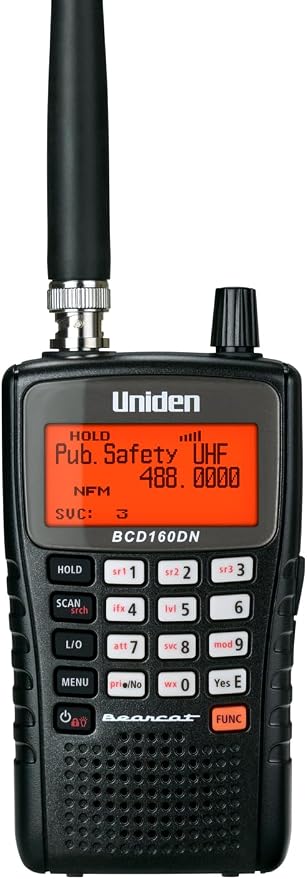
Standing out for its advanced digital decoding capabilities, the Uniden Bearcat BCD160DN is tailored for those who want to catch a wide range of signals without dealing with trunking systems. Its speed in detecting tones and codes makes it exceptionally efficient for anyone serious about scanning digital radio communications.
Setting it up involves connecting via USB and updating the firmware for full functionality, including APCO P25 Phase 1 & 2 decoding. During daily use, features like the Band Scope and Rapid System/Channel Number Tagging simplify finding and organizing broadcasts.
Instant decoding of CTCSS tones and DCS codes saves time and gives quick access to system settings without guessing.
Performance is solid for conventional digital signals, capturing DMR and NXDN almost instantly. Its build feels durable, easy to hold for extended periods, and responsive in operation.
The standout feature is really how quickly it decodes digital signals, while the biggest drawback comes from no support for trunking or encrypted channels, limiting its use in more complex radio systems.
Fast detection and display of digital signals is widely praised, making it quick to identify frequencies and systems. On the downside, many users note the limitation that trunking signals and encrypted channels cannot be decoded, which narrows its effectiveness for some scanning needs.
Ideal for hobbyists focused on simple conventional digital radio scanning who appreciate fast tone decoding. Not a good choice for those requiring comprehensive trunking system coverage or encryption decoding capabilities.
Pros
- Instant CTCSS and DCS code detection
- Supports multiple digital standards out of the box
- Includes Band Scope for faster signal discovery
- USB connection for easy updates
Cons
- No trunking system support
- Cannot decode encrypted signals
| Specification | Details |
|---|---|
| Scanner Type | Radio Scanner |
| Connection Type | USB |
| Digital Decoding Support | DMR, NXDN, APCO P25 Phase 1 & 2 (via update) |
| Trunking Support | Not supported |
| Encrypted Signal Decoding | Not supported |
8. Uniden BCD436HP HomePatrol Digital Handheld Scanner

Uniden BCD436HP HomePatrol Digital Handheld Scanner excels at making advanced radio scanning straightforward and accessible, especially for those who want quick setup without programming. It suits people interested in public safety broadcasts, weather alerts, and a range of communication channels, with ease of use as its standout feature.
Getting started requires just entering your zip code, and the TrunkTracker V feature manages complicated scanning automatically. The large display and GPS connectivity help keep track of local transmissions. Daily use is simple thanks to features like Close Call RF Capture and Discover Modes, which detect nearby signals without manual tuning, making it practical for casual listening and emergency monitoring alike.
Scanning moves swiftly at 85 channels per second, covering frequencies from 25 MHz to 1300 MHz. The build focuses on user-friendliness, though it lacks water resistance and operates on 3 AAA batteries lasting about 8 hours. The device receives well in both UHF and other common bands.
Most users find it easy to operate, yet some note the absence of water resistance as a drawback.
Ease of use is the biggest strength, as the scanner works immediately after entering a zip code without programming. The most common complaint concerns its lack of water resistance, which limits use outdoors in wet conditions.
People wanting an entry-level, ready-to-go scanner for public safety and weather will appreciate this model. Those needing a water-resistant option or longer battery life may want to consider alternatives.
Pros
- Easy setup with just zip code input
- Fast scan speed of 85 channels per second
- Large, clear display for easy reading
- Includes weather alerts and GPS features
Cons
- Not water resistant
- Relies on AAA batteries that last about 8 hours
| Specification | Details |
|---|---|
| Number of Channels | 85 |
| Scan Speed | 85 channels per second |
| Frequency Range | 25-512 MHz, 758-824 MHz, 849-869 MHz, 894-960 MHz, 1240-1300 MHz |
| Battery Type | 3 AAA batteries required |
| Battery Life | 8 hours |
| Connectivity | GPS |
9. Uniden BC355N Base/Mobile Scanner

Easy to use and reliable, this analog scanner suits anyone interested in traditional radio frequency monitoring, especially in areas without digital trunking. Its biggest strength lies in Close Call RF Capture Technology, which quickly locks onto nearby signals, making it straightforward to pick up local broadcasts without manual tuning.
Setup involves plugging in the corded electric power source and connecting via USB for computer interaction. The LCD display provides clear information, while the 1-band, 800 MHz frequency range keeps scanning focused and manageable. Internal organization into service banks feels practical for daily use, and Close Call helps you catch transmissions in real-time without constant searching.
Performance meets expectations for an analog-only device, handling local radio frequencies well and reliably tuning into nearby transmitters. Build quality feels solid enough for desk or mobile use, though the reliance on one specific battery type may require attention. Common praise highlights Close Call’s responsiveness, while frequent criticism points to its incompatibility with digital radio systems.
Close Call RF Capture Technology quickly detects nearby analog signals, allowing users immediate access to local broadcasts. The scanner’s main limitation is its inability to pick up any digital radio communications, reducing its usefulness in areas that have switched to digital systems.
Anyone interested in scanning local analog channels will find this scanner straightforward and efficient. Users requiring digital trunking compatibility or multi-band support should look toward digital scanner options from the same brand for broader system coverage.
Pros
- Quick tuning to nearby signals with Close Call technology
- Clear LCD for easy reading
- Wide frequency and service bank coverage
- Simple USB connectivity for setup
Cons
- Cannot monitor digital radio systems
- Requires specific product batteries
| Specification | Details |
|---|---|
| Connectivity Technology | USB |
| Power Source | Corded Electric |
| Radio Bands Supported | 1-Band |
| Frequency | 800 MHz |
| Display Type | LCD |
| Additional Features | Close Call RF Capture Technology, Wide Frequency and Service Bank Support |
10. Uniden BCD325P2 Handheld Digital Scanner

Perfect for anyone wanting wide radio coverage and easy access to local signals, the Uniden BCD325P2 Handheld Digital Scanner stands out with its Close Call RF Capture Technology. It offers efficient scanning across 25,000 channels, making it ideal for radio enthusiasts and professionals tracking local communications.
Setting up the scanner is straightforward thanks to the Quick-Key System Access that allows 100 customizable keys. These make switching between preferred systems fast and convenient during daily use.
GPS compatibility adds value by keeping location-based communication relevant. Close Call technology quickly tunes to the closest active signals, which keeps you in the loop without constantly needing to adjust.
This scanner performs solidly by scanning a vast range of channels and supporting advanced digital formats like APCO Project 25 Phase II. Its construction is practical and tailored for handheld use. Praise often focuses on how reliably it picks up nearby signals, while the most frequent complaint involves the complexity some face when programming the device initially.
Many appreciate how the scanner quickly captures nearby signals without manual tuning, making it very effective in active areas. Users often mention a steep learning curve during programming but find the effort worthwhile once set up properly.
People who need reliable access to a broad range of local radio communications will find this scanner meets those needs well. Those wanting simpler operation or a more vivid display might consider alternative models with easier interfaces or richer screen colors.
Pros
- Scans up to 25,000 channels
- Close Call RF capture for local signals
- Quick-Key System with 100 customizable keys
- Supports APCO Project 25 Phase II systems
Cons
- Programming can be complicated at first
- Black bits color depth limits display richness
| Specification | Details |
|---|---|
| Scanner Type | Radio |
| Connection Type | gps |
| Resolution | 2400 dpi |
| Wattage | 20 watts |
| Media Type | USB |
Best Radio Scanners Comparison Table
| Product | Channels | Frequency Range | Power Source | Additional Features |
|---|---|---|---|---|
| Uniden BC125AT Analog | 500 | 25-54,108-174,225-512 MHz | 2 AA batteries included | Digital Display |
| Uniden SDS200 Digital | – | – | USB | – |
| Whistler WS1025 Analog | – | – | Bluetooth | – |
| Whistler WS1065 Digital | – | – | Wi-Fi | – |
| Uniden SR30C Analog | – | 32000 MHz | USB, Battery-Powered | Close Call, Turbo Search |
| Uniden BCD996P2 Mobile | – | 25 MHz | 12 volts DC | Close Call, TrunkTracker V |
| Uniden BCD160DN Handheld | – | – | USB | – |
| Uniden BCD436HP HomePatrol | 85 | 25-1300 MHz | 3 AAA batteries | Weather Alert |
| Uniden BC355N Base/Mobile | – | 800 MHz | Corded Electric | Close Call, Wide Frequency |
| Uniden BCD325P2 Handheld | – | – | GPS | – |
- Channels500
- Frequency Range25-54,108-174,225-512 MHz
- Power Source2 AA batteries included
- Additional FeaturesDigital Display
- Channels–
- Frequency Range–
- Power SourceUSB
- Additional Features–
- Channels–
- Frequency Range–
- Power SourceBluetooth
- Additional Features–
- Channels–
- Frequency Range–
- Power SourceWi-Fi
- Additional Features–
- Channels–
- Frequency Range32000 MHz
- Power SourceUSB, Battery-Powered
- Additional FeaturesClose Call, Turbo Search
- Channels–
- Frequency Range25 MHz
- Power Source12 volts DC
- Additional FeaturesClose Call, TrunkTracker V
- Channels–
- Frequency Range–
- Power SourceUSB
- Additional Features–
- Channels85
- Frequency Range25-1300 MHz
- Power Source3 AAA batteries
- Additional FeaturesWeather Alert
- Channels–
- Frequency Range800 MHz
- Power SourceCorded Electric
- Additional FeaturesClose Call, Wide Frequency
- Channels–
- Frequency Range–
- Power SourceGPS
- Additional Features–
How to Choose the Best Radio Scanner
Key factors to consider include frequency range, scanning speed, and ease of use, as these affect how effectively you can monitor signals. Choosing the right features prevents frustration and extra costs from buying incompatible or overly complex scanners, ensuring long-term satisfaction.
Frequency Range and Compatibility
Radio signals in some areas cover a wide range of frequencies, including everything from traditional analog transmissions to newer digital formats and trunked systems used by emergency services. Devices with limited frequency ranges often miss important channels, leaving gaps in communication coverage.
Everyday use can quickly become frustrating if local police, fire, or public utility bands are unsupported.
A good scanner covers at least VHF low (around 25 to 54 MHz), VHF high (around 137 to 174 MHz), and UHF (400 to 512 MHz) bands. Support for digital signaling formats like P25 or DMR and trunking protocols is necessary for catching modern broadcasts. Compatibility with both local and regional frequencies ensures the device stays useful across different locations.
Scan Speed and Sensitivity
In daily use, the speed at which a device cycles through channels makes a big difference. Slow scanning can cause missed transmissions, especially during short or urgent calls. Fast scan speeds help catch these moments but may also increase power consumption slightly.
Sensitivity impacts how well weak or distant signals come through. A scanner with high sensitivity picks up more transmissions, even from miles away or in difficult terrain.
Balancing scan speed and sensitivity is key; look for a unit that offers adjustable scanning rates and has a good signal-to-noise ratio to avoid constant static interruptions.
Portability and Power Options
Taking a device outdoors or on the go means weight and size truly matter. Bulkier models feel cumbersome over long periods, while smaller, handheld ones fit comfortably in bags or pockets.
Consistent power is also essential; batteries that drain quickly can ruin prolonged listening sessions.
Look for scanners that offer rechargeable batteries along with options for replaceable AA or NiMH packs. This flexibility lets you swap batteries without waiting hours for a recharge. The inclusion of external power options like AC adapters or vehicle chargers extends usage in home or field settings without interruptions.
User Interface and Programming
Programming frequencies by hand can be tedious if the controls are clunky or unintuitive. Clear displays with backlighting and tactile buttons improve the experience, especially in low light conditions. Without these, setup takes longer and mistakes become common.
Software support for programming via PC or mobile apps speeds up the process and allows importing frequency lists. Practical features include searchable memory banks, presets for common channels, and the ability to name memory slots. These reduce the hassle of scanning through dozens of frequencies manually.
Audio Quality and Speaker Performance
Listening through a built-in speaker is part of everyday use. Without clear and loud output, transmissions become difficult to understand, often lost in static or interference. Devices with flat or muffled sound make critical communication frustrating during key moments.
Look for scanners with volume control that reaches at least 90 dB and built-in noise reduction to minimize static. A quality headphone jack or Bluetooth connectivity provides better audio options. Some models even allow equalizer adjustments so users can customize sound settings to personal preferences and environments.
Optimizing Radio Scanner Performance with Advanced Programming Techniques
Programming your radio scanner correctly can significantly improve signal reception and overall performance. Many scanners allow direct input of frequency ranges or specific channels, which helps reduce scan delays and avoids unnecessary scans of irrelevant bands.
Advanced techniques include:
- Utilizing software to manage and update frequencies, which simplifies programming and keeps your scanner current.
- Setting priority channels to return quickly to important transmissions during a scan.
- Grouping similar frequencies together to minimize scan time and improve signal monitoring efficiency.
Proper programming ensures the scanner focuses on desired signals, making it easier to catch transmissions without long wait times. Taking time to learn your scanner’s programming features can make a big difference in real-world use.
Essential Maintenance Tips to Extend the Life of Your Radio Scanner
Regular maintenance helps keep a radio scanner working reliably over the years. Battery care is crucial; removing batteries when storing the device prevents corrosion and power drain.
Other key maintenance tips include:
- Cleaning connectors and antenna ports periodically with a soft brush or contact cleaner to maintain good electrical contact.
- Storing the scanner in a dry, cool place away from dust to protect internal circuitry.
- Checking cables and antennas for wear or damage before use to avoid weak reception or shorts.
Simple upkeep like this prevents common issues and extends scanner life, keeping it ready to use whenever needed.
Comparing Radio Scanners to Software-Defined Radio Alternatives
Radio scanners and software-defined radios (SDRs) serve similar purposes but operate differently. Traditional scanners scan selected frequency bands with hardware designed for specific ranges, while SDRs convert radio signals into digital data for processing on a computer or mobile device.
Differences to consider:
- Scanners are generally plug-and-play with dedicated controls, making them easier to use without extra equipment.
- SDRs offer more flexibility by covering wider frequency ranges and allowing advanced digital signal processing but require compatible software and hardware.
- SDRs often depend on a computer or smartphone, which can add complexity and reduce portability compared to standalone scanners.
Choosing between the two depends on your comfort with technology, portability needs, and interest in signal analysis capabilities.
People Also Asked
How Do I Properly Care for a Radio Scanner?
Keep your radio scanner clean and dry, storing it away from dust and moisture. Using a soft cloth to wipe it down regularly can prevent dirt damage. Avoid dropping it because internal components are sensitive.
What Size Radio Scanner Is Suitable for Beginners?
A handheld radio scanner is usually best for beginners due to its portability and straightforward controls. It also allows easy scanning of different frequencies without complex setup.
Is Using a Radio Scanner Safe for Everyday Use?
Using a radio scanner for everyday listening is generally safe as long as you follow local laws about scanning certain frequencies. Always avoid transmitting unless you have a license.
How Long Does a Typical Radio Scanner Last?
A well-maintained radio scanner can last many years, sometimes over a decade. Battery life is often the first to decline, so replacing or using rechargeable batteries extends usability.
What Are Common Problems with Radio Scanners and Solutions?
Common issues include poor reception and difficulty programming channels. Checking the antenna connection and using updated frequency lists often solves these. Resetting to factory settings also helps clear glitches.
Conclusion
Choosing a radio scanner means focusing on scan range, ease of use, and the types of frequencies it covers. Those three factors will shape how well the scanner fits your needs and how clear the audio will be. A scanner with a simple interface and reliable reception usually makes the experience better.
Think about where you’ll use the scanner most and how much you want to spend before making a choice. For everyday use, something easy to carry and quick to program works best. Take another look at the comparison table and the picks above to match a model to your setup and preference.