Top 10 Best SHTF Scanner You Can’t Live Without Today
Many who rely on the best shtf scanner know the frustration of slow response times and unreliable reception during critical moments. Cheaper or poorly made scanners often suffer from limited frequency ranges or short battery life, leaving vital information unnoticed. A scanner that misses emergency broadcasts or has a fragile build can become more of a liability than an asset in survival situations.
Key features that distinguish a good shtf scanner include strong, clear reception across a wide frequency range, typically from around 25 MHz to 1.3 GHz, which covers most emergency and public safety bands. Battery life is crucial; look for models that run on replaceable batteries or can connect to external power sources, lasting at least 8-10 hours. Durable construction with a weather-resistant casing makes a difference when using the device outdoors in unpredictable conditions.
Need a Quick Check?
| Image | Product | Price |
|---|---|---|
Our Top Picks 1  | MUNBYN N6803FR Scanner | Check Price |
Our Top Picks 2  | Farset F7-WiFi Scanner | Check Price |
Our Top Picks 3  | Uniden SDS100 Scanner | Check Price |
Our Selected Top 10 Shtf Scanner You Can Trust
This selection features reliable emergency scanners designed for various situations, offering detailed insights into each model’s performance and user suitability. You will discover the strengths and weaknesses to help determine which scanner best meets your specific communication and monitoring needs.
1. MUNBYN N6803FR Handheld Barcode Scanner
Scanning items at various distances can be a hassle without the right tool. Ideal for warehouses, retail, or logistics workers, this handheld scanner tackles near to far-range scans up to 10 meters with ease. Its standout feature is the versatile scanning range, helping to speed up tasks and reduce wrist strain during long shifts.
Setup is straightforward, thanks to its compatibility with many devices like desktops, laptops, smartphones, and tablets. Staying powered is easy too, with a single rechargeable lithium-ion battery included.
Daily use involves connecting via USB cable or Wi-Fi, giving flexibility depending on where you need to scan. Handling the scanner feels comfortable, supporting quick movement between distances without needing to swap devices.
It reads barcodes clearly from close up to 30 feet, allowing for efficient work across different environments. The build is solid and durable enough for busy warehouse or retail settings. Many users appreciate how well it manages various scanning distances, but some note that battery life could be better for extended heavy use.
It balances performance with durability quite well.
Users praise the wide scanning range that supports near, mid, and far distances, making it easier to handle different work environments without switching tools. The most noted downside is the battery life not lasting through long, intense scanning sessions.
This model suits people who need flexible scanning distances and compatibility with various devices, especially in warehouses or retail. Those requiring longer battery life or fully wireless operation might consider other options.
Pros
- Scans effectively from near to far range
- Works with many device types
- Battery included and rechargeable
- Multiple connectivity options
Cons
- Battery life may be short during heavy use
- Not fully wireless without USB cable
| Specification | Details |
|---|---|
| Compatibility | Desktop, Laptop, POS, Smartphone, Tablet |
| Power Source | Battery Powered |
| Connectivity Technology | USB Cable, Wi-Fi |
| Number of Batteries | 1 Lithium Ion (included) |
| Scanning Range | Up to 10 meters (30 feet) |
2. Farset F7-WiFi Android Barcode Scanner
Running on Android 14 with GMS support, this scanner fits well in busy warehouses or retail settings that rely on popular inventory apps. Its biggest strength is compatibility with business software like Zoho Inventory and inFlow Inventory, making it ready for tough inventory or logistics jobs.
Setting it up is straightforward since it runs Android 14 and connects over Wi-Fi, Bluetooth, USB Type-C, or GPS. You get a physical SCAN button to handle frequent barcodes with one hand, which helps in fast-paced environments.
The included 9V battery means it’s ready to go without hunting for power sources, and it fits into existing Android-compatible workflows easily.
The SE6100 scan engine handles 1D, 2D, and QR codes accurately across different surfaces. It’s built solidly for daily warehouse or retail use, with a real angle of view of 40 degrees helping capture codes quickly.
Most praise focuses on reliable scanning performance, while some mention the battery type as a downside since it uses a 9V instead of rechargeable options.
Reliable scanning of 1D, 2D, and QR codes stands out as a strong point while the requirement for a 9V battery instead of rechargeable power tends to cause inconvenience. The device consistently performs its core job in busy inventory and logistics workflows.
Those needing quick deployment and broad app compatibility will appreciate this scanner. People preferring rechargeable power sources or longer battery life should consider other models better suited to those needs.
Pros
- Supports multiple popular business apps
- Physical button for easy one-handed scanning
- Runs latest Android 14 platform
- Multiple connectivity options including Wi-Fi and Bluetooth
Cons
- Uses 9V battery instead of rechargeable option
- Some find battery replacement inconvenient
| Specification | Details |
|---|---|
| Operating System | Android 14 with GMS |
| Scan Engine | SE6100 1D/2D/QR |
| Connectivity | Bluetooth, GPS, USB Type-C, Wi-Fi |
| Power Source | 1 9V battery (included) |
| Angle of View | 40 degrees |
3. Uniden SDS100 Digital Handheld Scanner
People looking for a handheld scanner that handles both digital and analog signals well will find this one practical. It suits those who want reliable reception in tricky radio environments. The biggest strength is how well it picks up weak signals and manages digital trunked systems with accuracy.
Getting started is straightforward by just entering a zip code, which helps program the scanner with nearby radio systems quickly. The customizable color display makes it easy to find the information you want without clutter. Daily use involves updating the database often via USB and Sentinel software, keeping you in tune with the latest radio activity without fuss.
The scanner performs better than many others, especially in areas where signals overlap or are weak, making it dependable for emergency or situational monitoring. Built solidly for handheld use, it is designed to last but some users mention it can be tricky to program for beginners despite the zip code option. The battery life isn’t highlighted but the overall build feels durable and well-made.
Uniden SDS100 offers clear digital reception, especially in areas with weak signals or tricky radio environments. Its True I/Q receiver improves scanning quality compared to older models. Programming is straightforward since entering a zip code will import local radio systems, though some find the menu navigation a bit slow and the screen colors not as bright in daylight.
People needing a reliable scanner for emergency preparedness or hobby scanning will appreciate the accurate database and digital clarity. Those wanting quick channel switching or a simple radio might prefer something less complex and more user-friendly. The SDS100 fits best with users willing to spend time learning its features for better radio monitoring.
Pros
- Improved digital performance in challenging RF areas
- Customizable color display for easy information access
- HomePatrol database includes US and Canada systems
- Weekly database updates keep scanning current
Cons
- Programming can be complicated for some users
- No mention of battery life specifics
| Specification | Details |
|---|---|
| Scanner Type | Digital Handheld Scanner |
| Connection Type | USB |
| Resolution | 24 Bits |
| Color Depth | 24 |
| Media Type | MicroSD Card |
4. Uniden Bearcat BCD160DN Digital Scanner
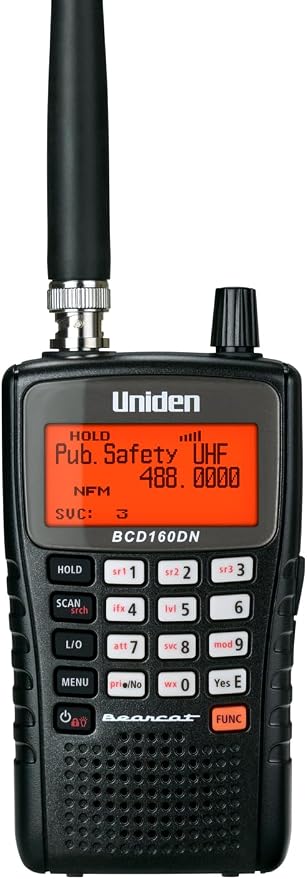
Uniden’s Bearcat BCD160DN stands out with its quick detection of digital and analog signals, making it ideal for anyone serious about scanning for local radio activity. It suits those who want precise decoding of DMR, NXDN, and with updates, APCO P25, focusing on conventional signals without trunking complexity.
Setup involves USB connection and installing the software to manage channels, which is straightforward. The Band Scope lets you scan large frequency ranges rapidly, and the Rapid System/Channel Number Tagging simplifies organizing signals by name or number.
Day-to-day use relies heavily on the instant decode of tones and signals, speeding up identification and minimizing time spent tuning.
Performance is reliable when scanning conventional digital and analog signals, decoding codes promptly. The build quality feels solid yet compact enough for desk use. Quick tone detection is often praised, but the lack of trunking support limits scanning complex public safety or commercial systems, which may frustrate some users.
The scanner’s ability to quickly decode both analog and digital tones is its biggest strength, making signal identification smooth and quick. Most users find the lack of trunking support limiting, especially for those wanting to monitor more complex communication systems.
People looking for straightforward conventional scanning and strong digital tone detection will be satisfied with this scanner. Those needing trunking capabilities or encrypted signal decoding should look for alternatives better suited to advanced system monitoring.
Pros
- Instantly detects CTCSS and DCS tones
- Includes Band Scope for fast frequency scanning
- Supports popular digital formats out of the box
- Free firmware updates add important new decoding
Cons
- No trunking system support
- Cannot decode encrypted signals
| Specification | Details |
|---|---|
| Scanner Type | Radio Scanner |
| Connection Type | USB |
| Digital Decoding | DMR, NXDN, APCO P25 (firmware update) |
| Exclusive Features | Band Scope, Rapid System/Channel Tagging |
| Signal Support | Conventional Digital |
5. Tera HW0009 Wireless Barcode Scanner

Tera HW0009 Wireless Barcode Scanner stands out by offering a customizable screen display that adapts to how you want to work. It’s ideal for anyone needing a flexible, wireless scanning tool compatible with most devices, with easy settings adjustment for language, volume, and connection preferences.
Setting it up is straightforward, with options to connect via 2.4G wireless, Bluetooth, or USB cable, which covers most devices like desktops, laptops, smartphones, and tablets. The included charging cradle and cable keep the battery charged, while the screen lets you track your scanned codes and manage the scanner’s settings without hassle every day.
Scans come through at a rate of 650 codes per second, which handles busy environments smoothly. The build feels solid, backed by a battery-powered design with a lithium-ion battery included. Some praise the customization, but a few mention occasional hiccups with wireless connection stability as the main drawback.
The most praised feature is the customizable screen that lets you adjust language, volume, and connection options with ease. The most common complaint centers around the occasional wireless connection stability, which may interrupt continuous scanning in some setups.
People who need versatility and customization in scanning will find this highly useful. Those who require completely stable connections without interruptions might want to consider other options. It pairs well with a range of devices making it flexible for multiple settings.
Pros
- Customizable screen display settings
- Multiple connection options
- Includes charging cradle and cable
- Compatible with many device types
Cons
- Occasional wireless connection issues
- Scan rate unit is unclear (650 seconds)
| Specification | Details |
|---|---|
| Connectivity Technology | 2.4G Wireless, Bluetooth, USB Cable |
| Compatible Devices | Desktop, Laptop, Smartphone, Tablet |
| Power Source | Battery Powered |
| Batteries Required | 1 Lithium Ion battery (included) |
| Scan Rate | 650 seconds |
6. NETUM Mini Bluetooth Barcode Scanner

Picking up and scanning barcodes feels quick and straightforward with the NETUM Mini Bluetooth Barcode Scanner, making it a solid choice for anyone needing a versatile device that works with multiple gadgets. Its ability to connect in several ways stands out as its biggest strength, fitting a variety of environments and devices.
Setting it up involves choosing between Bluetooth, 2.4G wireless with a USB dongle, or a wired USB connection, allowing you to use it with laptops, phones, tablets, and POS systems. Connection feels reliable within typical distances, and the scanner can operate on battery power or while charging via USB cable, which keeps it ready for long sessions without interruption.
Scanning feels responsive thanks to solid connectivity options, providing smooth barcode reads. The compact design is lightweight enough for daily handling without strain. One highlight is the long transmission range of the 2.4G wireless mode, which reaches up to 100 meters in open space.
A common downside mentioned is a shorter Bluetooth transmission range of about 10 meters in obstructed environments, which may require positioning adjustments.
Reliable scanning and flexible connection options make it easy to match this scanner to different devices and work setups, but Bluetooth connections can struggle when walls or other obstacles interfere. The battery use is generally fine, yet heavy scanners might need more frequent replacements.
People needing a scanner for mixed-device environments and longer wireless ranges will appreciate this model. Those working mostly within Bluetooth range and wanting less battery swap might consider alternatives with extended Bluetooth coverage or rechargeable batteries.
Pros
- Multiple connection modes: Bluetooth, 2.4G wireless, USB
- Supports a variety of devices including smartphones and PCs
- Battery included with option to scan while charging
- Long wireless transmission range with 2.4G mode
Cons
- Bluetooth range limited to 10m with obstacles
- Single battery may require frequent replacement in heavy use
| Specification | Details |
|---|---|
| Connectivity Technology | Bluetooth, USB Cable, wireless |
| Power Source | Battery Powered, Corded Electric |
| Compatible Devices | Smartphone |
| Number of Batteries | 1 Lithium Metal battery required (included) |
| Operating Voltage | 5 volts |
| Transmission Distance (2.4G Wireless) | Up to 100m / 330ft (no obstacles) |
7. Rugged Android Handheld Barcode Scanner

Rugged Android Handheld Barcode Scanner suits anyone needing reliable, tough, and accurate data capture in demanding environments. Its biggest strength lies in combining Android 12 with a solid Octa-Core 2.0G processor and a quick 1D/2D Barcode scanner, ensuring smooth and efficient operation on the go.
Getting started is straightforward, with Android 12 providing familiar navigation and fast app support. Equipped with 4GB RAM and 64GB ROM, it handles Android ERP, WMS, and web-based mobile apps without lag. The ergonomic scanning buttons allow for easy one-handed use, and the cordless design boosts portability while on the move.
The scanner does its job well with rapid and accurate barcode and QR-code recognition, thanks to its 2D scan engine. Built tough to IP66 standards, it resists dust and water, ready for rough use. Reviews highlight reliability in data capture as a major plus, though some users note the bulk from its rugged build as a downside.
High marks come from its accurate and efficient scanning combined with rugged durability. Common complaints focus on its size and weight, which can feel cumbersome during extended use.
Ideal for anyone needing dependable performance in tough work environments like warehouses or outdoor settings. Those prioritizing a lightweight design or wired connectivity should look into other options.
Pros
- Smooth Android 12 experience with fast processor
- Accurate 1D/2D barcode and QR scanning
- IP66 rated for dust and water protection
- Ergonomic single-hand operation buttons
Cons
- Bulkier than lighter handheld scanners
- No wired connectivity options included
| Specification | Details |
|---|---|
| Operating System | Android 12 |
| Processor | Octa-Core 2.0G |
| Memory | 4GB RAM + 64GB ROM |
| Scan Rate | 1280 x 800 pixels mp |
| Power Source | Battery Powered (1 Lithium Polymer included) |
| IP Rating | IP66 (dustproof and waterproof) |
8. TM-10B Bluetooth & USB Barcode Scanner

Compact and cordless, the TM-10B Bluetooth & USB Barcode Scanner fits well in hand and suits users needing versatile barcode reading with wireless freedom. Its biggest strength lies in supporting both 1D and 2D barcodes, making it perfect for diverse scanning tasks beyond basic products.
Setup requires connecting through Bluetooth, 2.4Ghz wireless, or USB cable, offering flexible options depending on your device. Daily use feels straightforward since it works with laptops, tablets, smartphones, and POS systems.
Battery-powered with an included lithium ion cell, it doesn’t tether you to a station, which is handy when moving between items or locations.
Scanning speeds and decoding accuracy are solid for a device in this range, handling common barcode types easily. The build feels sturdy enough for regular handling, though some note the scanner can be a bit bulky for constant one-handed use. Failure to support Square payments limits it in some retail environments, but no issues arise with standard barcodes and QR codes.
The scanner is praised for reliably decoding a wide variety of 1D and 2D codes without confusion. Common complaints focus on its incompatibility with Square and the device’s size making it less comfy for extended, one-handed operation. Most find setup flexible and appreciate the wired or wireless connection choices.
Individuals needing a scanner that handles diverse barcodes across multiple devices will find this a good fit. Those requiring Square compatibility or a more lightweight scanner for constant handheld use should look elsewhere for better options tailored to those specific needs.
Pros
- Supports multiple barcode types including 2D codes
- Wireless options with Bluetooth and 2.4Ghz connectivity
- Works across various devices including smartphones
- Includes rechargeable lithium ion battery
Cons
- Not compatible with Square payment system
- Scanner feels bulky for prolonged handheld use
| Specification | Details |
|---|---|
| Compatibility | Laptop, Desktop, Tablet, Smartphone, POS |
| Power Source | Battery Powered |
| Connectivity Technology | 2.4Ghz Wireless, Bluetooth, USB Cable |
| Number of Batteries | 1 Lithium Ion battery included |
| Barcode Types Supported | 1D and 2D codes, including QR and DataMatrix |
9. Epson Workforce ES-50 Mobile Document Scanner

Lightweight and extremely portable, this single-sheet-fed scanner suits anyone who needs quick document scanning on the go. Its biggest strength lies in its speed, turning a page into a digital copy in just over five seconds.
Setup is simple with a USB connection that works with both Windows and Mac, making it straightforward to get started right away. Handling documents up to 8.5 x 72 inches, it easily fits into a backpack or briefcase without adding bulk.
The included Epson ScanSmart software provides clear options to scan, review, and save without fuss, helping keep things organized without extra steps.
Scanning quality is sharp, with a 1200 dpi resolution that captures detail well for receipts, ID cards, or longer documents. The build is compact and light, perfect for mobile use, though it only handles one sheet at a time, which slows batch work.
Many appreciate how fast it works, but some find the single-sheet capacity limiting for larger scanning tasks.
The scanner is praised for its speed, completing each page scan in just 5.5 seconds. The most frequent downside noted is the limitation of a single-sheet feeder, which can be inconvenient when dealing with multiple pages at once. Users value the convenience of quick results despite this.
Individuals who scan sporadically or need portability will find this scanner well suited to their needs. People with large scanning jobs requiring higher sheet capacity may want to look for different options that handle multiple pages without manual feeding.
Pros
- Very fast single-page scanning
- Compatible with Windows and Mac
- Handles long documents up to 72 inches
- Light and easy to carry
Cons
- Single-sheet capacity slows bulk work
- Only USB connection type available
| Specification | Details |
|---|---|
| Scanner Type | Document |
| Connection Type | USB |
| Resolution | 1200 |
| Standard Sheet Capacity | 1 |
| Optical Sensor Technology | CIS |
| Wattage | 2.1 watts |
10. ScanSnap iX2500 Wireless Document Scanner

Outstanding scanning speed and wireless versatility make this a great pick for busy offices or anyone needing a dependable workhorse scanner. Its main strength is the combination of rapid double-sided scanning and stable Wi-Fi 6 connectivity, allowing you to process large batches of documents with consistent quality.
Setting it up is straightforward with Wi-Fi or USB options, and the large touchscreen lets you pick personalized profiles with ease. Handling 100 sheets in one go saves time during heavy scanning sessions, while automatic image optimization reduces manual adjustments. Sending scans directly to cloud storage or mobile devices works smoothly, suitable for a workflow that involves multiple platforms.
It performs well at 45 pages per minute using CIS optical sensor technology, delivering clear scans up to 600 dpi. The device feels solidly built, supporting various document types including photos and ID cards. Pros often praise the quick menu for easy app integration, though some users report occasional wireless connectivity issues despite the stable setup.
Highly praised for its fast scanning speed and range of document types supported, the scanner reliably produces high-resolution images. Most issues mentioned involve wireless stability hiccups, which can interrupt smooth scanning sessions despite the built-in Wi-Fi 6.
People needing to scan large volumes quickly and send documents to multiple devices will find it useful. Those requiring fully flexible touchscreen controls or very consistent wireless connections might prefer alternative models or wired-only scanners.
Pros
- Fast 45ppm double-sided scanning
- Large customizable touchscreen
- Supports Wi-Fi 6 for quick connections
- 100-sheet automatic document feeder
Cons
- Occasional drops in wireless connection
- Lacks touchscreen customization beyond presets
| Specification | Details |
|---|---|
| Scanner Type | Document, Business Card, Photo, Receipt, ID Card, Insurance Card |
| Connection Type | USB, Wi-Fi |
| Resolution | 600 dpi |
| Standard Sheet Capacity | 100 |
| Wattage | 17 watts |
Best SHTF Scanners Compared Side by Side
| Product | Compatible Devices | Power Source | Connectivity Technology | Number of Batteries |
|---|---|---|---|---|
| MUNBYN N6803FR Scanner | Desktop, Laptop, POS, Smartphone, Tablet | Battery Powered | USB Cable, Wi-Fi | 1 Lithium Ion |
| Farset F7-WiFi Scanner | Warehouse Systems, Android Apps | Battery Powered | Bluetooth, GPS, USB-C, Wi-Fi | 1 9V |
| Uniden SDS100 Scanner | – | – | USB | – |
| Uniden Bearcat BCD160DN | – | – | USB | – |
| Tera HW0009 Wireless Scanner | Desktop, Laptop, Smartphone, Tablet | Battery Powered | 2.4G Wireless, Bluetooth, USB | 1 Lithium Ion |
| NETUM Mini Bluetooth Scanner | Smartphone | Battery Powered, Corded | Bluetooth, USB, Wireless | 1 Lithium Metal |
| Rugged Android Scanner | Desktop, Laptop, POS, Smartphone, Tablet | Battery Powered | Wireless | 1 Lithium Polymer |
| TM-10B Bluetooth Scanner | Laptop, Desktop, Tablet, Smartphone, POS | Battery Powered | 2.4Ghz Wireless, Bluetooth, USB | 1 Lithium Ion |
| Epson ES-50 Scanner | – | – | USB | – |
| ScanSnap iX2500 Scanner | – | – | USB, Wi-Fi | – |
- Compatible DevicesDesktop, Laptop, POS, Smartphone, Tablet
- Power SourceBattery Powered
- Connectivity TechnologyUSB Cable, Wi-Fi
- Number of Batteries1 Lithium Ion
- Compatible DevicesWarehouse Systems, Android Apps
- Power SourceBattery Powered
- Connectivity TechnologyBluetooth, GPS, USB-C, Wi-Fi
- Number of Batteries1 9V
- Compatible Devices–
- Power Source–
- Connectivity TechnologyUSB
- Number of Batteries–
- Compatible Devices–
- Power Source–
- Connectivity TechnologyUSB
- Number of Batteries–
- Compatible DevicesDesktop, Laptop, Smartphone, Tablet
- Power SourceBattery Powered
- Connectivity Technology2.4G Wireless, Bluetooth, USB
- Number of Batteries1 Lithium Ion
- Compatible DevicesSmartphone
- Power SourceBattery Powered, Corded
- Connectivity TechnologyBluetooth, USB, Wireless
- Number of Batteries1 Lithium Metal
- Compatible DevicesDesktop, Laptop, POS, Smartphone, Tablet
- Power SourceBattery Powered
- Connectivity TechnologyWireless
- Number of Batteries1 Lithium Polymer
- Compatible DevicesLaptop, Desktop, Tablet, Smartphone, POS
- Power SourceBattery Powered
- Connectivity Technology2.4Ghz Wireless, Bluetooth, USB
- Number of Batteries1 Lithium Ion
- Compatible Devices–
- Power Source–
- Connectivity TechnologyUSB
- Number of Batteries–
- Compatible Devices–
- Power Source–
- Connectivity TechnologyUSB, Wi-Fi
- Number of Batteries–
How to Choose the Best SHTF Scanner
Choosing the right SHTF scanner involves considering signal range, scanning speed, and ease of use, as these factors ensure reliable communication during emergencies. Prioritizing these features helps avoid costly upgrades and frustration, making your investment more efficient and dependable when it matters most.
Frequency Range and Coverage
In an emergency, finding the right channel can mean the difference between getting crucial information and being left in the dark. Scanners that cover both VHF and UHF bands provide access to a broad array of public safety and emergency communications. Many agencies use trunked or digital systems, so a device that supports these is essential to avoid missing important transmissions.
A scanner limited to just one band or unable to handle trunked systems often results in frustration and gaps in coverage. Practical units typically span roughly 25 MHz to 512 MHz, covering police, fire, EMS, aviation, and even weather frequencies.
Look for models that explicitly list support for digital modes such as APCO P25, which are common in modern emergency services.
Scanning Speed and Performance
A slow scanner can cause anxiety, especially when trying to catch a fleeting message during a crisis. Good scanners scan hundreds of frequencies per second, so active transmissions pop up quickly without wasting time.
Memory capacity matters too; keeping a large database of frequencies stored locally prevents lag from constant reprogramming.
Search functions that efficiently skip empty or junk channels reduce dead air waiting and improve chances of hearing something critical. Units with at least a few thousand memory channels and rapid scan rates of 300+ channels per second tend to perform well in the field.
Portability and Power Options
Emergency situations often require a scanner that can be carried around easily. Models that weigh just a few hundred grams and have a compact footprint fit comfortably in a backpack or belt pouch.
Power options affect endurance; scanners with rechargeable batteries plus USB or car adapter options extend usability when wall outlets aren’t available.
Battery life fluctuates with display brightness and scan activity, but a solid unit should last 8 to 12 hours of steady use on a full charge. Having multiple charging pathways and swappable batteries can reduce downtime during long outages or off-grid emergencies.
User Interface and Ease of Use
During tense or low-light scenarios, fumbling with controls is not an option. Scanners designed for quick operation use clearly labeled buttons and menus that users can memorize easily. Display readability benefits from backlighting and high contrast to ensure you don’t miss frequency or signal strength details.
Audio should come through clearly, with volume that can be adjusted swiftly. Programmability allows pre-loading local emergency frequencies, customizing alerts, and setting priority scanning.
This customization helps avoid distractions and directs attention to the most critical channels in your area.
Durability and Build Quality
Dropping a scanner or exposing it to rain is common in urgent outdoor situations. Devices built with sturdy plastics or metal frames resist damage from shocks and falls. Some have an IP rating indicating dust and water resistance, which adds reliability during rough use or adverse weather.
Antennas designed to stay connected and tuned despite movement or jostling make a big difference. Quality connections and flexible, rugged antenna materials help maintain consistent reception, so you catch transmissions even while on the move or in challenging environments.
Effective Usage Strategies to Maximize Your SHTF Scanner’s Performance
Setting up your SHTF scanner properly ensures you catch critical signals during emergencies. Start by programming frequencies that local emergency services use, including police, fire, and medical channels.
Place the scanner in a location with minimal interference, preferably near a window or elevated spot, to improve reception.
- Regularly update your scanner’s firmware for better functionality and bug fixes.
- Use priority channels to monitor the most important frequencies continuously.
- Adjust squelch and volume levels for clear audio without constant background noise.
- Test your device in different areas to identify where the signal is strongest.
Taking advantage of features like scanning delay and locking out irrelevant channels saves time and helps focus on urgent transmissions. Frequent practice with your scanner also familiarizes you with its controls, making quick adjustments during stressful situations easier to handle.
Maintenance and Care Tips to Extend the Lifespan of Your SHTF Scanner
Keeping an SHTF scanner clean and well-maintained ensures it works reliably when needed. Wipe down the exterior regularly with a soft cloth free of abrasive cleaners to remove dust and grime.
Avoid exposing the device to moisture and extreme temperatures, which can damage internal components.
- Check antenna connections for tightness to prevent signal loss over time.
- Store the scanner in a protective case when not in use to shield it from bumps and scratches.
- Replace batteries promptly and consider using rechargeable options to avoid leakage and corrosion.
- Periodically test all functions, including scanning and channel memory, to catch issues early.
Routine care like this greatly extends the lifespan of your scanner, ensuring it remains dependable well after purchase.
Comparing SHTF Scanners with Alternative Communication Devices for Emergency Preparedness
SHTF scanners specifically pick up a wide range of radio frequencies, which some alternative devices cannot. Handheld radios and CB radios often have limited channels and focus on two-way communication. Smartphones rely on cellular networks, which might fail during disasters or when coverage is poor.
- SHTF scanners can monitor multiple emergency services simultaneously without active transmission needed.
- Unlike ham radios, scanners don’t require a license to operate, making them accessible to more users.
- Satellite phones offer reliable communication in remote areas but tend to be expensive and depend on battery life.
- Traditional radios may work well within small groups but lack the broad scanning capability important for situational awareness.
Choosing a scanner provides passive listening to a variety of channels, which is valuable for staying informed during emergencies alongside other communication tools.
People Also Asked
How Do I Properly Care for My SHTF Scanner?
Keep the scanner clean and dry, especially the antenna and connectors. Avoid dropping it and store it in a protective case when not in use to prevent dust or moisture damage. Regularly check battery contacts for corrosion and recharge or replace batteries as needed to maintain proper function.
What Size SHTF Scanner Is Suitable for Everyday Carry?
A compact scanner around 5 to 7 inches fits well in a backpack or belt pouch without adding too much bulk. Look for lightweight models that still offer good battery life to make carrying feasible over long periods. This size is practical during travel or outdoor activities.
Is Using a SHTF Scanner Safe in All Environments?
The scanner itself is generally safe, but strong electromagnetic interference, such as near high-power machinery or some medical devices, can affect its performance. Stay cautious in cramped, metallic environments where the signal may drop or fail completely. Some weather conditions might also reduce reception quality.
Are SHTF Scanners Compatible with Other Emergency Gear?
Most scanners work well alongside radios, GPS units, and emergency lighting, as long as they operate on non-interfering frequencies. Check that your scanner’s battery or power supply can be recharged using your other gear’s energy sources like solar chargers or power banks for convenience.
What Common Problems Should I Expect with SHTF Scanners?
Common issues include battery drain, antenna damage, and difficulty maintaining clear signals in built-up or remote areas. Loose connections or worn buttons can also appear over time. Regularly testing the scanner and having spare batteries or parts helps prevent unexpected failures.
Conclusion
Choosing the right SHTF scanner comes down to a few important factors: range, durability, and ease of use. A scanner with good range helps catch more frequencies, while a sturdy build ensures it holds up in tough conditions.
Controls should be straightforward since complicated setups slow down your response.
Think about where you’ll keep the scanner and how often you’ll use it before making a choice. A more affordable, compact option might work fine for occasional use, while regular users may need a larger device with advanced features.
The comparison table above lays out these details clearly to help you decide which scanner fits your needs and budget.