
Top 12 Best Trail Camera SD Card Viewer You Need Now!
Many trail camera users have faced the frustration of trying to view memory cards, only to find the device incompatible or prone to glitches. A poorly chosen best trail camera sd card viewer can corrupt files or fail to display images correctly, spoiling hours or days of footage. This problem often happens because the viewer does not support the specific SD card speed or format used by the camera, leading to slow transfers or unreadable data.
A reliable trail camera SD card viewer typically supports SD, SDHC, and SDXC cards, covering capacities up to 256GB or more. The connection interface, such as USB 3.0 or USB-C, significantly affects transfer speed, with USB 3.0 offering around 5 Gbps for quick access to photos and videos. Durability also matters; a compact, well-built viewer made from sturdy materials withstands trips in rough outdoor conditions.
A simple interface with clear buttons makes handling files straightforward and easy to understand.
Need a Quick Check?
| Image | Product | Price |
|---|---|---|
Our Top Picks 1  | Muddy CRV3 Viewer | Check Price |
Our Top Picks 2  | Stealth Cam LCD Reader | Check Price |
Our Top Picks 3 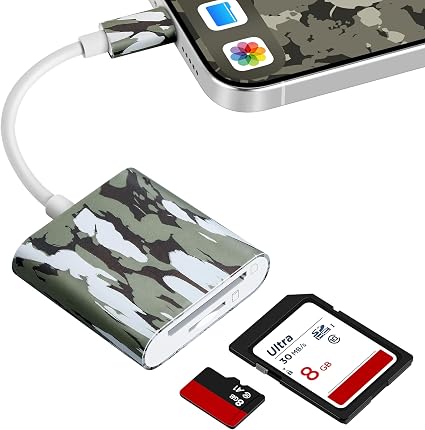 | Trail Camera USB-C Viewer | Check Price |
Our Selected Top 12 Trail Camera Sd Card Viewer You Can Trust
This list features carefully chosen trail camera SD card viewers designed for easy image access and management. Each review covers performance, ideal users, and key advantages and drawbacks to help you find a reliable and efficient tool for viewing your trail camera footage.
1. Muddy CRV3 HD SD Card Viewer
Muddy CRV3 HD SD Card Viewer is designed for anyone who wants clear, on-the-go viewing of images and videos stored on SD cards. Its standout feature is the 4.3-inch color LCD screen that offers sharp, high-definition visuals, making it easier to check your trail camera captures without needing a computer.
Setting up the viewer involves simply inserting the SD card, which it supports up to 32GB. The screen brightness and volume are adjustable, so you can customize the viewing experience depending on your environment. It plays back video in 1080P resolution, offering detailed footage.
Being portable and durable, it fits comfortably into outdoor activities where quick playback is needed.
The viewer does a solid job displaying images and videos with great clarity on the 4.3-inch screen. It feels well-built enough to handle outdoor use without being bulky.
The best feature people notice is the sharpness of the display. On the downside, some users find the single SD card slot limiting when handling multiple cards.
The viewer gets strong praise for delivering crisp and detailed images and video playback on a compact screen, which makes checking trail camera footage straightforward. On the flip side, its single SD card slot and 32GB capacity limit the handling of larger collections or multiple cards during extended trips.
People who only need a simple, portable way to view and play back SD card contents will appreciate this viewer. Those dealing with larger storage needs or multiple cards might want to consider options with bigger capacity and more card slots.
Pros
- Clear high-definition 4.3-inch color screen
- Supports 1080P video playback
- Portable and durable build
- Adjustable brightness and volume
Cons
- Only one SD card slot
- Limited to SD cards up to 32GB
| Specification | Details |
|---|---|
| Media Type | SD Card |
| Connectivity Technology | Micro USB |
| Video Playback | 1080P |
| Screen Size | 4.3-inch color LCD |
| Max Card Capacity | 32GB |
2. Stealth Cam SD Card Reader with LCD Screen
Using the Stealth Cam SD Card Reader with LCD Screen feels straightforward and practical, especially for people who spend time outdoors capturing wildlife. Its biggest draw is the clear LCD screen, letting you check your photos and 1080P videos right away without needing extra devices. This makes it ideal for quick reviews in the field.
Setup involves simply inserting your SD card and connecting through the Micro USB interface. The durable rubberized buttons handle frequent pushing without wearing down, and the water-resistant casing means you’re safe from dust, snow, or rain. Managing images by viewing and deleting directly on the device adds convenience when space is tight, saving trips back to a computer.
Image and video playback is good for a small, portable viewer, giving a sharp look at your data right on-site. The rugged, waterproof design handles tough weather well, offering reliable protection.
Praise often points to its ability to work through rough conditions. Some mention the screen size could be larger for easier viewing, but it stays functional and tough.
The biggest strength lies in the rugged design and reliable image management capabilities, allowing users to view and delete content easily while outdoors. Most complaints focus on the LCD screen size, which some find a bit small for comfortable viewing during long sessions.
People needing a sturdy, portable viewer for SD cards in outdoor or rough environments will appreciate this model. Those requiring compatibility with multiple card types or a larger display might want to look for other options.
Pros
- Clear 1080P video playback on LCD screen
- Durable, waterproof housing for outdoor use
- Manage images with view and delete options
- Portable and easy to carry in the field
Cons
- LCD screen size could be larger
- Limited to SD cards only
| Specification | Details |
|---|---|
| Media Type | SD Card |
| Connectivity Technology | Micro USB |
| Additional Features | Durable, Portable, Waterproof |
| Compatible Devices | Camera |
| Hardware Interface | USB |
3. Trail Camera Viewer USB-C for iPhone and Android
Perfect for hunters and outdoor enthusiasts, this Trail Camera Viewer USB-C works directly with iPhones, MacBooks, and Android devices. Its biggest strength lies in real-time file management that allows you to view and manage your trail camera captures instantly without any extra apps or Wi-Fi.
Setting up takes seconds as it plugs directly into any USB-C port. No need for complicated software or connection steps means you can quickly check photos and videos on the spot. It supports deleting and sharing files right away, making daily use straightforward whether you’re in the field or reviewing data at home.
It handles file viewing and management smoothly with reliable wired connectivity. The device feels compact and solid, built to be a simple accessory rather than a bulky extra. Most praise it for being easy and fast, while some mention connectivity needing OTG support on certain Android phones as a limitation.
The strongest praise highlights how quick and simple it is to view and manage trail camera files without apps or Wi-Fi. The most common complaint concerns needing OTG functionality on certain Android phones for proper use.
Hunters or outdoor users with compatible devices will appreciate this straightforward solution for immediate image access. Those with older phones lacking USB-C or OTG support should consider other options built for more device types.
Pros
- Instant file viewing and management
- No third-party apps or Wi-Fi needed
- Compact and easy to carry
- Works with most trail cameras
Cons
- Requires OTG support on some Android devices
- Only compatible with USB-C ports
| Specification | Details |
|---|---|
| Connectivity Technology | Wired |
| Compatible Devices | Game & Trail Camera |
| Hardware Interface | USB Type C |
| Operating System | Android |
4. LOWDOWN High Speed Trail Camera and Video Viewer

Lightweight plastic construction and a compact 7-inch touch screen make this ideal for those who want quick image viewing from trail cameras in the field. Its standout feature is the QuickView mode, which facilitates fast browsing of multiple photos, perfect for wildlife watchers or hunters needing efficiency.
Setting it up involves simply loading the included SanDisk 32GB Ultra SDHC cards and powering on. Day-to-day use is convenient as the touch screen responds well for switching between three viewing modes: QuickView, FullView, and Slide Show. The IP54 rating adds confidence outdoors, protecting against dust and splashes while you check images at a nearby table or camp setup.
Images load quickly whether browsing eight at once or one by one, making reviewing trail photos smooth without delays. The device is sturdy enough for outdoor use but not fully waterproof.
Most users find the screen size and viewing options highly practical, though some mention the limited waterproof rating as a downside for very wet conditions.
QuickView mode receives strong praise for letting users scroll through images efficiently without lag. The main complaint centers around the IP54 rating, which offers limited water resistance and may be insufficient during very wet outdoor conditions.
Those seeking speedy, tabletop viewing of trail camera photos outdoors in fair weather will appreciate this. People requiring rugged waterproofing or broader device compatibility might consider other options for their remote setups.
Pros
- QuickView mode speeds up image browsing
- Includes two 32GB SanDisk SD cards
- IP54 rating for outdoor protection
- Large 7-inch touch screen
Cons
- Not fully waterproof for heavy rain
- Only compatible with tablets
| Specification | Details |
|---|---|
| Screen Size | 7 inches |
| Controller Type | Touch Screen |
| Waterproof Rating | IP54 |
| Compatible Devices | Tablet |
| Mount Type | Tabletop Mount |
| Light Source | LED |
5. WILDGAME INNOVATIONS Trail Pad Swipe VU60 SD Card Viewer

Compact design catches the eye immediately, making it ideal for quick in-field use. Suited for hunters or wildlife watchers who want to review photos and videos from their trail cameras without fuss. The standout feature is the easy swipe navigation that keeps things simple and fast when checking footage on the spot.
Setup is straightforward, just insert your SD card into the Secure Digital Card slot and power it on via the USB or auxiliary ports. The lightweight, portable build means you can carry it easily on outdoor trips.
Swiping through captured images and videos feels natural and smooth enough to get a quick sense of what your camera has caught without needing a full laptop setup.
Performance-wise, it scans through files quickly and shows images sharply, doing exactly what you expect from a media viewer. The build is solid for a handheld device, made for rugged outdoor use rather than delicate office environments.
Reviews often praise the intuitive swipe control, but some note the screen size could be bigger for easier viewing.
The main praise revolves around how the swipe navigation makes browsing through trail camera content feel quick and intuitive. Commonly mentioned drawback is the relatively small screen, which can make spotting fine details tough right on the device.
Those needing a simple, portable way to check trail camera footage without extra gear will find this convenient. Users wanting a bigger screen or multiple card slots should consider other options better suited for those demands.
Pros
- Compact and lightweight for easy field use
- Simple swipe navigation for quick browsing
- Supports playback of images and videos directly
- Works with standard SD cards
Cons
- Screen could be larger for detailed viewing
- Limited to one SD card slot
| Specification | Details |
|---|---|
| Media Type | SD Card |
| Connectivity Technology | Auxiliary and USB ports |
| Hardware Interface | Secure Digital Card |
| Slot Count | 1 |
| Additional Features | Portable |
| Compatible Devices | Printer |
6. Wildgame Innovations Trail Pad Swipe SD Card Reader

Perfect for anyone who needs to check trail camera footage on the spot, the Wildgame Innovations Trail Pad Swipe stands out by offering a bright LCD screen and simple touchscreen controls without any cords. It suits outdoor enthusiasts who want an easy way to review photos and videos right out in the field.
Setting up is straightforward, you just slip an SD card into the device and it powers up automatically. The touchscreen makes browsing your photos and videos quick, and the compact design fits easily into a backpack. Its lightweight feel and water-resistant housing mean it can handle rugged outdoor conditions without adding bulk or worry about damage.
Performance-wise, it handles displaying files smoothly and keeps everything well-organized on the screen. The housing feels solid and ready for outdoor use, making it reliable for rough conditions.
The best part noted by users is the clear, vibrant display and easy navigation, but some find the single card slot limiting if they want to view multiple cards in one go.
The touchscreen makes reviewing videos and photos quick and simple, even in the field. The device’s rugged build is praised for withstanding outdoor elements. On the downside, some mention the single card slot as a constraint if checking multiple SD cards during one outing.
Those who need a straightforward, durable viewer on their outdoor trips will appreciate how easy it is to use. Anyone wanting to browse several cards at once might want to look for a model with multiple slots or faster file transfer options.
Pros
- Bright, easy-to-use touchscreen
- Compact and lightweight for outdoor use
- Heavy-duty, water-resistant housing
- Includes fast 32GB SDHC cards
Cons
- Only one card slot limits multi-card use
- No cables included or needed for PC connection
| Specification | Details |
|---|---|
| Media Type | SDHC |
| Connectivity Technology | USB Type A |
| Hardware Interface | USB 3.0 Type A |
| Slot Count | 1 |
| Operating System | All operating systems |
7. BoneView USB-C SD Card Reader for Android

Getting quick access to trail camera photos without fumbling through apps or cables makes hunting trips so much smoother. Suited for hunters with the latest USB-C Android phones, the BoneView USB-C SD Card Reader stands out for its instant plug-and-play ability, letting you view and manage SD cards directly on your device.
Setup involves just plugging the reader into your phone’s USB-C port and inserting your trail camera’s SD or microSD card. No extra apps get in the way, and you can swipe through thousands of photos or play supported videos right away. It’s designed to work well even in remote woods where there’s no internet, Wi-Fi, or cell service, and it doesn’t need batteries, which simplifies daily use outdoors.
Performance lives up to the promise with fast data transfer speeds of up to 480 megabits per second, making large photo batches quick to load. Build quality feels solid, with a single card slot that accepts all major trail camera SD cards.
Praise highlights how easily it reads various memory cards without needing extra software. Some mention that it supports mostly Android devices, with no noted compatibility for other operating systems.
The strongest praise comes from its simple, instant use without extra apps or power sources, making it reliable in the field. The main complaint is its limitation to Android devices with USB-C ports, which excludes users on other platforms.
Anyone using a recent Android phone for hunting will find this reader straightforward and dependable for quick photo viewing. Users with iPhones or other non-Android devices should consider alternatives better suited to their systems.
Pros
- Plug and play, no apps needed
- Works without internet or battery
- Supports all major trail camera SD cards
- Fast file transfer speeds
Cons
- Only compatible with Android devices
- Single card slot limits simultaneous use
| Specification | Details |
|---|---|
| Media Type | SDHC, microSD |
| Connectivity Technology | USB Type C |
| Data Transfer Rate | 480 megabits_per_second |
| Slot Count | 1 |
| Operating System | Android |
8. Trail Camera Viewer with Zipper Case for Android

Instantly viewing, saving, and sharing trail camera photos and videos on Android devices is a huge time saver for hunters. Designed specifically for Type-C Android phones, it reads SD and microSD cards from all major trail cameras without the need for extra apps. Its biggest strength lies in truly plug-and-play convenience with fast transfers.
Setup couldn’t be simpler. Just plug the device into your phone or tablet and swipe through photos or play videos immediately.
It supports thousands of images and most video formats with ease. Since it doesn’t need batteries, internet, Wi-Fi, or cell service, it works perfectly wherever the woods take you, making field use straightforward and reliable.
It performs as promised, quickly displaying files from the SD cards without lag or fuss. The zipper case adds practical protection, keeping it safe during outdoor trips.
Praise often points to how fast and easy the transfers are, while complaints occasionally mention limitations with video compatibility on some rare file types, but overall it’s very dependable.
Fast transfer speeds and no app requirements get praised often, making it easy to manage thousands of photos in the field. The most common complaint involves occasional trouble playing certain video formats from trail cameras, which may require workarounds.
Hunters and outdoorspeople with Type-C Android devices looking for simple, offline photo viewing will find this very handy. Those with non-Android phones or needing full video compatibility might prefer a different option.
Pros
- Reads all major trail camera SD and microSD cards
- No extra apps needed, plug and play instantly
- Works without internet, Wi-Fi, batteries, or cell service
- Fast transfer speeds for photos and videos
Cons
- Some video files may not play properly
- Designed only for Type-C Android devices
| Specification | Details |
|---|---|
| Media Type | SD Card, microSD |
| Connectivity Technology | USB Type C, Wireless |
| Additional Features | Plug & Play |
| Hardware Interface | USB |
| Slot Count | 2 |
| Operating System | Android |
9. HME HD SD Card Reader with LCD Screen

People who spend a lot of time out in the field with trail cameras will find the HME HD SD Card Reader with LCD Screen a solid choice for quickly viewing footage on the go. Its biggest strength lies in the clarity of its 4.3-inch screen, which makes reviewing photos and videos from SD cards feel straightforward and convenient.
Setting it up involves simply inserting an SD card (up to 64GB) into the slot, then powering the device through a Micro USB connection. The 4.3-inch LCD screen offers clear playback of full HD videos at 1080P, which is handy when scouting game or checking camera results directly from the card without needing a laptop or phone.
Performance-wise, the device handles video playback smoothly and shows details sharply, making content review easy in the field. It’s portable enough to carry without adding much bulk to your gear. Reviews say it delivers on picture quality but some mention the Micro USB charging can feel a bit dated compared to newer ports.
The device receives high praise for its crisp, full HD video playback that reveals great detail on a compact 4.3-inch screen. A common complaint centers on the Micro USB charging slot, which feels outdated compared to USB-C ports found on newer gadgets.
Anyone needing a simple, portable way to view SD card contents without extra devices will appreciate this reader. Those wanting compatibility beyond SD cards or updated charging options might want to consider alternatives that address these points.
Pros
- 4.3-inch screen shows clear HD images and videos
- Supports SD cards up to 64GB
- Portable design fits easily in field kits
- Micro USB slot for charging or power
Cons
- Limited to SD cards, no other media formats
- Uses Micro USB rather than newer charging ports
| Specification | Details |
|---|---|
| Compatible Devices | SD Cards |
| Form Factor | Cover |
| Compatible Device Size Maximum | 4.3 inches |
| Video Playback | Up to 1080P Full HD |
| Additional Features | Portable |
10. LOWDOWN High Speed Trail Camera and Video Viewer
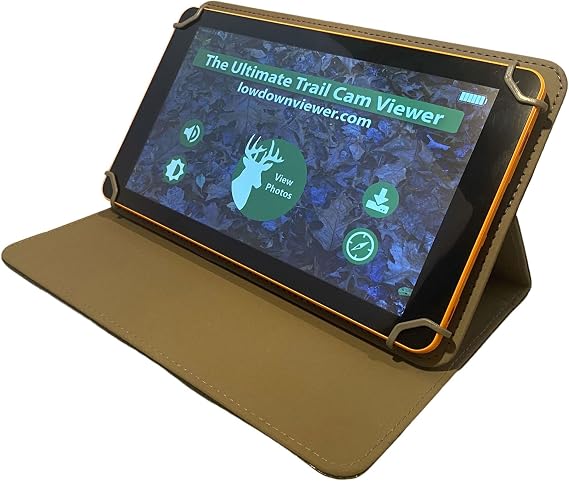
Designed purely for fast, no-fuss viewing of trail cam photos and videos, this viewer suits outdoor enthusiasts who want to check their shots quickly. Its standout feature is how it lets you scroll through large batches of images with ease, saving time without overwhelming the screen.
Setup comes down to inserting your trail camera SD card and powering it on, with no complicated menus to slow you down. QuickView mode displays eight images at once on a bright 7-inch screen, which is slightly bigger than standard.
Switching to FullView gives you one photo or video at a time, with quick loading no matter the chosen mode. Live View lets you preview shots on the spot without transferring files.
Handling images and videos made from your trail cameras feels natural with a 16:9 aspect ratio and an automatic exposure control. Build quality is compact yet sturdy, weighing just 16 ounces in a brown casing. Reviews usually highlight the fast image loading and easy browsing as big pluses.
The most frequent gripe concerns the lack of a camera flash, limiting use in very low light.
Fast image loading and the ability to scroll through multiple photos without lag is the top positive noted repeatedly. The absence of any camera flash is the most common drawback, which might be limiting in darker conditions. Navigation between photos is straightforward and suits those wanting quick results.
People who prioritize speed and simple photo management will find this viewer practical and efficient. Those needing higher video resolution or built-in lighting may want to consider other options that better support those features.
Pros
- Quick loading in both QuickView and FullView modes
- 3 viewing modes including Live View feature
- Compact and lightweight form factor
- Larger screen area than many 7-inch viewers
Cons
- No camera flash for low-light shots
- Video limited to 720p resolution
| Specification | Details |
|---|---|
| Screen Size | 7 inches |
| Video Resolution | 720p |
| File Format | AVI |
| Color | Brown |
| Item Weight | 16 ounces |
| Viewfinder | Electronic |
11. Stealth Cam SD Card Reader and Viewer Bundle

Stealth Cam Browtine 14MP Trail Camera with SD Card Reader-Viewer excels at letting outdoor enthusiasts check trail camera footage on the spot. Ideal for anyone wanting quick image and video viewing in the field, it shines with its intuitive 5 point touch detection and a clear 4.3-inch color LCD screen.
Setting up involves pairing the trail camera with the compact viewer and using the high speed USB 2.0 card reader to access files. Managing your photos and videos is straightforward with the tap-friendly controls that allow easy viewing and quick deletion.
Having wireless connectivity also adds flexibility when moving between locations out in nature.
Image and video display on the screen is sharp and helps identify wildlife without lugging around bulky equipment. The package feels durable enough to handle outdoor conditions, boasting water resistant features. Users praise the smart gestures for navigation, yet some mention the proprietary OS as a slight hurdle for compatibility with other devices.
Smart gesture control makes browsing trail camera images very intuitive on the 4.3-inch screen. The most frequent drawback comes from its proprietary operating system, which can cause hiccups when trying to integrate with other devices or software.
Great for those needing to quickly review and manage outdoor footage without carrying bulky laptops. Users relying heavily on cross-device compatibility might prefer a more universal viewer solution.
Pros
- User-friendly touch controls and gestures
- Compact and water resistant design
- Wireless connection for easy image access
- Clear, vibrant 4.3-inch display
Cons
- Proprietary OS limits compatibility
- Limited to USB 2.0 speeds for card reading
| Specification | Details |
|---|---|
| Sensor Type | CMOS |
| Connectivity Technology | Wireless |
| Special Feature | 5 Point Touch Detection and Smart Gestures |
| Display | 4.3-inch color LCD screen |
| Water Resistance Level | Water Resistant |
| Item Weight | 16 ounces |
12. Trail Camera Viewer for iPhone with Corded SD Reader

Plugging this into your iPhone 15 or newer feels straightforward and quick, especially for checking trail camera photos right on the go. Perfect for anyone who needs fast access without fussing with apps or filling up their phone’s storage.
It stands out for letting you browse and manage images with just your phone’s native Files app.
Setup is just a matter of plugging the corded SD reader into your device’s USB-C port. No software to install, no automatic importing, so you can scroll through images and videos directly from the card.
Saving or deleting files happens instantly without using up your phone’s memory. Daily use stays simple and fast, as long as your device supports USB-C.
Performance is solid for reading SD, SDHC, and microSD cards at a 10 gigabit per second transfer rate with USB 3.0 Type C speeds. The single card slot keeps the design minimal and portable.
The most praised feature is the plug-and-play simplicity with native Apple app support. The main criticism revolves around incompatibility with older iPhones that lack USB-C ports.
The biggest strength is the immediate plug-and-play experience with no software hassle, letting you browse and manage photos straight from your SD card using the native Apple Files app. The most frequent complaint is the strict USB-C compatibility, limiting use to only late-model Apple devices.
This product suits anyone using an iPhone 15 or newer or a USB-C iPad who wants quick, direct access to trail camera files without importing. People with older Lightning port iPhones will need to look for an alternative since this won’t connect with those devices.
Pros
- No third-party apps required, uses native Files app
- Fast 10 gigabit per second data transfer rate
- Direct viewing and managing on SD or microSD cards
- Compact and portable design, easy to carry
Cons
- Works only with USB-C devices, not older iPhones
- Supports single card slot only
| Specification | Details |
|---|---|
| Media Type | SD Card, SDHC, microSD |
| Connectivity Technology | USB Type C |
| Data Transfer Rate | 10 gigabits_per_second |
| Hardware Interface | USB 3.0 Type C |
| Slot Count | 1 |
| Compatible Devices | iPad with USB-C, iPhone 15 and later |
Best Trail Camera SD Card Viewers Comparison Table
| Product | Media Type | Connectivity | Compatible Devices | Additional Features |
|---|---|---|---|---|
| Muddy CRV3 Viewer | SD Card | Micro USB | Printer | Portable, Durable |
| Stealth Cam LCD Reader | SD Card | Micro USB | Camera | Durable, Portable, Waterproof |
| Trail Camera USB-C Viewer | – | Wired, USB Type C | Game & Trail Camera | Game Tracking & Trail Monitoring |
| LOWDOWN High Speed Viewer | – | – | Tablet | Outdoor, Touch Screen |
| Wildgame VU60 SD Viewer | SD Card | Auxiliary, USB ports | Printer | Portable |
| Wildgame Trail Pad Reader | SDHC | USB Type A | Camera | Durable, Compact |
| BoneView USB-C Reader | SDHC, microSD | USB Type C | Camera | Plug & Play |
| Trail Camera Zipper Case | SD Card, microSD | USB Type C, Wireless | – | Plug & Play |
| HME HD LCD Reader | – | – | SD Cards | Portable |
| LOWDOWN Video Viewer | – | – | – | Live View, Compact |
| Stealth Cam Reader Bundle | – | Wireless | – | Water Resistant, Touch |
| Trail Camera iPhone Reader | SD Card, SDHC, microSD | USB Type C | iPad, iPhone | Portable, High Speed |
- Media TypeSD Card
- ConnectivityMicro USB
- Compatible DevicesPrinter
- Additional FeaturesPortable, Durable
- Media TypeSD Card
- ConnectivityMicro USB
- Compatible DevicesCamera
- Additional FeaturesDurable, Portable, Waterproof
- Media Type–
- ConnectivityWired, USB Type C
- Compatible DevicesGame & Trail Camera
- Additional FeaturesGame Tracking & Trail Monitoring
- Media Type–
- Connectivity–
- Compatible DevicesTablet
- Additional FeaturesOutdoor, Touch Screen
- Media TypeSD Card
- ConnectivityAuxiliary, USB ports
- Compatible DevicesPrinter
- Additional FeaturesPortable
- Media TypeSDHC
- ConnectivityUSB Type A
- Compatible DevicesCamera
- Additional FeaturesDurable, Compact
- Media TypeSDHC, microSD
- ConnectivityUSB Type C
- Compatible DevicesCamera
- Additional FeaturesPlug & Play
- Media TypeSD Card, microSD
- ConnectivityUSB Type C, Wireless
- Compatible Devices–
- Additional FeaturesPlug & Play
- Media Type–
- Connectivity–
- Compatible DevicesSD Cards
- Additional FeaturesPortable
- Media Type–
- Connectivity–
- Compatible Devices–
- Additional FeaturesLive View, Compact
- Media Type–
- ConnectivityWireless
- Compatible Devices–
- Additional FeaturesWater Resistant, Touch
- Media TypeSD Card, SDHC, microSD
- ConnectivityUSB Type C
- Compatible DevicesiPad, iPhone
- Additional FeaturesPortable, High Speed
How to Choose the Right Trail Camera SD Card Viewer
Choosing a good trail camera SD card viewer involves considering compatibility with your camera’s memory card type, clear image display, and ease of use. Selecting the right features prevents frustration and wasted time, ensuring smooth viewing and saving money on unnecessary accessories or replacements.
Compatibility with Sd Cards
Many trail cameras save large batches of photos and videos to memory cards, but not all card readers accept every type or size of card. Using a viewer that only supports standard SD cards can be frustrating when the camera uses SDHC or SDXC cards, which often have higher capacities and faster speeds. A suitable device usually handles up to 128GB or 256GB cards, which covers most common uses without constant card swapping.
File system compatibility is important too, as some viewers only read FAT32 but trail cameras sometimes format cards as exFAT or NTFS, especially with larger capacities. This can cause the viewer to fail reading files altogether.
Also, images and videos from trail cameras often come in specific formats and resolutions; a good viewer reads various raw or compressed file types, such as JPEG and certain video codecs, without error. Skipping these details often means wasting time and missing important footage.
Display Quality and Size
Seen a blurry or tiny screen on a card viewer outdoors? It makes checking details like animal markings or small movements nearly impossible.
Most effective viewers have a screen resolution around 800×480 pixels or higher, which provides enough clarity to inspect images and clips without guessing. A screen size near 3 to 4 inches balances portability and comfort; smaller screens force squinting, while larger ones add unnecessary bulk. Direct sunlight can wash out displays, turning them into near mirrors at times; displays with anti-glare coatings or IPS panels improve outdoor readability.
Using a viewer without at least modest brightness control often means stepping into shade every few minutes just to see clearly. Good screen quality saves time and makes onsite decisions straightforward.
Battery Life and Power Options
Power issues surface quickly in the field if a viewer drains batteries in a few hours or uses rare battery types. Common viewers run on AA batteries, which makes replacements easy when away from power sources. Battery life typically ranges from 6 to 12 hours on fresh alkalines but can vary depending on screen brightness and usage frequency.
Models supporting rechargeable NiMH batteries or built-in lithium-ion packs add convenience, as they allow multiple charges and reduce waste. Power-saving modes that dim the screen or enter sleep after inactivity extend runtime considerably.
Changing or recharging batteries shouldn’t require tools or removing complicated parts because in-field swapping happens often when reviewing multiple cards on longer trips.
Portability and Durability
Holding a viewer that’s bulky or flimsy during a long hike can quickly become a nuisance. Compact devices weighing under 8 ounces fit easily in pockets or backpacks without strain.
A sturdy plastic or rubberized case guards against drops, rain, and dust, which frequently occur in outdoor conditions. Some models offer water resistance ratings like IP54, protecting against splashes and light dust intrusion, which means less worry about weather. Textured grips, logically placed buttons, and a well-angled screen contribute heavily to ease of use outside, especially when wearing gloves or working in low light.
Cheap, delicate builds tend to fail quickly, forcing repairs or replacements mid-season.
User Interface and Ease of Use
Many viewers complicate simple tasks with menus buried deep or button layouts that don’t match typical use patterns. Easy-to-use devices offer clear, responsive controls and menu systems navigable with minimal button presses. Quick startup and rapid image loading allow reviewing many photos without long waits, which gets tiresome fast during scouting.
Being able to organize files into folders, zoom to see fine details, or delete unwanted images directly on the device cuts down on post-trip editing. Skipping these features leads to repeated card transfers to a PC just for basic management, which defeats the purpose of a portable viewer designed for efficiency.
Optimizing Trail Camera SD Card Viewer Performance for Faster Image Access
Loading images quickly depends largely on the type and speed class of the SD card used with your trail camera SD card viewer. Cards with higher write and read speeds reduce delays during playback and file transfers.
Using a UHS-I or UHS-II card helps the viewer handle high-resolution photos and 4K videos more efficiently.
Other factors influencing performance include:
- The viewer’s internal processor speed, which impacts how fast it decodes and displays images.
- The quality of the viewer’s card slot and its compatibility with card formats (SDHC, SDXC).
- Avoiding overloaded memory by regularly deleting unnecessary files or using cards with enough capacity to prevent slowdown.
Regular firmware updates for your viewer, if available, can also improve responsiveness by fixing bugs and optimizing software handling of files.
Essential Maintenance Tips to Prolong Your SD Card Viewer’s Lifespan
Keeping your SD card viewer in good condition starts with careful handling. Avoid exposing it to extreme temperatures or moisture, as these conditions can degrade the device’s electronics and screen.
Simple maintenance steps include:
- Cleaning the SD card slot with a soft brush or compressed air to remove dust particles that may cause read errors.
- Gently wiping the screen with a microfiber cloth to prevent scratches and ensure clear image display.
- Safely ejecting the SD card before removing it to avoid data corruption.
- Storing the viewer in a protective case when not in use to prevent physical damage.
Routine care like this helps extend the lifespan of your device and maintains reliable access to your trail camera footage.
Comparing Standalone SD Card Viewers with Multi-Function Devices for Trail Cameras
Standalone SD card viewers offer a simple plug-and-play experience, focusing on quick image review from trail camera cards without extra functions. They usually have a straightforward interface and are budget-friendly.
Multi-function devices, on the other hand, combine viewing with other features such as file management, editing capabilities, or direct camera control. These can be more convenient if you need an all-in-one solution but tend to be bulkier and more expensive.
Choosing between the two depends on your needs: a standalone viewer prioritizes speed and portability, while multifunction models provide versatility at the cost of complexity. For purely reviewing images, standalone SD card viewers usually offer better usability and longer battery life.
People Also Asked
How Do I Properly Care for a Trail Camera SD Card Viewer?
Keep the trail camera SD card viewer clean and avoid exposure to moisture. Wiping the screen gently with a microfiber cloth helps prevent scratches. Storing the device in a dry, dust-free case when not in use extends its lifespan.
What Size SD Card Works Best with a Trail Camera Viewer?
A 32GB to 64GB SD card is a practical size for most trail camera viewers because it balances storage capacity and transfer speed. Larger cards may be unnecessary unless you record high-resolution images or videos continuously for long periods.
Is It Safe to Use a Trail Camera SD Card Viewer Outdoors?
Most trail camera SD card viewers are designed primarily for indoor use and are not weatherproof. To use one outdoors, keep it in a protective case or under shelter to avoid damage from rain or dust.
How Long Does a Typical Trail Camera SD Card Viewer Last?
A typical trail camera SD card viewer lasts about two to four years under regular use. Battery life and screen durability are usual factors that determine how long the device remains functional.
What Are Common Problems with Trail Camera SD Card Viewers?
Common problems include poor screen visibility in bright sunlight and slow response times when scrolling through images. Also, compatibility issues with some SD card brands or files can occur, so testing with your specific cards before extended use helps avoid frustration.
Conclusion
Choosing an SD card viewer for trail cameras comes down to a few key points: compatibility with your camera’s card type, ease of reading and transferring files, and durability for use in outdoor conditions. Having a clear screen or the ability to connect to other devices can also make reviewing your footage easier.
Pick a viewer that fits the space where you’ll use it and aligns with how often you check your cards. Budget is important too; sometimes spending a bit more pays off in reliability.
Take a look at the comparison table and the options above to find the one that suits your needs best.