Top 12 Best Fire Scanners You Absolutely Need Today
Using a fire scanner that fails to keep up with emergency frequencies or that picks up too much static can be more frustrating than helpful. Those relying on the best fire scanners understand the importance of clear, reliable reception without delays or dropped signals, especially in urgent situations. A poorly chosen scanner might miss critical fire or safety alerts, making it less of a tool and more of a liability.
Key factors that set effective fire scanners apart include their frequency range, scan speed, and durability. Good models cover the VHF and UHF bands, often from around 25 MHz up to 512 MHz, to ensure they pick up both fire department and related emergency frequencies.
Fast scan rates, typically measured in channels per second, reduce delays in catching new transmissions. The sturdy build and easy-to-clean surfaces help devices endure outdoor conditions, while clear displays and simple controls make them easier to use in stressful situations.
Need a Quick Check?
| Image | Product | Price |
|---|---|---|
Our Top Picks 1  | Uniden Bearcat BC125AT | Check Price |
Our Top Picks 2  | Uniden BC365CRS Clock Scanner | Check Price |
Our Top Picks 3 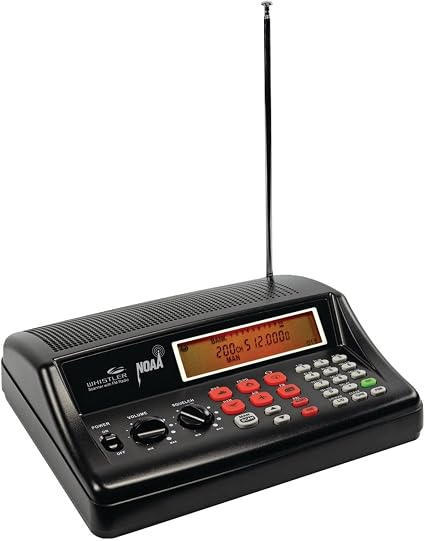 | Whistler WS1025 Analog Scanner | Check Price |
Our Selected Top 12 Fire Scanners for Every Budget
This list features a variety of fire scanners designed to meet diverse needs and budgets. Each review covers performance, suitability for different users, and highlights key strengths and potential drawbacks, helping readers make informed decisions based on their specific requirements.
1. Uniden Bearcat BC125AT Analog Handheld Scanner
Someone interested in analog monitoring of fire, police, or emergency services in areas with traditional radio systems will find this uniden scanner a solid pick. It’s best for those who want a straightforward, compact handheld device with a high channel count without needing digital system coverage.
Setup involves charging up with two included AA batteries, which last about 10 hours before needing replacement, a reasonable runtime for daily use. Programming up to 500 channels is handy, and the Close Call RF capture tunes into nearby transmitters without fuss. The digital display simplifies scanning through frequencies within the typical public safety UHF and VHF bands.
It handles analog signals well and picks up transmissions clearly within its frequency ranges. The build is compact and portable, though it is not water resistant, so care is needed outdoors. Many appreciate the large channel capacity and easy tagging, but the inability to monitor digital trunking systems is a common limitation mentioned.
This scanner is praised for its large channel capacity and quick tuning to nearby analog signals using Close Call RF capture. The main downside is it can only handle analog frequencies, missing out on digital systems, which limits use in areas transitioning to modern public safety networks.
People who want to monitor analog channels reliably in smaller or rural areas will appreciate the BC125AT. Those needing digital or trunked system coverage in major cities should consider a different scanner that supports digital protocols.
Pros
- Supports 500 alpha-tagged channels
- Close Call RF capture technology included
- Compact and easy to carry
- Comes with two AA batteries
Cons
- Not capable of digital system monitoring
- Not water resistant for outdoor use
| Specification | Details |
|---|---|
| Number of Channels | 500 |
| Frequency Range | 25-54 MHz, 108-174 MHz, 225-380 MHz, 400-512 MHz (UHF) |
| Battery Average Life | 10 hours |
| Number of Batteries Required | 2 AA batteries (included) |
| Voltage | 3 volts |
2. Uniden BC365CRS Analog Scanner and Alarm Clock
Uniquely combining a scanner, alarm clock, and FM radio into one device, the Uniden BC365CRS suits someone looking for an easy way to listen in on local emergency channels along with regular radio programming. Its standout feature is the 500-channel capacity with presets that cover police, fire, weather, and more, making staying informed simple.
Setting it up involves plugging it in and selecting channels from the presets or manually tuning to others you prefer. The push-button controls are straightforward for navigating between scanner channels, FM stations, and alarm functions.
Saving up to 30 FM presets is handy for quickly switching between favorite local broadcasts without fuss.
It does a solid job picking up analog signals, giving clear access to non-digital police, fire, and emergency frequencies. The desktop design feels sturdy enough for everyday use, though some find the need for 3 AA batteries inconvenient compared to fully corded models.
Common praise highlights its channel variety, while complaints mention occasional difficulty getting consistent reception on certain bands.
The biggest plus is the extensive preset channel list covering many emergency and public service bands, making it easy to find relevant broadcasts. The most frequent drawback is reception inconsistency, which varies depending on location and signal strength for certain analog frequencies.
People who want a straightforward scanner combined with an alarm and radio on their desktop will appreciate this model. Those needing digital scanning capabilities or flawless reception in weak signal areas might want to consider alternatives better tuned for those needs.
Pros
- 500 channels, including popular emergency presets
- Combines scanner, alarm clock, and FM radio
- Saves up to 30 FM station presets
- Simple push-button controls
Cons
- Requires 3 AA batteries along with corded power
- Reception can be spotty on some frequencies
| Specification | Details |
|---|---|
| Power Source | Corded Electric |
| Number of Channels | 500 |
| Battery Description | Alkaline |
| Number of Batteries | 3 AA batteries required |
| Control Method | Push Button |
| Mounting Type | Tabletop Mount |
3. Whistler WS1025 Analog Desktop Scanner
Whistler WS1025 Analog Desktop Scanner is designed for experienced scanner users who want precise control over their scanning channels. Its standout feature is priority channel scanning, which allows you to keep an eye on a specific channel while scanning others at regular intervals.
Setting up the scanner involves connecting it via Bluetooth and configuring features like the scan delay, which waits two seconds before moving on to the next channel, helping catch any responses. The tune function helps discover new frequencies starting from a set point, making it easy to customize the scan list. The 300-sheet capacity supports plenty of paper if you’re using it for documentation alongside scanning.
The scanner performs solidly as a radio device with a 200 dpi resolution that provides clear frequency scanning. Build quality feels sturdy, with LED light source and modern CCD, CMOS sensors.
Most praise highlights how responsive and accurate the scanning features are. A common complaint involves the delay setting which can slow down scanning more than some expect.
Many appreciate the priority channel feature that lets you monitor a specific frequency without missing it during a scan. Users often find the scan delay helpful for hearing replies, although sometimes it causes slower scanning than preferred. The build supports dependable scanning accuracy with solid sensor technology.
Experienced scanner operators will find the feature set suits their needs well, especially those who value tuning capabilities. Beginners might want to look elsewhere since this model requires some familiarity to unlock its full potential and adjust settings comfortably.
Pros
- Priority channel scanning every two seconds
- Scan delay allows listening to channel replies
- Tune function finds unlisted frequencies
- Bluetooth connection for flexible placement
Cons
- Scan delay can slow channel switching
- Settings more suited to experienced users
| Specification | Details |
|---|---|
| Scanner Type | Radio |
| Connection Type | Bluetooth |
| Resolution | 200 dpi |
| Standard Sheet Capacity | 300 |
| Optical Sensor Technology | CCD, CMOS |
| Light Source Type | LED |
4. Uniden SDS100 True I/Q Digital Handheld Scanner

Scanning local fire and emergency channels feels straightforward and user-friendly, especially for anyone who wants reliable digital reception. Best suited for hobbyists or professionals who need detailed coverage, its biggest strength lies in handling digital signals clearly even in tricky reception areas.
Setup involves entering your zip code, which populates the scanner with relevant radio systems immediately using the HomePatrol database. The color display is customizable, so you can see exactly what matters most.
Updates come through the Sentinel software and happen weekly, keeping your scanner current without fuss. Its USB connection makes transferring data or updating simple and dependable, while storage on a MicroSD card keeps things flexible.
Performance excels in both simulcast and weak-signal environments thanks to the True I/Q receiver, a rare feature in handheld scanners. Built solidly with reliable materials, the device feels sturdy enough for regular use. The strongest praise focuses on its unmatched digital clarity, while some users find programming beyond the initial zip code entry a bit challenging.
Signal clarity is excellent even in weak or complex digital environments, making it reliable for serious scanning. Programming mostly works well but has a learning curve beyond the initial setup with zip code entry.
Those looking for precise, regularly updated digital reception will appreciate this scanner. Users wanting a fully plug-and-play experience with minimal setup might find it less intuitive and might prefer a simpler model.
Pros
- The True I/Q receiver improves digital signal clarity
- Customizable color display for easy information access
- HomePatrol database updated weekly via Sentinel software
- Simple zip code programming for quick setup
Cons
- Advanced programming can be confusing
- Relies on USB connection for updates
| Specification | Details |
|---|---|
| Scanner Type | Digital Handheld Scanner |
| Connection Type | USB |
| Resolution | 24 Bits |
| Color Depth | 24 Bits |
| Media Type | MicroSD Card |
5. Whistler WS1065 Digital Trunking Desktop Scanner

Great for those wanting a reliable desktop fire scanner with clear alerts and smart tracking technology, the Whistler WS1065 stands out mainly for its adaptive digital tracking that keeps up with shifting signals without any manual tuning.
Setting it up is straightforward, especially with its Wi-Fi connection allowing easy updates and remote control. The multi-color LED lets you customize alerts to colors that suit you, making it simple to spot priority messages. Digital AGC means audio adjusts to digital signal changes smoothly, avoiding sudden volume drops during scanning sessions.
Its primary function of decoding P25 signals works well thanks to fast digital tracking and NAC filtering, making it sharp at separating important transmissions from noise. The device feels solid and dependable on a desk.
Some users mention the size and use of paper media as a minor drawback, especially where portability or digital storage would be preferred.
Most praise highlights the scanner’s ability to automatically follow changing digital signals, significantly reducing manual tuning hassle. The common complaint points to the use of paper media, which some find outdated compared to today’s digital storage methods.
The scanner suits enthusiasts wanting a stable, clear desktop setup with minimal tweaking. Those needing portable scanning or digital storage might look for handheld or newer digital scanners instead.
Pros
- Fast adaptive P25 digital tracking
- Customizable Alert LED with 8 color options
- Automatic digital volume adjustment
- Network Access Code filtering keeps noise out
Cons
- Uses paper media instead of digital storage
- Larger desktop footprint limits portability
| Specification | Details |
|---|---|
| Scanner Type | Radio |
| Connection Type | Wi-Fi |
| Resolution | 200 |
| Media Type | paper |
6. Uniden BC355N Base/Mobile Scanner

Plastic housing keeps the Uniden BC355N lightweight and approachable for those seeking a traditional analog scanner. Ideal for fire scanner enthusiasts in areas without digital radio systems, its single biggest strength lies in the Close Call RF Capture Technology that quickly locks onto nearby emergency signals.
Setting it up involves plugging into a power source with its corded electric design and tuning through the LCD display. The one-band 800 MHz frequency coverage focuses on specific analog transmissions, aided by wide frequency and service bank support.
Day-to-day use benefits from USB connectivity for updates and ease of managing scanned frequencies.
Performance centers on sharp reception of analog signals near you, with the Close Call RF Capture routinely picking up transmissions without prolonged searching. The build feels solid enough for desktop or mobile use but is limited by lack of digital scanning capabilities. Praised for simplicity and signal detection speed, some users find its analog-only design restrictive in modern digital signal environments.
The scanner excels at catching analog signals nearby with its Close Call feature, making scanning fast and reliable in analog-only zones. The most frequent drawback lies in the scanner’s inability to pick up digital transmissions, severely limiting its usefulness in areas where emergency services use digital trunking systems.
Anyone living in regions still on analog systems will appreciate the simplicity and efficiency of this scanner. Those needing to monitor digital fire or police channels should look for digital-capable models instead.
Pros
- Quickly tunes to nearby radio signals
- Wide frequency and service bank support
- Lightweight plastic construction
- USB connectivity for updates
Cons
- Not compatible with digital radio systems
- Supports only 1 frequency band (800 MHz)
| Specification | Details |
|---|---|
| Close Call RF Capture Technology | Yes |
| Radio Bands Supported | 1-Band |
| Frequency | 800 MHz |
| Connectivity Technology | USB |
| Power Source | Corded Electric |
| Display Type | LCD |
7. Uniden BCD996P2 Digital Mobile TrunkTracker Scanner

Sharp reception and detailed channel options make the Uniden BCD996P2 ideal for anyone wanting thorough and up-to-date scanning, especially for fire or emergency information. Its biggest strength lies in combining advanced trunk tracking with NOAA weather access, providing reliable alerts and wide coverage.
Setting it up involves plugging into a 12-volt DC power source, which suits vehicle use or a fixed location with the right power. The LCD display makes it easy to browse through 25,000 channels smoothly.
Close Call RF Capture technology quietly detects nearby transmissions without interrupting your listening. Weather alerts with S.A.M.E. give you timely warnings about severe conditions, making daily use straightforward and informative.
It offers solid performance on tracking digital and analog signals via TrunkTracker V technology, catching important transmissions clearly. Build quality is practical with a sturdy design and easy-to-read screen though it’s not water-resistant, so outdoor exposure requires care.
Praised for detailed alerts and solid scanning range, some note the unit’s size can be bulky for small spaces.
Detailed weather alerts and reliable scanning coverage receive consistent praise for keeping users informed. Common feedback notes the device’s bulky design and lack of water resistance as downsides for portable or outdoor use.
People who want extensive channel options and weather alerts in a mobile or vehicle setup will appreciate its capabilities. Those needing a compact or waterproof scanner might consider alternatives better suited for rugged environments.
Pros
- Excellent NOAA weather and severe alert system
- Large channel capacity with TrunkTracker V tech
- Close Call RF Capture detects nearby transmissions
- Compatible with smartphones via IR
Cons
- Not water resistant, limits outdoor use
- Size can be bulky for some mounting spaces
| Specification | Details |
|---|---|
| Power Source | 12 volts Direct Current (DC) |
| Channels | 25,000 |
| Weather Alerts | S.A.M.E. weather alert |
| Technology | Close Call RF Capture, TrunkTracker V |
| Display Type | LCD or LED |
8. Uniden Bearcat BCD160DN Handheld Digital Scanner
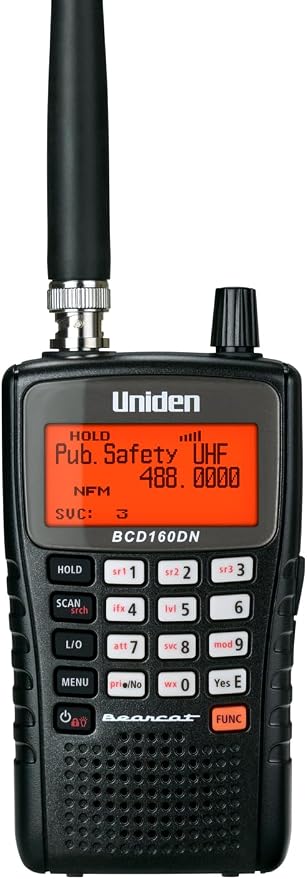
Perfect for serious hobbyists who want detailed digital scanning, this handheld scanner stands out with its rapid decoding features and wide digital support. It suits people focused on catching signals quickly and decoding a variety of digital transmissions without the need for trunking functionality.
Setting up involves connecting it via USB for easy updates and data transfer. Searching for signals is quicker thanks to the Band Scope and Rapid System/Channel Number Tagging. The scanner instantly identifies CTCSS tones and DCS codes, which simplifies tuning.
The lack of trunking means it avoids complexity, making it straightforward for scanning conventional digital signals.
Performance is solid, handling DMR and NXDN out of the box with digital decoding clarity. It’s well-built for handheld use, compact enough to carry around comfortably. The strongest praise revolves around its fast tone and code recognition.
The most noted downside confirms it cannot decode encrypted signals, which limits use in some networks.
The scanner is praised for its rapid and clear decoding of digital signals and tone detection, making signal identification much faster and easier. A common limitation is the inability to handle encrypted transmissions, which means some communication channels remain inaccessible.
People wanting conventional digital scanning with precise tone detection will appreciate this device, especially those not needing trunking capabilities. Users focused on trunking systems or encrypted communications should look for alternative scanners that support those features.
Pros
- Quick detection of CTCSS tones and DCS codes
- Supports multiple digital formats without trunking
- USB connection for easy firmware updates
- Accurate Band Scope for fast signal searching
Cons
- Does not support trunking systems
- Encrypted signals cannot be decoded
| Specification | Details |
|---|---|
| Scanner Type | Radio Scanner |
| Connection Type | USB |
| Conventional Digital Decoding | DMR, NXDN; APCO P25 Phase 1 & 2 via free update |
| Exclusive Features | Band Scope, Rapid System/Channel Number Tagging |
| DCS/CTCSS Rapid Decode | Instant detection and display of tones and codes |
9. Uniden SDS150 Digital Radio Scanner

Trying to pick up clear radio signals outdoors or in busy areas often means dealing with interference and complicated controls. The Uniden SDS150 Digital Radio Scanner suits anyone needing sharp reception combined with easy handling.
Its main advantage is enhanced sensitivity that cuts through the noise to deliver clearer scanning.
Setting it up involves syncing with your smartphone via Bluetooth and utilizing the U/AWARE app, which adds convenience to everyday scanning tasks. The control layout feels straightforward thanks to the digital display. Battery life lasts long enough for extended use, and its lightweight and durable build make it comfortable to carry around all day without worry.
Reception lives up to expectations with TrunkTracker X and APCO P25 Phase I & II tuners, making it very capable of picking up a wide range of signals. The rugged design stands up well to daily professional use outdoors. The best feature praised is its ability to filter out interference effectively.
A frequent downside mentioned is the nonstandard battery, which means replacements might not be easy to find.
The strongest praise revolves around its enhanced sensitivity and filtering that reduce interference in busy signal environments. Most complaints cite the nonstandard battery, which can be inconvenient to replace during longer trips or heavy use. Daily scanning benefits greatly from its Bluetooth and app integration for quick management.
Anyone needing reliable, clear reception and comfortable carry for fieldwork will appreciate this scanner. Those new to radio scanning or looking for simpler battery options might consider other models better suited for casual or occasional scanning needs.
Pros
- Improved signal reception and filtering
- Lightweight and durable for daily use
- Extended battery life for long field work
- Supports multiple advanced trunking systems
Cons
- Uses nonstandard battery, replacement challenges
- Complex tuner options may overwhelm beginners
| Specification | Details |
|---|---|
| Connectivity Technology | Bluetooth |
| Power Source | Battery Powered |
| Tuner Type | TrunkTracker X, APCO P25 Phase I & II, Motorola, EDACS, LTR DMR Tier III*, Hytera XPT*, Single-Channel DMR* NXDN 4800/9600*, EDACS ProVoice* |
| Frequency | 1300 MHz |
| Additional Features | Weather Alert |
| Display Type | digital |
10. Uniden SDS200 TrunkTracker X Digital Scanner

A large 3.5 fully customizable color display sets this scanner apart, making it ideal for anyone focused on clear visuals and easy navigation. Suited for those tracking digital simulcast systems, it handles complex signals thanks to Software Defined Radio and True I/Q technology, providing reliable reception even in tricky environments.
Setting up involves connecting via USB and loading the HomePatrol database, which covers all known US and Canadian systems and updates weekly. Daily use is straightforward as the color display can be tailored to show as much or as little information as preferred. Adjusting display colors for different data fields helps quickly identify transmissions without sifting through clutter.
The scanner performs exceptionally well with digital simulcast signals, maintaining clear reception where others struggle. Build quality feels solid, and the LED light source makes it user-friendly in low light. Common praise highlights the database’s accuracy and update frequency, while some note the standard sheet capacity is limited and may require frequent adjustments.
Reviews often highlight how well the scanner manages digital simulcast systems and appreciates the up-to-date HomePatrol database for smooth operation. On the downside, several point out that the limited sheet capacity can be a nuisance and managing database updates requires attention.
Those needing consistent digital scanning with clear displays will find this scanner fits well. Users looking for less frequent maintenance or simpler operation might want to consider alternatives better suited for ease of use without regular updates.
Pros
- Customizable 3.5″ color display
- HomePatrol database with weekly updates
- Handles digital simulcast well
- USB connection for easy data transfer
Cons
- Limited standard sheet capacity of 10
- Some setup complexity with database updates
| Specification | Details |
|---|---|
| Scanner Type | Radio Scanner |
| Connection Type | USB |
| Resolution | scanner |
| Standard Sheet Capacity | 10 |
| Light Source Type | LED |
| Media Type | USB |
11. Uniden BCD436HP HomePatrol Digital Handheld Scanner

Uniden designed the BCD436HP HomePatrol Digital Handheld Scanner for users seeking quick access to public safety, police, and fire communications without a complicated setup. Its biggest strength lies in its ease of use, as it does most of the programming for you by using your zip code and TrunkTracker V technology.
Setting up this scanner is straightforward: turn it on, type in a zip code, and it starts scanning relevant frequencies. The large display makes it easy to read channel information at a glance.
The Close Call RF Capture feature helps detect nearby active signals you might not have found otherwise, and GPS connectivity ensures it stays accurate to your location as you move around.
Performance is solid with fast scan speed covering 85 channels per second and support for a wide frequency range from 25 to 1300 MHz. The build feels lightweight and handheld-friendly, powered by three AAA batteries providing about 8 hours of use.
The scanner earns praise for its simple operation and detailed frequency coverage, though some users note it isn’t water resistant, limiting outdoor use in wet conditions.
The scanner is praised for its user-friendly setup and ability to start scanning right away with minimal input. The main complaint centers around its lack of water resistance, which can be limiting during outdoor activities in bad weather.
People who want straightforward handheld scanning with strong public safety frequency coverage and no programming hassle will appreciate this model. Those needing rugged outdoor use or rechargeable power options might want to consider different scanners.
Pros
- Quick setup using just zip code
- Large, easy-to-read display
- GPS connectivity for location-based scanning
- Close Call RF Capture detects nearby signals
Cons
- Not water resistant for outdoor rainy use
- Runs on AAA batteries, not rechargeable
| Specification | Details |
|---|---|
| Number of Channels | 85 |
| Frequency Range | 25-512 MHz, 758-824 MHz, 849-869 MHz, 894-960 MHz, 1240-1300 MHz |
| Battery Average Life | 8 hours |
| Number of Batteries | 3 AAA batteries required |
| Connectivity Protocol | GPS |
12. Uniden Bearcat BCD260DN Base/Mobile Digital Scanner

Uniden Bearcat BCD260DN stands out by covering a wide range of emergency service bands, including fire, police, and weather alerts, making it suitable for anyone serious about monitoring public safety communications. Its biggest strength lies in fast signal detection thanks to features like Band Scope Rapid System and Channel Number Tagging.
Setting it up is straightforward since it comes pre-programmed with service bands relevant to emergency reporting. Day-to-day use benefits from its USB connection for quick updates and easy frequency management.
Searching for signals is faster with narrowband reception and advanced scanning options, making fire and other emergency scanning more efficient than many older models.
Performance-wise, it picks up digital and non-digital signals nicely across various emergency channels. The build feels solid, aimed at base or mobile use, and it handles broad frequency ranges well.
Most praise revolves around its speed and detection capabilities. A common complaint involves its complexity for newcomers, as there is a learning curve to accessing all its features.
The scanner gains strong praise for quickly picking up emergency signals thanks to advanced scanning features. Common feedback points to its complexity for those not familiar with radio scanners or detailed programming options.
This model will satisfy users looking for a powerful base or mobile scanner focused on emergency and public service signals. Those needing a simpler, handheld setup might prefer a different option.
Pros
- Pre-programmed emergency and service bands
- Rapid signal detection with Band Scope
- Wide frequency coverage including digital channels
- USB connection for easy updates
Cons
- Steep learning curve for beginners
- Not designed for compact handheld use
| Specification | Details |
|---|---|
| Scanner Type | Radio Frequency scanner |
| Connection Type | USB |
| Resolution | 300 dpi |
| Pre-programmed Bands | Emergency, Aviation, Marine, Railroad, NASCAR |
| Frequency Access | 10,000 frequencies |
Best Fire Scanners Compared Side by Side
| Product | Frequency Range | Channels | Power Source | Additional Features |
|---|---|---|---|---|
| Uniden Bearcat BC125AT | 25-512 MHz | 500 | 2 AA batteries | Digital Display |
| Uniden BC365CRS Clock Scanner | – | – | 3 AA batteries | Ultrasonic Sensor |
| Whistler WS1025 Analog Scanner | – | – | – | Bluetooth |
| Uniden SDS100 Handheld Scanner | – | – | Battery Powered | USB connection |
| Whistler WS1065 Digital Trunking | – | – | – | Wi-Fi |
| Uniden BC355N Base Scanner | 800 MHz | 1-Band | Corded Electric | Close Call RF Capture |
| Uniden BCD996P2 TrunkTracker Mobile | 25 MHz | 1-Band | 12 volts DC | Close Call RF Capture |
| Uniden Bearcat BCD160DN Digital Handheld | – | – | – | USB connection |
| Uniden SDS150 Digital Scanner | – | – | Battery Powered | Weather Alert |
| Uniden SDS200 TrunkTracker X | – | – | – | USB connection |
| Uniden BCD436HP HomePatrol Scanner | 25-1300 MHz | 85 | 3 AAA batteries | Weather Alert |
| Uniden Bearcat BCD260DN Base/Mobile | – | – | – | USB connection |
- Frequency Range25-512 MHz
- Channels500
- Power Source2 AA batteries
- Additional FeaturesDigital Display
- Frequency Range–
- Channels–
- Power Source3 AA batteries
- Additional FeaturesUltrasonic Sensor
- Frequency Range–
- Channels–
- Power Source–
- Additional FeaturesBluetooth
- Frequency Range–
- Channels–
- Power SourceBattery Powered
- Additional FeaturesUSB connection
- Frequency Range–
- Channels–
- Power Source–
- Additional FeaturesWi-Fi
- Frequency Range800 MHz
- Channels1-Band
- Power SourceCorded Electric
- Additional FeaturesClose Call RF Capture
- Frequency Range25 MHz
- Channels1-Band
- Power Source12 volts DC
- Additional FeaturesClose Call RF Capture
- Frequency Range–
- Channels–
- Power Source–
- Additional FeaturesUSB connection
- Frequency Range–
- Channels–
- Power SourceBattery Powered
- Additional FeaturesWeather Alert
- Frequency Range–
- Channels–
- Power Source–
- Additional FeaturesUSB connection
- Frequency Range25-1300 MHz
- Channels85
- Power Source3 AAA batteries
- Additional FeaturesWeather Alert
- Frequency Range–
- Channels–
- Power Source–
- Additional FeaturesUSB connection
How to Choose the Right Fire Scanner
Choosing a reliable fire scanner depends on factors like signal range, ease of use, and compatibility with local emergency channels. Prioritizing these features ensures quick access to alerts, helping you stay informed without wasting time or money on devices that don’t meet local needs.
Frequency Coverage
Scanners that only cover a narrow frequency range quickly frustrate anyone trying to catch all relevant signals, especially public safety channels that often switch between analog and digital formats. A device covering from about 25 MHz up to 1300 MHz will catch most commonly used bands, including police, fire, EMS, and amateur radio. Support for both analog and digital modes is essential because emergency services frequently upgrade to digital for clarity and security, making older scanners quickly outdated.
Customizable channels and memory banks simplify daily use by letting users organize frequently accessed frequencies. Without this, it’s easy to waste time scrolling through irrelevant signals.
Look for models with at least 200 to 500 programmable channels alongside scan and priority channel functions. Wide frequency coverage paired with flexible memory management makes practical scanning much more effective.
Reception Sensitivity and Range
Picking up weak signals often separates usable scanners from disappointing ones. Sensitivity matters especially in urban areas where buildings block signals or in rural places with limited tower coverage. Internal antennas sometimes fall short, so models with a standard SMA connector for external antennas prove valuable.
Using a better antenna or mounting it outdoors significantly improves reception quality.
Placement of the scanner also affects performance. Keeping the device near windows or higher spots in a building yields better results. Models designed with strong RF front-end filters reduce interference from nearby single-frequency devices.
Look for specifications listing sensitivity around -120 dBm or better for clear weak-signal reception.
User Interface and Controls
Menus that are overly complicated or slow can transform a tool into a daily annoyance. Smooth navigation with clear button labels and keypad layouts speeds up programming channels or adjusting scan settings.
Presets or quick scan functions enable rapid access to important bands, saving time during urgent situations.
Displays must be bright and easy to read from different angles, especially outdoors. Backlighting is a practical feature for low-light conditions. Alerts should be loud or customizable with vibration to avoid missing important transmissions.
Clear, readable displays and intuitive controls make using a scanner less stressful and more efficient.
Portability and Power Options
Long sessions of scanning drain battery quickly on some models, which can be frustrating during extended events or emergencies. Devices with rechargeable lithium-ion batteries typically offer around 8 to 12 hours of continuous use.
Support for AC adapters and USB charging increases flexibility, allowing users to choose the best power source at hand.
Portability matters when carrying a scanner through venues or vehicles. Smaller, lighter models under 1.5 pounds fit comfortably in hand for hours without fatigue.
Bulkier devices with heavy batteries become cumbersome and less practical despite possibly better reception. Balance between battery life, size, and weight is key for daily convenience.
Additional Features and Compatibility
Some scanners include emergency alert tones or weather alert features, which are useful for raising attention to critical events without constant monitoring. These functions add value, especially in areas prone to severe weather or emergencies.
Compatibility with programming software simplifies managing channels on a computer rather than entering frequencies manually. Support for basic encryption decoding and trunked system tracking varies but is important for keeping up with evolving public safety communication methods.
Devices able to handle these systems provide broader usability in complex signal environments.
Optimizing Fire Scanner Performance with Effective Setup and Placement
Proper placement strongly influences the effectiveness of fire scanners. Positioning the device near a window or in an area with minimal metal obstruction improves signal reception, especially in urban settings or inside buildings with thick walls.
Many scanners come with adjustable antennas; extending or rotating the antenna can significantly boost the range and clarity of incoming transmissions. Avoid placing the scanner near other electronic devices that might cause interference, such as Wi-Fi routers or microwave ovens.
Here are some setup tips for better performance:
- Choose a high shelf or wall mount to reduce obstacles and increase signal reach.
- Test different antenna angles to find where the signal strength peaks.
- Keep the scanner powered with a reliable source; a steady power supply ensures continuous monitoring.
- Update the firmware and scan frequencies periodically to stay aligned with current emergency channels.
Following these steps helps fire scanners pick up alerts clearly, making them more useful when timely information is critical.
Essential Maintenance Tips to Prolong Your Fire Scanner’s Lifespan
Regular maintenance is key to keeping a fire scanner working reliably over years of use. Dust buildup, battery corrosion, and outdated software can all reduce functionality without visible warning signs.
Start by cleaning the exterior and vents with a soft cloth every few months to prevent overheating. Inspect and replace rechargeable batteries as needed, avoiding corrosion that might damage the contacts.
Removing the batteries during long periods of inactivity also helps preserve their life.
Check for firmware updates from the manufacturer’s website. These updates often include bug fixes or improvements to frequency scanning that maintain compatibility with emergency services.
Maintenance checklist:
- Wipe the scanner and antenna regularly to keep signal quality high.
- Replace or clean power connectors and battery compartments.
- Install software updates following manufacturer recommendations.
- Store the scanner in a dry place to avoid moisture damage.
Consistent upkeep will ensure the scanner remains accurate and responsive for emergency alerts.
Comparing Fire Scanners to Alternative Emergency Alert Devices
Fire scanners differ from other emergency alert devices mainly in their ability to receive live radio transmissions from fire departments and emergency services. Unlike smartphone apps that rely on internet or cellular connectivity, scanners pick up analog or digital radio signals directly.
Some alternative devices include weather radios and mobile alert systems. Weather radios broadcast official NOAA alerts, which cover severe weather and some emergency warnings but do not provide real-time fire department communication.
Mobile alert apps can send push notifications for various emergencies but depend on network availability and can be delayed or muted during busy cellular traffic.
Comparing key points:
- Fire scanners provide real-time audio feeds from firefighters and dispatchers, offering immediate situational awareness.
- Weather radios focus on broad warnings rather than specific fire incidents.
- Mobile apps require internet access and might not cover all local fire activities promptly.
Deciding between these devices depends on whether live emergency communication or broad alert notifications better suit your needs.
People Also Asked
How Do I Properly Size a Fire Scanner for My Home?
Choose a fire scanner that covers the frequency range used by local fire departments. Check community scanner guides or websites for the right bands. Place the scanner in an open area away from metal obstructions to improve reception.
What Safety Precautions Should I Take When Using a Fire Scanner?
Keep the scanner well ventilated and avoid exposure to rain or moisture. Make sure to adjust the volume to a safe level to avoid hearing damage. Regularly check for firmware updates to maintain security and functionality.
How Long Does a Typical Fire Scanner Usually Last?
A fire scanner can last several years with proper care. Avoid dropping or exposing it to extreme temperatures to prevent damage. Battery-powered portable models may require more frequent battery replacements.
Are Fire Scanners Compatible with Smart Home Systems?
Some fire scanners connect with smart home systems through Wi-Fi or Bluetooth. Verify the model’s compatibility upfront by checking the manufacturer’s specifications. Integration usually allows remote listening and alerts on mobile devices.
What Are Common Problems Users Face with Fire Scanners?
Users often face reception issues caused by improper antenna placement or interference from electronic devices. Software glitches may require resets or firmware updates. Battery drainage is common in portable scanners not regularly charged or maintained.
Conclusion
Choosing the right fire scanner means focusing on clear reception, ease of use, and durable design. The scanner should pick up relevant frequencies accurately and be simple to operate during an emergency. It also needs to hold up under regular use, without frequent breakdowns or complicated maintenance.
Consider where you will keep the scanner and how often you plan to use it when making your choice. Matching the scanner to your living or work environment and budget will help avoid spending on features you don’t need. Review the comparison table and product details above to find the option that fits your situation best.